
Apple’s Silicon Gamble: Why the $599 MacBook Neo is a Nightmare for the Windows Ecosystem
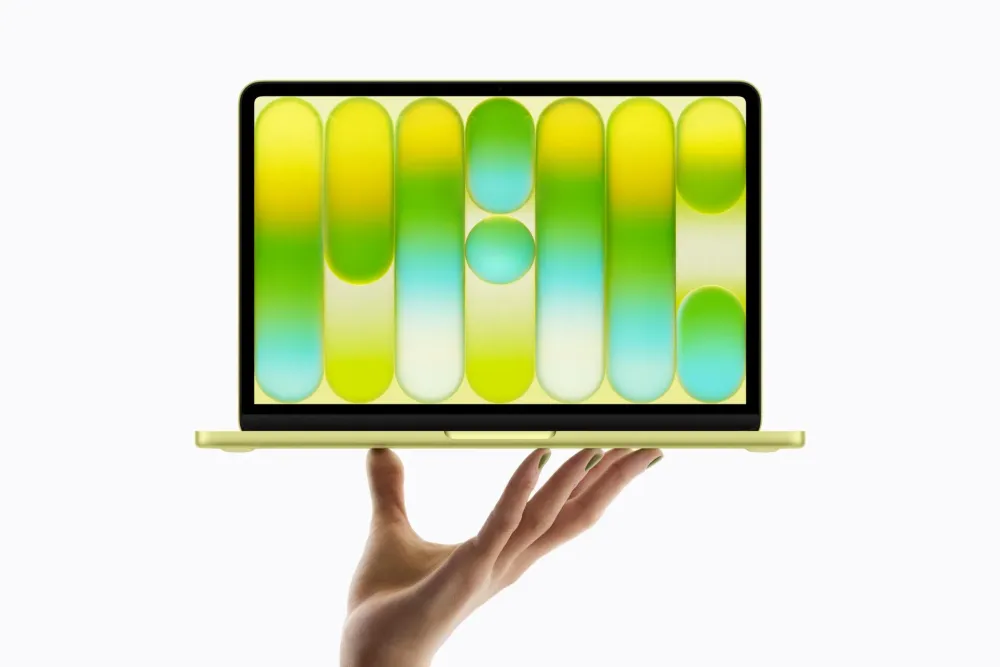
Apple releases the $599 MacBook Neo featuring the A18 Pro chip, reclaiming the entry-level laptop market and challenging high-end Chromebooks and budget Windows PCs.
This post contains affiliate links. We may earn a commission if you make a purchase, at no extra cost to you. As an Amazon Associate, Dadnology earns from qualifying purchases.
1. The Gap Apple Finally Filled
🍎 This story is part of our Apple Brand Hub — Vision Pro, Mac mini, iPhone and AirPods: everything Apple we actually use.
For years, Apple’s entry-level strategy relied on a “trickle-down” economy of aging hardware. As the MacBook Air transitioned into a premium tier—with the latest M5 model commanding a $1,099 entry price—the company effectively ceded the sub-$800 territory to the high-end Chromebook and the mid-range Windows PC. This created a strategic vacuum for students and casual users who demanded the macOS experience without the four-figure commitment.
The MacBook Neo is the “impossible” answer to that problem. Revealed in New York following a rare slip in Apple’s own regulatory filings, the Neo represents far more than a “cheap” Mac. It is a masterclass in addressable market expansion and silicon amortization. By moving away from the M-series architecture for its entry-level portable, Apple has deployed a Trojan Horse into the education sector, aiming to secure ecosystem lock-in for a generation that might otherwise have defaulted to ChromeOS.
AdApple MacBook Neo (256GB, Silver) (opens in a new tab)
The classic Silver finish. A $599 entry into macOS powered by the A18 Pro chip. Perfect for everyday family use and students.

2. The Silicon Crossover: An iPhone Heart in a Mac Body
The Neo’s most disruptive feature is its internal architecture: it is the first Mac powered by “iPhone-class” silicon, specifically the A18 Pro chip. This is a brilliant strategic play in economies of scale. By utilizing the R&D already paid for by 100 million iPhone 16 Pro units, Apple is able to subsidize its entry into the $599 market.
From a technical perspective, the strategist must look past the “mobile” label. The A18 Pro’s single-core benchmark of 3,250 puts it in the same league as the M3, proving that modern smartphone silicon is more than capable of handling desktop workloads like document processing and media consumption. However, the Senior Strategist will note the tactical trade-offs: with only 6 CPU cores compared to the original M1’s 8, the Neo’s multi-core performance lags behind the first-generation M1. This ensures that while the Neo is snappy for everyday tasks, it poses no threat of cannibalizing the MacBook Pro’s sustained workflow territory.
John Ternus, Apple’s Senior Vice President of Hardware Engineering, framed the move as a fulfillment of brand promise:
“The MacBook Neo delivers the magic of the Mac at an attractive price… It is a laptop that only Apple could develop.”
AdApple MacBook Neo (512GB, Silver) (opens in a new tab)
The classic Silver finish with double the storage. Ideal for storing more family photos and school projects locally.
3. The $599 Disruption: A Direct Shot at the Chromebook
Apple is launching the Neo at an aggressive $599 (£599 / €699), with a dedicated $499 education price. This is a frontal assault on the “Intel Killer” narrative. Apple claims the A18 Pro is 50% faster in daily tasks and offers 3x the AI performance of the bestselling Intel Core Ultra 5 PC. This isn’t just a lifestyle choice; it is a performance-per-dollar argument that high-end Chromebooks cannot match.
Feature Comparison:
- MacBook Neo: Starting Price $599 | Processor A18 Pro (6-Core) | Battery Life 16 Hours | Display 13” sRGB Liquid Retina
- MacBook Air (M5): Starting Price $1,099 | Processor M5 (10-Core) | Battery Life 18 Hours | Display 13.6” P3/True Tone
- High-End Chromebook: Starting Price ~$599 | Processor Intel Core Ultra 5 | Battery Life ~10 Hours | Display 1080p Standard
Apple MacBook Neo (256GB, Blush) (opens in a new tab)
A playful Blush finish that brings color back to the Mac lineup. A great aesthetic choice for the living room.

4. Aesthetics of Choice: The Return of “Sweet” Colors
In a technicolor return to the iMac G3 era, the Neo abandons professional minimalism for a playful, lifestyle-oriented palette. The device is available in four distinct finishes: Silver, Blush, Citrus, and Indigo.
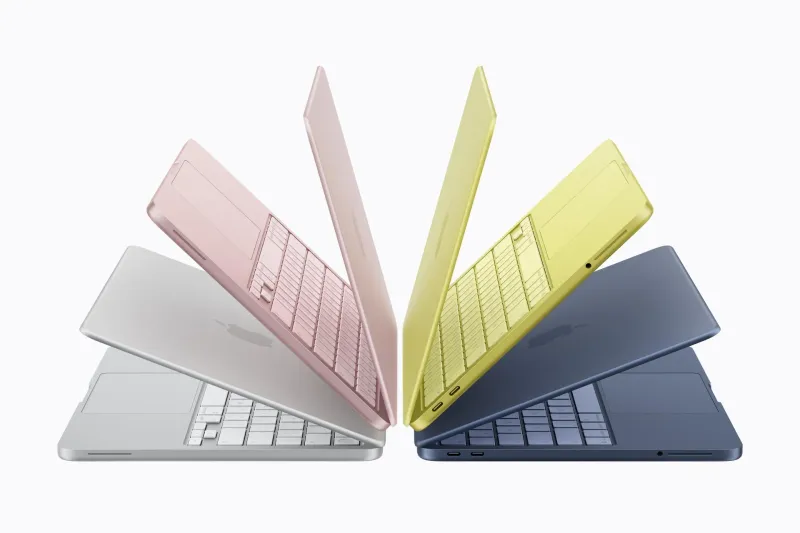
Official Apple product imagery.
This is a clear shift from viewing the Mac as a “productivity tool” to a “lifestyle accessory.” Apple has matched the system backgrounds and even the Magic Keyboard nuances to the chassis colors, creating a cohesive aesthetic that resonates with Gen Z. It transforms the notebook into a fashion statement, further differentiating it from the utilitarian black-and-gray plastic dominated by Windows OEMs.
AdApple MacBook Neo (256GB, Citrus) (opens in a new tab)
The vibrant Citrus finish. A bold, fun look that stands out from the sea of gray and black laptops.

5. The “Catch”: Understanding the Strategic Trade-offs
To hit the $599 price target without eroding the Air’s value proposition, Apple performed several surgical cuts. These are not accidental omissions; they are visible compromises designed to keep prosumers moving up the margin ladder.
- Keyboard Backlighting: Perhaps the most painful cut, making the Neo feel “cheaper” than an Air despite its sleek aluminum frame.
- Split USB-C Speeds: While it has two ports, only one is USB 3 (10Gb/s); the other is limited to a glacial USB 2 (480Mbps) standard.
- Networking and Connectivity: The Neo lacks MagSafe and the new N1 chip, leaving it stuck on Wi-Fi 6E rather than the newer Wi-Fi 7.
- The Display: The 13-inch panel is limited to sRGB color, missing the P3 wide color gamut and True Tone technology essential for creative work.
- Biometrics: Touch ID is absent on the $599 base model; it is only available if you upgrade to the $699 / 512GB configuration.
- Regional Sting: In the UK and Europe, the Neo does not ship with a power adapter or cable, a major lifestyle friction point for new ecosystem entrants.
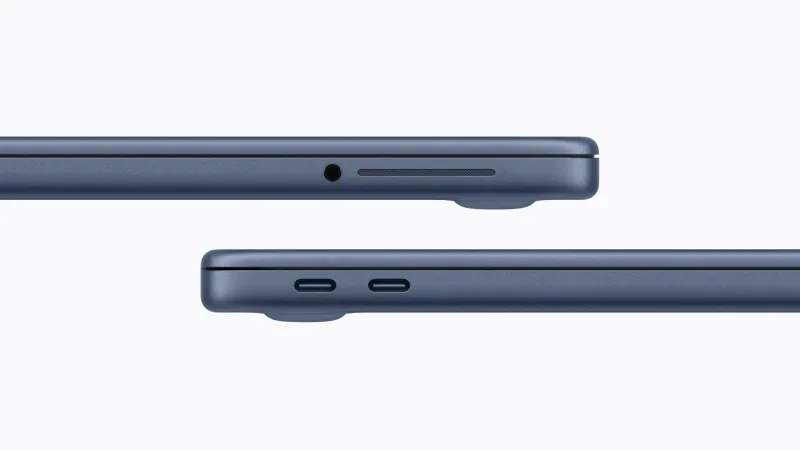
Official Apple product imagery — note the two USB-C ports and the absent MagSafe connector.
AdApple MacBook Neo (256GB, Indigo) (opens in a new tab)
The sleek Indigo finish. A stylish and modern take on the entry-level Mac.

6. The Broader Context: A Week of “Pro” Upgrades
The Neo didn’t launch in isolation. It was part of a broader reconfiguration of the Apple lineup, including the iPhone 17e ($599), the M5 MacBook Pro ($1,699), and the Studio Display XDR ($3,300).
Strategically, the Neo is a “parts-bin” masterpiece. While the concurrently launched iPhone 17e features the newer A19 chip, the Neo uses the year-old A18 Pro. This highlights a fascinating irony: the phone in your pocket may have more advanced silicon than the laptop on your desk, yet the laptop provides the full macOS experience for the same $599 price point.
7. Conclusion: The Neo Reality
The MacBook Neo marks a strategic inflection point for the industry. It proves that mobile silicon has matured to the point where “phone power” is the new floor for desktop computing. By aggressively pricing a modern, colorful Mac at $599, Apple is finally reclaiming the entry-level space it abandoned years ago.
The question for the consumer is one of priorities: Is the lack of a backlit keyboard or MagSafe a dealbreaker, or is the “iPhone inside” the future of computing? For Apple, the answer is already clear—the Neo is the gatekeeper to the ecosystem, and at $599, the gate has never been wider.
Pros
- Aggressive $599 entry price makes macOS accessible again
- A18 Pro chip is surprisingly capable for everyday tasks
- Fun, colorful aesthetic options (Silver, Blush, Citrus, Indigo)
- Strong 16-hour battery life
- A genuine alternative to high-end Chromebooks and budget PCs
Cons
- No keyboard backlighting
- Base $599 model lacks Touch ID
- Display limited to sRGB, missing P3 and True Tone
- One of the USB-C ports is limited to USB 2.0 speeds
- No power adapter included in UK/EU boxes
🗣️ Dadnology Take
Let’s be brutally honest: as Tech-Dads, we are often the household IT department, and buying laptops for kids or shared family use is always a headache. You want something that survives a chaotic Tuesday, doesn’t cost as much as a used car, and actually works without constant troubleshooting. The MacBook Neo hits that sweet spot perfectly.
Yes, the lack of a backlit keyboard is annoying, and the USB 2.0 port is a classic Apple upsell tactic. But at $599, you are getting a legitimate Mac that won’t lag when opening a PDF or running a school presentation, unlike many sub-$600 Windows machines that feel like e-waste after two years. It’s not for editing 4K family videos (get the Pro for that), but for homework, web browsing, and general family logistics, the “price-to-tantrum” ratio here is phenomenal. The Neo is the family laptop we’ve been waiting for.
❓ FAQ
Is the MacBook Neo powerful enough for everyday use?
Does the $599 base model have Touch ID?
Should I buy this or a Chromebook for my child?
Keep this in your inbox
One email a week: what we actually watched, built and reviewed — the stuff worth a dad's time. No hype, no daily spam.
Dadnology Weekly
One email a week: the LEGO, gaming and movie news worth a dad's time — plus what we actually reviewed. No hype, no daily spam.
Disclaimer: This review and its visuals were created with the help of AI. Some links may be affiliate links – we may earn a commission if you make a purchase, at no extra cost to you.
You might also like

The iPhone Duo Just Made Every Other Foldable Phone Boring
The iPhone Duo is the first Apple product in years that made us sit forward instead of scroll past. It is also a first-generation $1,999 phone, which is its own kind of caution. Here is what is genuinely good, what to wait on, and everything else Apple announced alongside it.
Apple's September 9 Keynote: What's Confirmed, What's Rumour
Apple's first keynote under CEO John Ternus is on 9 September. Here is the short list of what Apple has actually confirmed, and the long list of what it has not.
Is a Mac Mini Good for Small Business Local AI?
If the reason you have not adopted AI is that client data cannot leave the building, this is the cheapest honest answer — with four real caveats.