
Small box, big dad energy: Why the Mac mini M4 Pro is the ultimate 5x5 desk transformer
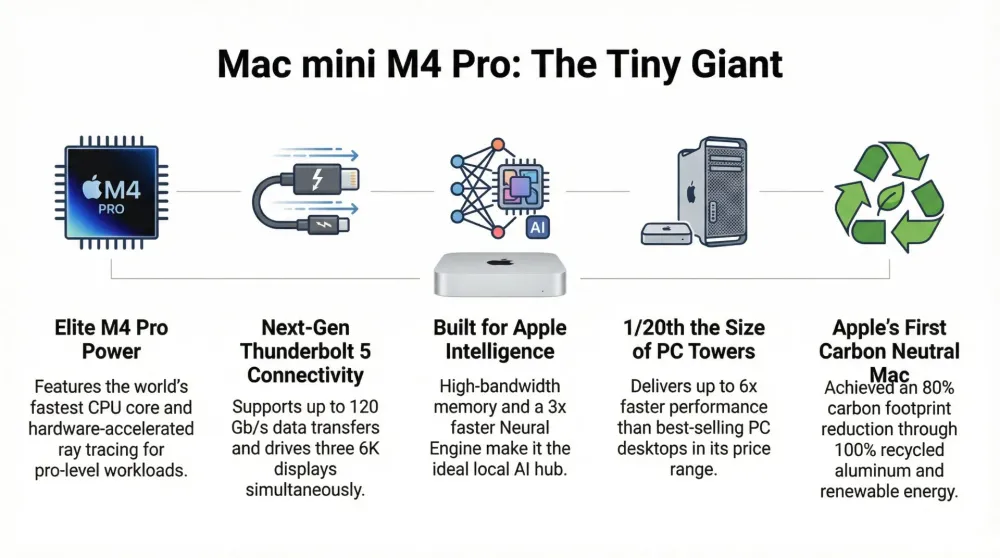
The Mac Mini M4 Pro isn’t just a minor spec bump; it’s a strategic shift toward stealth power. It challenges every assumption we have about 'Pro' gear needing to be large.
This post contains affiliate links. We may earn a commission if you make a purchase, at no extra cost to you. As an Amazon Associate, Dadnology earns from qualifying purchases.
The hook: When professional power meets zero footprint
🛠️ This review is part of the Best Tech for Dads – explore the gear that actually survives family life.
For anyone managing a home office that doubles as a homework station or a craft corner, the “bulky PC” problem is a daily headache. We’ve spent years tolerating monstrous towers that hog legroom or sprawling all-in-ones that dominate the desk. The Mac Mini M4 Pro isn’t just a minor spec bump; it’s a strategic shift toward what I call “stealth power.”
This machine is a tiny powerhouse that disappears into your setup until you need it to crush a 4K video export. It challenges every assumption we have about “Pro” gear needing to be large. By the time we dig into the benchmarks and environmental data, you’ll see why this isn’t just a gadget—it’s a long-term investment for the family.
The 5x5 transformation: More than just a smaller box
Apple’s engineers didn’t just shrink the box; they reinvented the way it breathes. To keep the M4 Pro chip from melting in a case this small, Apple developed a thermal architecture that vents air elegantly through the foot. It’s a dense, high-performance module that stays whisper-quiet even when you’re using AirPods Pro to tune out the background noise of a busy household.
Because the M4 Pro is designed for high-end workloads, keeping your desk organized is key. The Satechi Hub & Stand is a must-have here, providing that extra thermal headroom and bringing your most-used ports right to the front.
The price-performance king: Why the M4 Pro is the “buy once, cry once” choice
The $1,399 M4 Pro is the smart money for longevity. With a 14-core CPU and 273GB/s memory bandwidth, this machine stays relevant for a decade. It’s the ultimate “buy once, cry once” investment. To avoid Apple’s steep internal storage prices, I highly recommend pairing the 512GB base model with a Samsung T7 Shield 2TB. It gives you massive space for raw photo libraries without breaking the bank.
M4 Pro Performance Multipliers (vs. Intel i7 and M2 Pro):
- DNA Sequencing (Oxford Nanopore): 26x faster than Intel Core i7.
- Scene-Edit Detection (Premiere Pro): 9.4x faster than Intel Core i7.
- 3D Rendering (Blender): 2.9x faster than M2 Pro.
Connectivity redefined: The “BYODKM” savior
The back of the Pro model features Thunderbolt 5, a first for Mac, pushing 120 Gb/s transfer speeds. To actually see that power, you need a display that can keep up. The Apple Studio Display is the premium choice for that 5K clarity, while the BenQ 27 Inch 4K offers incredible value for serious photographers.
Don’t let a slow card reader bottleneck your new Thunderbolt 5 ports. Using a ProGrade Digital Reader ensures your 4K footage moves from camera to Mac in seconds, not minutes.
The green milestone: Performance meets sustainability
The Mac Mini is Apple’s first carbon-neutral Mac. By using 100% recycled aluminum and gold plating in the M4 Pro, Apple has proven that pro-level utility doesn’t have to come at an environmental cost. Since it’s a desktop with no battery to degrade, this is a machine you can confidently hand down to your kids for schoolwork five or six years from now.
Personal perspective: The ultimate living room powerhouse
The Mac Mini M4 Pro is the perfect companion for spatial computing. I’ve used it “headless” with the Vision Pro, creating a massive virtual workspace while the kids watch TV. To complete the “invisible” desk, I rely on the Apple Magic Keyboard with Touch ID and the Magic Trackpad. They are slim enough to tuck into a drawer when work is done, reclaiming the dining table for family dinner.
- Personal Rating: 5/5.
- Key Insight: This is the ultimate “hidden” workstation. Packaged with a Magic Mouse, it’s the cleanest pro setup on the market.
Who the M4 Pro is actually for (and who should skip it)
Let’s be direct: the M4 Pro costs roughly $800 more than the base M4. That gap is only justified if you fall into a specific category of user.
Buy the M4 Pro if you’re:
- A video editor who regularly works with 4K or higher footage. The doubled CPU/GPU cores and 273 GB/s memory bandwidth mean timelines that scrub without dropping frames, exports that finish before you’d get a second coffee, and ProRes workflows that don’t make you regret your purchase six months in.
- A software developer running multiple virtual machines, Docker containers, or heavy compilation jobs. The M4 Pro’s additional cores keep everything responsive even when your build pipeline is maxed.
- A photographer with a large Lightroom catalog. 24GB unified memory handles large raw libraries — especially medium-format files — without the disk-swapping slowdown that 16GB starts to show under heavy edits.
- Anyone who plans to drive three external displays. Thunderbolt 5’s bandwidth makes this effortless; the base M4 caps at two.
Stick with the base M4 if you’re:
- Managing spreadsheets, email, writing, and light photo edits. The base model handles all of this comfortably and you won’t notice the difference.
- On a tighter budget and the $800 gap is meaningful. The base M4 is not a compromise machine; it’s legitimately excellent for 80% of professional workloads.
- Setting up a home server or AI agent node. Compute headroom helps, but for local inference the base M4 is already more than capable for most LLMs.
The honest position: the M4 Pro is for professionals who will actually saturate the extra capability within a reasonable timeframe. If you’re buying “for future use” on tasks you don’t currently do, save the money.
A week in the workflow: What the performance actually feels like
Benchmarks tell one story; living with the machine tells another. Here’s what a week of actual work looked like on the M4 Pro:
Monday — Photography workflow: Imported 400 Sony ARW raw files into Lightroom, ran an AI Denoise pass on 80 images, and exported a full web gallery. The AI Denoise process that used to tie up a MacBook for 20 minutes finished in under 4 on the M4 Pro. The export ran in the background while Lightroom stayed fully responsive for editing. This is the kind of speed difference that changes behavior — you stop batching tasks for off-hours and just run them immediately.
Tuesday/Wednesday — Video edit: Cut a 12-minute YouTube video in Final Cut Pro using 4K ProRes footage. Playback was smooth at full quality throughout — no rendering bars before scrubbing, no wait on color grading previews. Export took 3 minutes for a 12-minute, 4K H.265 file. Previously, this job on an Intel Mac would have been a 25-minute background task.
Thursday — Development session: Ran three Docker containers simultaneously (a local Postgres, a Redis instance, and a Node app) while compiling a React Native build. The machine handled all of it without fan noise. Memory pressure stayed in the green.
Friday — Headless + Vision Pro session: The Mac Mini sat under the desk, completely out of sight. With the Vision Pro connected over WiFi, the virtual workspace stretched wall-to-wall with four virtual 4K monitors. Switching back to a real monitor for a screen-share meeting was seamless. This “invisible desktop” use case is genuinely the future of the home office — and the M4 Pro has more than enough headroom for it.
The consistent thread: the M4 Pro doesn’t just handle these tasks, it handles them fast enough to change your workflow habits. You stop planning around processing time and start working continuously.
Conclusion: The wolf in sheep’s clothing
The Mac Mini M4 Pro makes the Mac Studio redundant for 90% of users. It’s a future-proof powerhouse that respects both your budget and your desk space. It’s the definitive “Wolf in Sheep’s Clothing” for 2025.
Pros
- Genuine workstation power that rivals the pricier Mac Studio
- Exceptional value for the performance on offer
- Thunderbolt 5 and a strong, future-proof port array
- Tiny, quiet, and desk-friendly despite the pro-grade chip
- Handles heavy creative, dev, and multitasking loads with ease
Cons
- Apple's RAM and SSD upgrade pricing is steep
- Overkill (and overpriced) for light/everyday users — get the base M4
- Non-upgradeable internals, so you must spec it right at purchase
Buy now(Ad)
📌 FAQ – Common questions
Is the M4 Pro worth the $800 jump over the base M4?
Can the M4 Pro drive three 6K displays?
Does the M4 Pro get loud under load?
Should I buy the Magic Keyboard with Touch ID?
How does the M4 Pro compare to the Mac Studio?
Is 24GB of RAM enough for 'Pro' work?
Can the M4 Pro Mac Mini replace a MacBook Pro?
Keep this in your inbox
One email a week: what we actually watched, built and reviewed — the stuff worth a dad's time. No hype, no daily spam.
Dadnology Weekly
One email a week: the LEGO, gaming and movie news worth a dad's time — plus what we actually reviewed. No hype, no daily spam.
Disclaimer: This review and its visuals were created with the help of AI. Some links may be affiliate links – we may earn a commission if you make a purchase, at no extra cost to you.
Current deals in Tech & gadgets
Verified live discounts tracked on Amazon


You might also like
The invisible powerhouse: Why the M4 Mac mini is the ultimate dad-hack for 2025
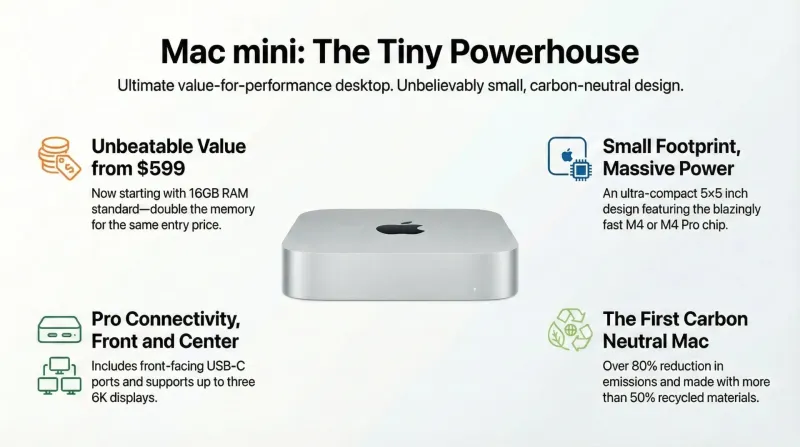
The Mac Mini M4 has matured from a budget entry point into a 'niche filler for every niche.' It is a silent office workhorse, a carbon-neutral milestone, and a 'ghost desktop' all in one. Personal Rating: 5/5.

Is a Mac mini good for small business local AI?
If the reason you have not adopted AI is that client data cannot leave the building, this is the cheapest honest answer — with four real caveats.

Is a Mac mini a good first computer for kids? A dad's take
Its best feature for a child is the one nobody markets: it cannot be taken to a bedroom. Here is the honest case, and when a tablet wins instead.