
OpenClaw 2.0 is out: Team features, and a real security warning
OpenClaw 2.0 just shipped with team collaboration and a new browser UI - but sandboxing is disabled by default, and that matters if you're running it at home.
This post contains affiliate links. We may earn a commission if you make a purchase, at no extra cost to you. As an Amazon Associate, Dadnology earns from qualifying purchases.
A big update, with a catch worth reading before you install it
OpenClaw 2.0 shipped this weekend, and it’s a genuinely large release: over 16,000 code changes from 933 contributors, turning the single-user AI agent into something built for teams. It also ships with sandboxing disabled by default — worth knowing before you point it at anything on your home network.
What actually changed
The headline feature is collaboration: OpenClaw 2.0 turns what used to be a single-user tool into a shared workspace, with cloud sessions multiple people can work in at once while the AI agent keeps context across everyone involved. That’s a meaningful shift from “my personal assistant” to “our team’s assistant,” and it comes with a redesigned browser interface that looks and installs a lot like ChatGPT — no more command-line setup required to get started.
Two more changes matter for anyone actually running this day to day. Permissions got more granular: administrators can now lock down access to specific commands rather than granting all-or-nothing control, which is the right direction for anyone who’s ever handed a family member or employee more access than they meant to. And OpenClaw now integrates with external password managers like 1Password, which sounds like exactly the kind of credential hygiene this project has needed — see the next section for why that matters more than it should.
The browser-based install is a bigger deal than it sounds. Every version up to now assumed a command line and at least some comfort with a terminal — a real barrier for anyone who wanted an AI agent handling home tasks but wasn’t going to open Terminal.app to get there. A browser-first setup that looks and behaves like a familiar chat interface removes that barrier entirely, which is exactly the audience this update is clearly chasing: teams and households who want the capability without the command-line tax.
The part that actually matters: Sandboxing is off by default
Here’s the honest problem with this release, and it’s a real one: sandboxing protections are disabled out of the box. Anyone updating with default settings is handing their AI agent broad access to local files without realizing it — the exact failure mode our own OpenClaw security and sandboxing guide exists to prevent, and one this update makes worse by making the safe setting opt-in instead of default.
It gets worse on the credential side. Despite the new 1Password integration, the project’s own documentation states that locally stored passwords are not encrypted. And the new team permissions, while more granular than before, still don’t provide strict isolation between departments or customers — so a “team” feature built for shared use doesn’t yet guarantee one team member’s data stays walled off from another’s.
None of this means don’t update. It means update, then immediately check your sandbox settings rather than trusting the factory configuration — the same discipline our security guide already recommends, now more important than it was last week.
There’s a real irony here worth flagging. Our own mid-2026 state-of-OpenClaw update specifically praised the project for getting more secure-by-default over its first two quarters — more conservative permissions out of the box was one of the concrete wins cited as evidence the platform had matured past its rough early days. A major version bump loosening that, in service of a friendlier onboarding flow, is a trade-off the project made without much fanfare. Easier setup and safer defaults shouldn’t be a trade-off at all, and it’s disappointing to see this release pick one over the other rather than shipping both.
The three things to actually do right now, in order: re-enable sandboxing manually in your settings before doing anything else with the updated agent; assume any password stored locally before this update is still sitting there unencrypted, and rotate anything sensitive rather than trusting the new 1Password integration to retroactively protect it; and if you’ve set up any team or multi-user access, treat the permission boundaries as advisory rather than a hard guarantee until the isolation gaps are addressed in a future patch.
Why it matters for dads
If OpenClaw is already running on a Mac mini in the house — ours included — this is the kind of update you don’t apply on autopilot. Our Mac mini buying guide for OpenClaw covers why it’s still the right host hardware, security caveats aside. An AI agent with unsandboxed file access and unencrypted stored passwords is a real risk on a machine that might also hold family photos, tax documents, or a kid’s homework folder. The fix is straightforward (re-enable sandboxing manually, don’t rely on the new password-manager integration alone to protect stored credentials), but it’s a fix you have to actually do — the update doesn’t do it for you.
If you’re brand new to any of this, our full OpenClaw guide is the place to start before touching version 2.0 at all — running a security-hardened setup from day one is a lot easier than retrofitting one after the fact.
Think through what your agent can actually see before you flip the update on. An OpenClaw instance handling calendar management or home automation is one risk profile; one with read access to a shared family drive, financial documents, or a kid’s school files is a very different one. The new team-collaboration features make this worse by design in a specific way — if a partner, older kid, or babysitter now has their own session on the same agent, unsandboxed file access means everyone’s session can potentially see everyone else’s data, not just the admin’s. That’s exactly the kind of blast-radius question worth answering before adding a second person to your setup, not after.
What’s next
Expect the OpenClaw Foundation to walk back the disabled-by-default sandboxing in a follow-up patch — this is the kind of default that draws immediate community pushback, and 933 contributors is a large enough project that pressure tends to land fast. That scale cuts both ways, though: a codebase absorbing 16,000 changes in one release also means more surface area for exactly this kind of default to slip through review unnoticed, and more time before every corner of the new permissions system gets properly audited by outside eyes. We’ll update this piece if a patch lands, and we’ll keep watching the project’s own security advisories for anything that changes the picture further.
In the meantime, this is also a good moment to reconsider whether you actually need the new team features at all. A single-user OpenClaw setup handling your own calendar and home automation was never exposed to the multi-session isolation problem in the first place — that risk only exists once you turn on shared access. If nobody else in the house needs their own session, the safest move for now is simply not enabling that part of the update, even after you’ve fixed the sandboxing default. New capability is only worth the risk it comes with when you’re actually going to use it.
The Dadnology Take
Team collaboration and a friendlier browser install are genuine, useful upgrades — this is a serious piece of software getting more capable. But shipping sandboxing disabled by default on a tool that runs with real access to your files is a bad call, and it’s the first thing to fix the moment you update, not a someday task. Update it, then immediately go turn the safety back on.
Buy now(Ad)
What is new in OpenClaw 2.0?
Is OpenClaw 2.0 safe to run on my home network?
Do I need a Mac mini to run OpenClaw 2.0?
Keep this in your inbox
One email a week: what we actually watched, built and reviewed — the stuff worth a dad's time. No hype, no daily spam.
Dadnology Weekly
One email a week: the LEGO, gaming and movie news worth a dad's time — plus what we actually reviewed. No hype, no daily spam.
Disclaimer: This review and its visuals were created with the help of AI. Some links may be affiliate links – we may earn a commission if you make a purchase, at no extra cost to you.
Current deals in Other gear
Verified live discounts tracked on Amazon

Gaming · Tested by Dadnology
Marvel’s Spider-Man 2 (PS5)
5/5“Bigger, bolder, near-perfect superhero storytelling”Read our review
LEGO · Tested by Dadnology
LEGO Star Wars Millennium Falcon 75375
5/5“The fastest hunk of junk, on your desk”Read our review
LEGO · Tested by Dadnology
LEGO Star Wars Yoda Bust 75438
4.5/5“Size matters not — Display presence does”Read our reviewYou might also like
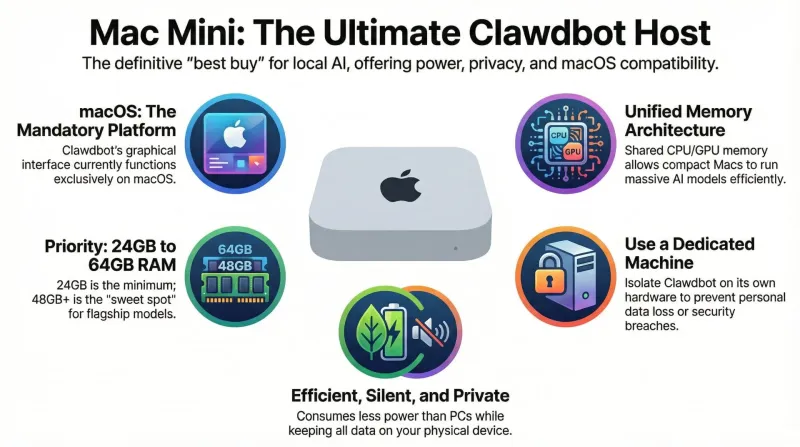
The Mac mini: The definitive "best buy" for your personal Clawdbot (OpenClaw) AI assistant
Why the Mac mini is the superior choice for a 24/7 private AI agent. We analyze hardware, security, and the ideal configuration for Clawdbot (OpenClaw).
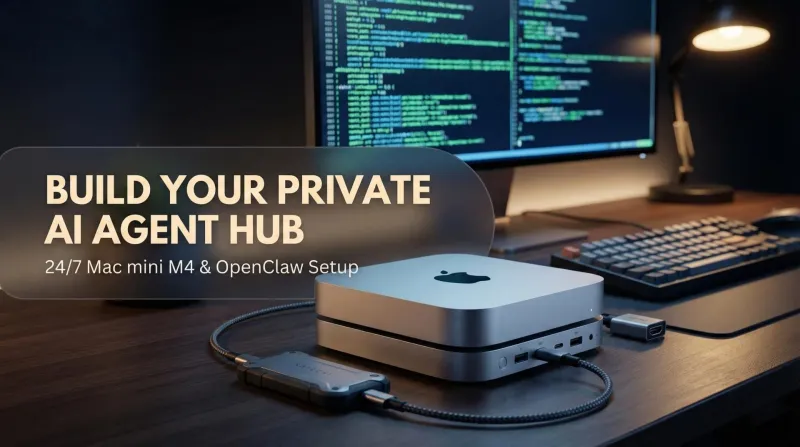
Clawdbot (OpenClaw) on Mac mini M4: How to build your 24-7 private AI agent hub
Turn your Mac mini M4 into 'The Clawdfather' – a proactive, private AI agent hub using Clawdbot (OpenClaw) and Ollama.
The Mac mini is an AI machine now, and that's why it's sold out
The Mac mini quietly became AI infrastructure, and the queue you are standing in now includes companies buying them by the rack. That does not change what a family needs, but it does change when you should buy and which upgrades are worth paying Apple for.