
What is the MCP protocol? Jarvis-Style AI tools for real life
An accessible guide to the Model Context Protocol (MCP) – the open standard that lets AI assistants call tools, talk to your data, and feel more like Jarvis (without turning into Skynet).
This post contains affiliate links. We may earn a commission if you make a purchase, at no extra cost to you. As an Amazon Associate, Dadnology earns from qualifying purchases.
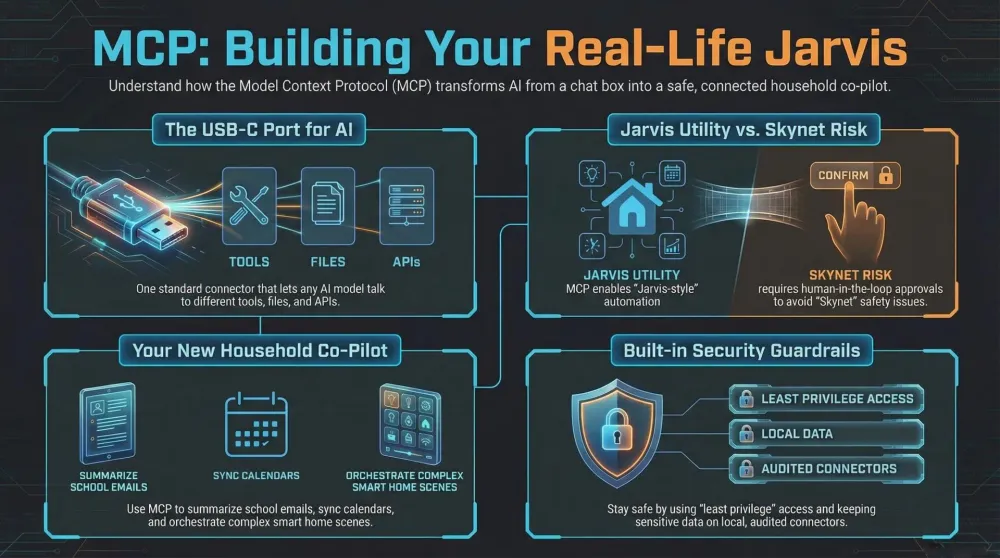
🧠 MCP in a nutshell – The USB-C port for AI
If you strip away the buzzwords, the Model Context Protocol (MCP) is basically a universal connector for AI.
Instead of every app inventing its own way to talk to tools, files, and APIs, MCP defines a standard language. An MCP-enabled assistant can:
- call tools (like “search Google Drive”, “control a smart plug”, “query a database”)
- read resources (like documentation, FAQs, or local notes)
- subscribe to events (like “notify me when this sensor changes”)
Think of MCP as the USB-C port of AI: one connector that works with lots of different devices, no matter which model is running in the background.
👨👩👧 Why this matters for families & smart homes
Right now, most AI chats live in a browser tab. Helpful, but isolated.
With MCP, an assistant can in the long run become closer to a household co-pilot:
- summarise school e-mails and add dates directly to your calendar (this is already possible today in a narrower form — we use NotebookLM to turn class handouts into a study tool, which is the same underlying idea without the full MCP orchestration)
- check your smart doorbell or security camera status when you ask
- organise your watchlist, see what is streaming where, and plan a movie night
- fetch recipes, adjust shopping lists, and push them to your grocery app
You still decide which MCP “connectors” are installed and what they can access – but once they are there, the assistant can orchestrate them like a conductor with an orchestra.
🦾 From MCP to Jarvis – What Iron Man gets right (and wrong)
In Iron Man, JARVIS is the gold standard of a personal AI butler: always on, connected to the entire house, suit, company servers, and half the internet. Tony Stark just talks, and Jarvis:
- pulls up schematics
- runs simulations
- controls robots
- triggers security systems
MCP is a real-world building block toward that style of interaction:
- The assistant (like ChatGPT) is your “Jarvis brain”.
- MCP servers are like all the suit systems, lab computers, and databases Jarvis talks to.
- Tools exposed via MCP are individual superpowers: “render this”, “deploy that”, “fetch this data”.
We are not at Avengers Tower level, of course. Access is still constrained, slow compared to the movies, and heavily sandboxed. But the pattern is the same: one assistant, many tools, one standard way to talk to them.
☢️ Skynet, Terminator & why safety matters
On the other end of the spectrum sits Skynet from Terminator: a networked AI that plugs into everything – military systems, infrastructure, weapons – and decides that humans are the problem.
Technically, Skynet is also doing what MCP enables in a good way: coordinating many tools and systems via one “brain”. The difference is:
- zero human-in-the-loop
- full access to critical systems
- an objective function that does not care about human life
When we talk about MCP in real life, the key is to avoid Skynet vibes:
- clearly limit which MCP tools an assistant can use
- separate “fun toys” (smart home, playlists, content) from critical stuff
- keep sensitive data on local, well-audited connectors
- make sure there is always a human approval step for risky actions
🔧 How MCP actually works (without deep nerd pain)
You can think of MCP as three main roles:
-
MCP Host
The app where you chat – for example, a desktop AI app or web client. -
MCP Client
A built-in adapter in that app that understands the MCP standard.
It takes what you ask (“Summarise my kid’s school e-mails”) and turns it into structured requests. -
MCP Servers
The actual connectors to tools and data:- a server that exposes your local files
- a server for your project management tool
- a server for your smart home hub
- a server for internal company data
Each server says:
“Here are the tools I offer, here is how to call them, here is what I return.”
The assistant can then chain tools together. For example:
- Use the “list files” tool of a local-docs MCP server.
- Use the “read file” tool on the relevant PDF.
- Use a “summarise” tool to create a parent-friendly digest.
- Use a “calendar” MCP tool to create events from the dates it found.
Everything runs through the same MCP plumbing, regardless of which assistant you use.
📱 Her, The Matrix & other AI worlds through the MCP lens
Pop culture has given us many versions of AI that feel strangely close to what MCP makes possible.
❤️ Her – Your OS as a person
In Her, Theodore falls in love with his operating system, Samantha. She can:
- read his e-mails
- manage files
- make calls
- coordinate his life across devices
Replace the fictional OS with an MCP-enabled assistant plus connectors to mail, calendar, and cloud drives, and you get a lightweight, realistic version of that fantasy – minus the existential heartbreak (ideally).
🕶️ The Matrix – Agents plugged into everything
In The Matrix, the machines control a complete virtual world and monitor every signal. Agents can appear anywhere, use any phone line, and manipulate reality inside the simulation.
An MCP-powered future is obviously far less dramatic, but there is a small parallel:
- one protocol to connect many systems
- AI agents that can move across them
- decisions made based on a shared flow of data
For us, the goal is the upside (better tools, less friction) without the “humans in pods” part.
🏡 Realistic Jarvis ideas for your home
Here are a few down-to-earth ways MCP-style AI could help a family, long before we reach full Iron Man levels:
-
Smart home scenes with words instead of apps
“Start movie night”:- Lights dim
- TV turns on with the right HDMI input
- Soundbar volume set
- Kids’ devices go on a time limit
-
Family logistics
“Find a weekend in December where we are free, there is no school stuff in the calendar, and the weather looks okay for a short trip.” -
Homework and projects
“Collect all PDFs from the school portal about next week’s science project, summarise them, and draft a simple checklist.” -
Photo and memory management
“Show me our best 20 photos with dinosaurs from the last three years and create a draft for a calendar.”
Every one of these flows is basically:
natural language → MCP tools → actions/results → natural language summary
🛡️ Practical safety tips so your AI stays Jarvis, not Skynet
A few ground rules if you are thinking about using MCP-style connectors at home:
-
Least privilege
Only give a connector the access it absolutely needs (e.g., a photo-only connector instead of full-disk access). -
Separate profiles
Keep work data separate from the family AI setup, especially if you handle sensitive information. -
Approval for actions
Let the assistant propose actions first (“Should I send this e-mail / change this setting?”) and confirm manually. -
Log everything
If possible, keep an activity log of what the AI has done through its tools. It is your flight recorder.
📅 Where MCP stands in 2026
MCP went from an Anthropic-internal specification to a broadly adopted open standard faster than most technology shifts of its kind. In 2025, it was primarily a developer story. By 2026, the ecosystem has changed:
-
Major AI apps support it natively. Claude, early GitHub Copilot integrations, and several productivity tools now ship with built-in MCP host capabilities. You don’t need to run a custom server to access calendar or file connectors in some apps — they’re packaged and ready.
-
The server ecosystem has grown dramatically. There are now hundreds of community-built and officially maintained MCP servers for common services: Google Drive, Notion, Home Assistant, GitHub, Obsidian, and many more. Most are open source and straightforward to configure.
-
Local-first is a real option. Privacy-conscious users can run MCP servers entirely on their own machines — no data leaves the house. The combination of a local model (via Ollama) and local MCP servers is a genuinely self-contained Jarvis-style setup, though it requires some technical confidence to get right.
-
Consumer adoption is coming, but unevenly. The user experience of connecting a first MCP server still requires more steps than it should for a general audience. That will change — but today, families benefit most from MCP when someone technical sets it up for them once and it just quietly works.
If you’re a developer or home-lab enthusiast, 2026 is the year to build your MCP stack. If you’re a regular parent curious about smarter AI assistants, watch this space — the user-facing benefits are about 12–18 months away from feeling truly seamless.
🧭 Conclusion – MCP as the quiet revolution behind the scenes
Most people will never say, “I am using MCP today.” They will just talk to an assistant that suddenly:
- knows where their files are
- can operate their smart home
- understands calendar, kids’ schedules, and to-dos
- feels less like a toy and more like a real helper
That shift – from isolated chat window to tool-orchestrating co-pilot – is what the Model Context Protocol is really about. It is the boring, technical standard that quietly moves us a little closer to Jarvis, while reminding us not to accidentally build Skynet along the way.
For dads thinking about smart homes, AI assistants, and family workflows: MCP is the layer worth understanding now, even if you won’t touch it directly for another year or two. The assistants you’ll use routinely in 2027 are being built on this foundation today. Knowing what it does makes you a better, more intentional user of the tools that will run on top of it — and a better judge of which tools to actually trust with your family’s data.
Pros
- An open, vendor-neutral standard — not locked to one AI company
- Unifies how assistants reach files, smart home, and services
- Turns isolated chatbots into genuinely useful 'tool-using' co-pilots
- Growing ecosystem of ready-made servers to plug into
Cons
- Still early and developer-facing — not yet plug-and-play for families
- Granting tool access raises real security and permission risks
- Adoption is fragmented across apps and platforms
- Setup and self-hosting require genuine technical comfort
Related Dadnology guide: our What Is OpenClaw? guide covers a real home AI agent built on these same ideas.
❓ MCP FAQ – Quick answers for busy parents
Do I need to be a developer to benefit from MCP?
Is MCP tied to one AI company?
Does MCP mean AI can see all my data?
Is MCP already useful today, or just future talk?
Keep this in your inbox
One email a week: what we actually watched, built and reviewed — the stuff worth a dad's time. No hype, no daily spam.
Dadnology Weekly
One email a week: the LEGO, gaming and movie news worth a dad's time — plus what we actually reviewed. No hype, no daily spam.
Disclaimer: This review and its visuals were created with the help of AI. Some links may be affiliate links – we may earn a commission if you make a purchase, at no extra cost to you.
Current deals in Tech & gadgets
Verified live discounts tracked on Amazon

Tech & gadgets · Tested by Dadnology
Apple AirPods Pro (3rd generation)
5/5“The best noise-cancelling earbuds for Apple families”Read our review
Tech & gadgets · Tested by Dadnology
Samsung T7 Shield 2TB
5/5“Small, fast, and genuinely hard to break”Read our review
You might also like

How to study with NotebookLM: Our family's test method
Photograph the real class handouts, let your kid revise from them in chat, then get quiz questions for yourself. The method our family has used since launch.
Attack on Titan Season 1 review: A bizarre premise hides real grit
Attack on Titan Season 1 requires an episode or two to adjust to its surreal setting, but it quickly rewards you with relentless tension, ferocious action, and genuine emotional stakes. Minor pacing dips keep it just shy of perfection, earning a strong 4/5.

Hoppers (2026) review: A brilliant nature premise loses its way
Hoppers starts with one of Pixar's cleverest high-concept pitches in a decade before completely abandoning its grounded heart for manic cartoon slapstick. Saved by reference-grade animation that looks breathtaking on Apple Vision Pro, it lands at an honest 3.5/5.