
Never Get Locked Out Again: 5 Best Smart Locks for Families (Prime Day 2026)
A dad-focused guide to the best smart locks for U.S. family homes in 2026 – including August, Schlage, Yale, Eufy, and Level – with picks for renters, Apple families, fingerprint fans, and more.
This post contains affiliate links. We may earn a commission if you make a purchase, at no extra cost to you. As an Amazon Associate, Dadnology earns from qualifying purchases.
Editor’s note: This guide is written from a U.S. family perspective. We focus on smart locks that are widely available on Amazon.com and compatible with typical American front doors and smart home setups.
👨👩👧 Why Smart Locks Matter for Families
Modern families have enough to juggle without stressing about keys and door locks.
Studies show most parents have misplaced a house key at least once, and a huge majority have wondered on the way to work, “Did I actually lock the door?” Smart locks take a lot of that mental load off your plate:
- Kids can get in with a PIN code, fingerprint, phone, or key card instead of a physical key.
- You can lock and unlock remotely from your phone if someone forgets their code or gets home early.
- Auto-lock makes sure the door doesn’t stay unlocked just because a teenager rushed out in a hurry.
No more spare key under the doormat. No more emergency drives home because your child is locked out. Pairing a smart lock with a video doorbell gives you complete control over your front entrance. And because it’s Prime Day 2026, many of the best family-friendly smart locks are heavily discounted on Amazon.com – making this a perfect time to upgrade.
In this guide, we’ll walk through five standout options:
- A super-easy retrofit lock that keeps your existing deadbolt (August).
- Two keypad deadbolts with lots of family codes (Schlage, Yale).
- A fingerprint lock that kids will love to use (Eufy).
- A beautiful, “invisible” lock that’s perfect for Apple families (Level Lock+).
🔐 TL;DR – Dadnology’s Top 5 Smart Locks
If you just want the quick answer first:
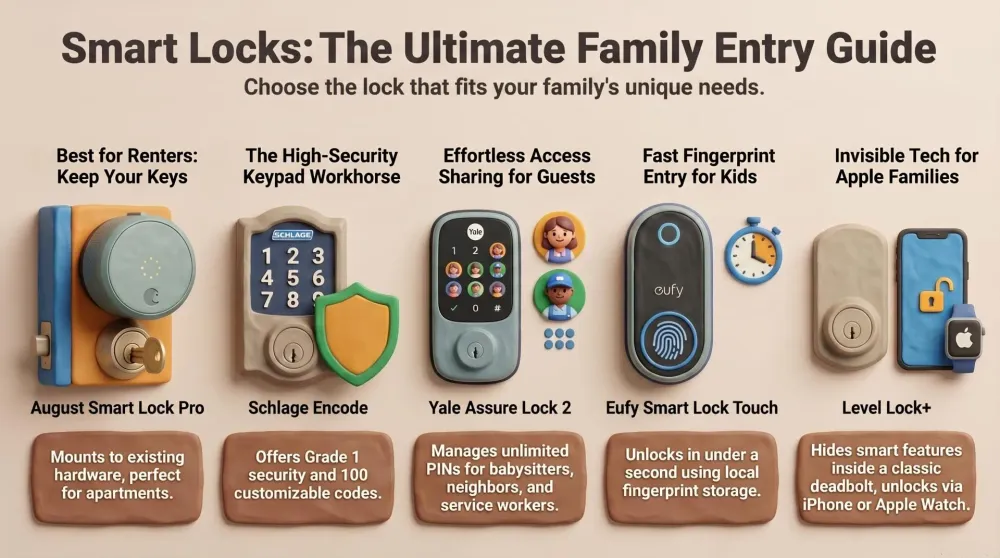
- Best retrofit / easiest install for renters: August Smart Lock Pro + Connect – Mounts inside on your existing deadbolt, keeps your current keys, and works with Alexa, Google, and HomeKit.
- Best all-in-one keypad deadbolt (no hub needed): Schlage Encode Smart WiFi Deadbolt – Grade 1 security, built-in Wi-Fi, and a bright touchscreen keypad with up to 100 codes.
- Best for flexible codes & mixed ecosystems: Yale Assure Lock 2 (Wi-Fi Keypad Deadbolt) – Excellent keypad, unlimited codes via app, and broad smart home support with modules.
- Best fingerprint lock on a family budget: Eufy Security Smart Lock Touch & Wi-Fi – Fingerprint, keypad, app, and key in one. Plenty of features at a more affordable price.
- Best for Apple families & design lovers: Level Lock+ with Apple Home Key – Looks like a regular deadbolt, hides the “smart” inside, and lets you unlock with your iPhone or Apple Watch.
Below we’ll go through each lock one by one, explain who it’s for, and share direct Amazon links so you can check prices and Prime Day deals right away.
1️⃣ August Smart Lock Pro + Connect – Retrofit Smart Lock for Renters & Key Lovers
If you like the idea of a smart lock but don’t want to change the outside of your door, the August Smart Lock Pro + Connect is the family-friendly retrofit pick.
Instead of replacing your deadbolt, August attaches to the inside of the door and turns your existing lock for you. From outside, the door looks completely normal and your old keys still work.
Why families love it
- Minimal installation: You keep your existing deadbolt and keys. The August unit simply replaces the inside thumb-turn. For many doors, it’s a 10–15 minute job with just a screwdriver.
- Perfect for renters and cautious homeowners: Because the exterior hardware stays the same, it’s landlord-friendly and easy to revert when you move.
- App and voice control from anywhere: With the included Connect Wi-Fi bridge, you can check if the door is locked, lock or unlock it remotely, and integrate with Alexa, Google Assistant, and Apple HomeKit.
- Smart auto-unlock: August can detect your phone and automatically unlock as you walk up to the door – very handy when you’re carrying groceries, a stroller, or a half-asleep kid.
- Flexible access for family & guests: Give each child their own app access or pair it with the optional August keypad for PIN codes. You can create temporary “keys” for babysitters, dog walkers, and visiting grandparents.
Pros for families
- No need to rekey or replace your deadbolt – your physical key always works as backup.
- Big ecosystem support: works with Alexa, Google, and HomeKit, so it fits into almost any smart home.
- Door status and activity feed: see when the kids got home and if the door is closed and locked.
- Auto-lock can relock the door after a delay so you’re not relying on memory.
Things to keep in mind
- Needs a Wi-Fi bridge (included in most bundles) for full remote control.
- No built-in keypad or fingerprint – you’ll need the optional keypad for PIN codes.
- The interior unit is a bit chunky, so it’s more visible on the inside than some other options.
- Runs on AA batteries, so you’ll need to swap them a couple of times a year (you’ll get low-battery warnings first).
If you want a low-commitment smart upgrade that keeps your keys and your existing deadbolt, August is a great first smart lock for families.
AdAugust Smart Lock Pro + Connect Wi-Fi Bridge (opens in a new tab)
Keep your existing keys while adding app control, auto-unlock, and voice commands. Great for renters and busy parents who want smart features without a full hardware swap.

2️⃣ Schlage Encode Smart WiFi Deadbolt – High-Security Workhorse with Built-in Wi-Fi
If you’re ready to fully replace your deadbolt and want top-tier security plus an integrated keypad, the Schlage Encode Smart WiFi Deadbolt is a powerhouse.
It swaps in as a complete deadbolt with a touchscreen keypad on the outside and a robust lock body on the inside. No extra hub is required – Wi-Fi is built right in.
Why it’s great in real family life
- Keypad for everyone: Kids, grandparents, and neighbors can unlock with their own PIN code – no smartphone required. You can store up to 100 unique codes and delete them anytime.
- Built-in Wi-Fi, no bridge: Encode connects directly to your home network, so you can lock/unlock from anywhere and see who used which code in the app.
- Grade 1 security: It’s rated at the highest residential security level, with strong hardware and a built-in tamper alarm to deter forced entry.
- Voice-friendly: Works with Alexa and Google Assistant, so you can ask if the door is locked or lock it with a voice command when heading to bed.
- Auto-lock & one-touch lock: You can set it to auto-lock after a certain time or just tap the Schlage logo button on the keypad to lock on your way out.
Pros for families
- Serious security with a trusted, long-standing lock brand.
- No extra hub cluttering your outlets.
- Keypad is easy for kids – give them their own code and you’ll see exactly when they came home.
- Supports up to 100 codes, perfect for larger families, guests, or even an Airbnb scenario.
- Weather-resistant and built to handle real front-door use.
Things to keep in mind
- Installation is more involved than a retrofit – you’ll remove your old deadbolt and install the new one (still very doable with a screwdriver).
- No native Apple HomeKit on the standard Encode model (great for Alexa/Google households).
- Runs on AA batteries, so you’ll need to change them periodically (with plenty of warning).
- The lock body is larger than a traditional deadbolt on the inside of the door.
Choose Schlage Encode if you want a high-security, do-everything lock with a keypad that the whole family can use and built-in Wi-Fi for easy app control.
AdSchlage Encode Smart WiFi Deadbolt (opens in a new tab)
Grade 1 security, built-in Wi-Fi, and a bright touchscreen keypad with up to 100 family and guest codes. A rock-solid front door upgrade for Alexa and Google homes.
3️⃣ Yale Assure Lock 2 – Code-Focused Lock with Flexible Smart Home Options
If your family frequently shares access with babysitters, cleaners, dog walkers, or relatives, the Yale Assure Lock 2 is a brilliant keypad-first smart lock.
Yale has been in the lock game for over a century, and the Assure line combines that heritage with modern app control, Wi-Fi, and broad smart home support.
Why it shines for busy families
- Everyone gets a PIN: The illuminated keypad makes it easy to punch in a code, even at night. You can generate unlimited codes in the app, label them, and set schedules so some only work at certain times.
- Great for sharing access: Need to let the cleaner in every Thursday morning? Or give the neighbor weekend access while you’re on a trip? You can do all that from the Yale app – no physical keys needed.
- Auto-Lock with DoorSense: With the included DoorSense sensor, the lock can detect whether the door is closed and then automatically lock itself. Perfect when kids forget to lock behind them.
- Flexible smart home integrations: Depending on the model or module, Yale Assure Lock 2 can work with Alexa, Google Assistant, Apple HomeKit, SmartThings, and more. It’s one of the most flexible options if you run a mixed ecosystem.
- Backup key option: You can choose a model with a traditional key for extra peace of mind, or go key-free if you’d rather live fully in the PIN and app world.
Pros for families
- Fantastic for code-based access – great if lots of people come and go.
- DoorSense + Auto-Lock reduces the risk of the door being left unlocked.
- The app shows a clear activity log, so you always know who came and when.
- Works with many major smart home platforms (depending on model/config).
- Yale’s build quality feels solid and confidence-inspiring.
Things to keep in mind
- Security rating is typically Grade 2 – still very strong, but not quite as tank-like as Grade 1 Schlage.
- Different models/modules can be confusing – make sure you pick one with Wi-Fi if you want remote control out of the box.
- Battery life can be shorter with always-on Wi-Fi, so be ready to swap AAs a couple of times a year.
- No built-in fingerprint or camera – it focuses on PINs + app instead.
Pick Yale Assure Lock 2 if you want a code-driven lock that makes sharing and managing access incredibly easy and works with pretty much any smart home setup you throw at it.
AdYale Assure Lock 2 (Wi-Fi Keypad Deadbolt) (opens in a new tab)
Give everyone their own PIN, manage unlimited codes in the app, and use Auto-Lock with DoorSense for peace of mind. A trusted, flexible smart lock that plays well with most smart home platforms.
4️⃣ Eufy Security Smart Lock Touch & Wi-Fi – Fingerprint Fun for Kids (and Parents)
If your kids can’t remember a code but never forget their fingers, the Eufy Security Smart Lock Touch & Wi-Fi is a fantastic family pick.
It combines a fast fingerprint reader, keypad, app control, and a traditional key into one sleek lock, usually at a more wallet-friendly price than many competitors.
What makes it family-friendly
- Fingerprint unlock in under a second: Just place a thumb on the reader and the door pops open. It feels like unlocking your phone – simple, fast, and fun.
- Five ways to unlock: Fingerprint, PIN code, phone app, voice assistant (Alexa/Google), or physical key. Every family member can choose what works best for them.
- Built-in Wi-Fi (on Touch & Wi-Fi model): No separate hub is needed for remote control. Use the Eufy Security app to lock/unlock from anywhere, see entry logs, and manage users.
- Auto-lock and geo features: Set auto-lock timers so the door locks itself after a delay, and enable features like geo-based auto-unlock when you arrive home with your phone.
- No monthly fees: All smart features are included with the lock – there’s no subscription for app use or cloud access.
Pros for families
- Fingerprints are great for kids who might struggle with codes or keys.
- Multiple access methods cover every generation in the household.
- Typically more affordable than other full-featured smart locks, especially on sale.
- Data like fingerprints are stored locally on the lock, not in the cloud.
- Weather-rated and sturdy enough for front-door use.
Things to keep in mind
- No native Apple HomeKit or Apple Home Key support – Eufy is best for Alexa/Google homes.
- Wi-Fi can drain batteries faster; you’ll need to recharge the pack or swap AAs periodically.
- Fingerprint reader can be a bit picky with wet or dirty fingers, so it’s smart to register two fingers per person.
- Eufy is a newer lock brand compared to Schlage/Yale, though backed by Anker’s reputation.
If you like the idea of walking up, tapping your thumb, and having the door unlock instantly – and you want to keep costs reasonable – Eufy’s Smart Lock Touch & Wi-Fi is a very family-friendly choice.
AdEufy Security Smart Lock Touch & Wi-Fi (opens in a new tab)
Unlock with a fingerprint in under a second, or use a code, app, or key. A feature-packed smart lock that delivers serious convenience at a family-friendly price.
5️⃣ Level Lock+ – Invisible Smart Lock with Apple Home Key
If your home runs on Apple and you care about curb appeal, the Level Lock+ is a dream lock.
It’s called the “invisible” smart lock because all the electronics are hidden inside the deadbolt. From the outside, it just looks like a high-quality traditional lock – but inside, it supports Apple Home Key, Siri, and more.
Why Apple families love it
- Tap your iPhone or Apple Watch to unlock: Store a digital house key in Apple Wallet and simply tap your device on the lock. Even if your phone battery is almost dead, Home Key can still work in Power Reserve mode.
- Clean, classic look: Because the smart parts sit inside the door, your front door doesn’t look “techy.” Great for HOA rules, picky spouses, or anyone who prefers a subtle aesthetic.
- Multiple access options: Use Apple Home Key, the Level app, included NFC key cards, traditional keys, Siri, Alexa, or Google (via the included Wi-Fi bridge). Everyone can use the method they prefer.
- Strong security and build: The lock is made from hardened steel and carries top-level security ratings, rivaling the best traditional deadbolts.
- Quiet and smooth: The motor is small and refined, so locking and unlocking is noticeably quieter than on some bulkier smart locks.
Pros for families
- Best-in-class Apple experience with Home Key and HomeKit support.
- Looks like a normal deadbolt, which many parents prefer on the front door.
- NFC key cards are great for kids or guests without smartphones.
- Includes a Wi-Fi bridge in many bundles for full remote access and Alexa/Google integration.
- High security rating and durable construction.
Things to keep in mind
- It’s a premium-priced lock – you’re paying for design and Apple integration.
- Works best if your household actually uses iPhones and Apple Watches.
- No built-in keypad or fingerprint sensor – PIN lovers will need the separate Level Keypad accessory.
- Installation is a bit more detailed than typical deadbolts because everything goes inside the door.
Pick Level Lock+ if you want a lock that doesn’t look like a gadget, but still gives your family futuristic tap-to-unlock convenience with Apple devices.
AdLevel Lock+ (Apple Home Key Smart Lock) (opens in a new tab)
Keep your door looking classic while unlocking with your iPhone, Apple Watch, NFC key cards, or a regular key. A premium, design-first smart lock that feels made for Apple households.
✅ Which Smart Lock Should Your Family Buy?
Quick recap:
- Go August Smart Lock Pro + Connect if you’re a renter or want the easiest upgrade that keeps your existing deadbolt and keys.
- Go Schlage Encode Smart WiFi Deadbolt if you want a high-security front door lock with built-in Wi-Fi, a keypad, and no extra hub.
- Go Yale Assure Lock 2 if you share access with lots of people and want powerful PIN and scheduling options plus broad smart home compatibility.
- Go Eufy Smart Lock Touch & Wi-Fi if you want fingerprint unlock and lots of features at a more affordable price.
- Go Level Lock+ if your home lives in the Apple ecosystem and you care about both security and a clean, invisible look.
Whichever you choose, grabbing one during Prime Day 2026 on Amazon.com is a smart move: you’ll make it easier for your kids to come and go safely, stop worrying about lost keys, and gain peace of mind with remote control and auto-lock.
Related Dadnology guides: Top 5 Smart Security Camera Systems for Families (2026) · Best Smart Thermostats for Families
Related Dadnology review: Baby Always in Sight
📌 FAQ – Smart Locks & Family Homes
Are smart locks really safe enough for my family’s front door?
Can I still use a physical key if the batteries die?
Which smart lock is best if I rent my home?
Will these smart locks work with my existing smart home devices?
Keep this in your inbox
One email a week: what we actually watched, built and reviewed — the stuff worth a dad's time. No hype, no daily spam.
Dadnology Weekly
One email a week: the LEGO, gaming and movie news worth a dad's time — plus what we actually reviewed. No hype, no daily spam.
Disclaimer: This review and its visuals were created with the help of AI. Some links may be affiliate links – we may earn a commission if you make a purchase, at no extra cost to you.
You might also like
Prime Day 2026: 5 Best Robot Vacuums for Family Households
Our dad-focused Prime Day guide to the top 5 robot vacuums in 2026 that keep family homes clean – from self-emptying Roombas to powerful all-in-one stations from Shark, Dreame, and eufy.
Top 5 Smart Security Camera Systems for Families (2026) – Dadnology Guide
Our dad-focused guide to the 5 best smart security camera systems for U.S. families in 2026 – from Ring and Arlo to Google Nest, eufy, and Blink – with options for every budget, ecosystem, and privacy preference.
Top 5 Smart Speakers and Displays for Families (2026) – Dadnology Prime Day Guide
Looking for the perfect smart speaker or display for your family this Prime Day? Discover 2026’s top five picks – including Amazon Echo Show 8, Echo Dot Kids, Google Nest Hub Max, Apple HomePod mini, and Sonos Era 100 – with family-friendly features and Prime Day deals.