
Top 5 Smart Security Camera Systems for Families (2026) – Dadnology Guide
Our dad-focused guide to the 5 best smart security camera systems for U.S. families in 2026 – from Ring and Arlo to Google Nest, eufy, and Blink – with options for every budget, ecosystem, and privacy preference.
This post contains affiliate links. We may earn a commission if you make a purchase, at no extra cost to you. As an Amazon Associate, Dadnology earns from qualifying purchases.
Editor’s note: We haven’t had every single kit in long-term use ourselves – except Ring, which we’ve been using at home for years and genuinely love – so this guide combines our own experience with manufacturer specs and trusted third-party reviews.
👨👩👧 Why Smart Security Cameras Matter for Families
Modern security cameras aren’t about turning your house into a fortress – they’re about peace of mind.
As parents, we mainly want to know:
- Did the kids get home from school safely?
- Is that noise outside just a raccoon or something else?
- Did the package actually arrive on the porch?
- What’s the dog doing while we’re out?
A good smart camera system lets you:
- Check in from anywhere via phone app – at work, on a trip, or upstairs with the baby.
- Get smart alerts when a person, package, or car shows up.
- Use two-way talk to say “I’m watching you” to porch pirates or “hey buddy” to the family dog.
- See clearly at night with infrared or color night vision.
And because Amazon Prime Day 2026 (June 23–26) is here, many of the best systems from Ring, Arlo, Google, eufy, and Blink are heavily discounted on Amazon.com – making it a smart moment to upgrade your home’s “extra eyes”. (For the front door specifically, a video doorbell might be the better fit.)
⚡ TL;DR – Dadnology’s Top 5 Camera Picks
If you just want the quick answer first:
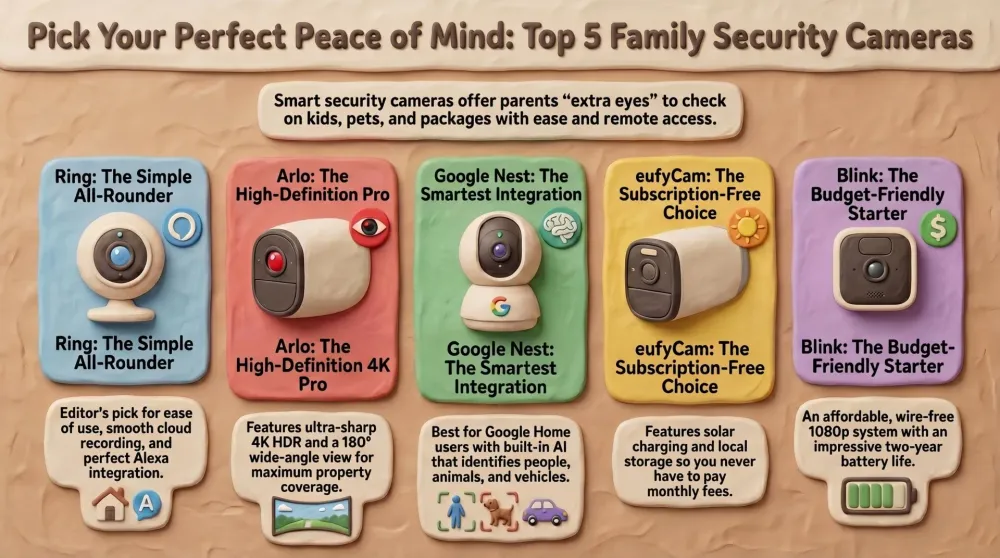
- Best overall for most families (Editor’s Pick): Ring Outdoor Cam Plus (Battery) – Super simple to install and use, excellent app, strong Alexa integration, and great subscription-based cloud recording.
- Best for ultra-sharp 4K and big yards: Arlo Ultra 2 4K Security Camera System – Premium wireless cameras with 4K HDR, wide 180° viewing angle, spotlight, and advanced detection.
- Best for Google Home families: Google Nest Cam (Battery, 2nd Gen) – Smart battery camera with built-in people/animal/vehicle detection and tight integration into Google Home.
- Best subscription-free system with local 4K storage: eufyCam 3 (S330) with HomeBase 3 – 4K solar-powered cameras with local storage and on-device AI, no monthly fees required.
- Best budget-friendly starter kit: Blink Outdoor 4 (4th Gen) – Affordable wire-free cameras with strong battery life and tight Alexa integration.
Below we’ll go through each system in detail, explain who it’s for, and include direct Amazon links so you can check prices and Prime Day deals right away.
1️⃣ Ring Outdoor Cam Plus (Battery) – Easy, Cloud-First All-Rounder (Editor’s Pick)
If you want to keep things simple, it’s hard to beat Ring Outdoor Cam Plus (Battery) as a first family security camera. We have run Ring in our own home since 2021 and now have nine cameras on it — our four-year Ring Alarm review covers the real battery life, the false alarms that made us remove the motion detectors, and whether the subscription pays off.
It’s designed to mount almost anywhere around your home – front porch, driveway, backyard – and runs on a rechargeable battery. No drilling into power lines, no running cables through walls: you just mount the bracket, clip the camera on, and connect it to Wi-Fi in the Ring app.
Why it fits real family life
- Wire-free and flexible: Battery power means you can place it where the view is best, not just where the outlets are. You can always add a Ring solar panel later if you want less charging hassle.
- Clear HD video with night vision: The Outdoor Cam Plus delivers sharp video with color night vision when there’s enough ambient light, plus solid infrared night vision when it’s very dark.
- Smart motion alerts and zones: You can define motion zones so the camera watches your porch but ignores the sidewalk, helping avoid constant pings every time a car drives by.
- Two-way talk: See and talk to whoever is at the camera – perfect for checking in on kids playing in the yard, chatting with delivery drivers, or warning off someone snooping around.
- Alexa integration: In an Alexa home, you can say “Alexa, show me the driveway” on an Echo Show or Fire TV and see live video instantly.
Our own experience with Ring
At Dadnology, this isn’t just theory:
We’ve been using Ring cameras at home for years and are super happy with them – especially with the Ring Protect subscription and its cloud recording. The app is easy to use, the notifications are reliable, and reviewing clips in the cloud has been smooth and hassle-free. For us, this combination of usability + cloud storage is a big reason Ring is our Editor’s Pick.
Subscription & cloud
You can use Ring cameras without a subscription for live view and basic alerts. But to store video clips, share them, and get richer features, you’ll want Ring Protect (paid monthly or yearly per camera or per household).
For most families, the Ring Protect Basic/Plus plan is absolutely worth it: you get 30–180 days of video history (depending on plan), rich notifications, and easier evidence sharing if there’s ever an incident.
Pros for families
- Extremely user-friendly app and setup flow.
- Flexible placement thanks to battery power and optional solar.
- Great, proven cloud service (Ring Protect) with smooth clip playback.
- Tight integration with Alexa devices.
- We’ve personally used Ring at home for years and can genuinely recommend it.
Things to keep in mind
- Full power of the system comes with a paid subscription.
- Cloud storage means footage is stored on Ring’s servers – you’ll want to review privacy settings and modes.
- Best fit for Alexa-centric homes (though you can still just use the Ring app).
If you’re looking for a no-drama, dad-friendly camera that “just works” and plays nicely with Alexa, the Ring Outdoor Cam Plus (Battery) is our top pick.
AdRing Outdoor Cam Plus (Battery) (opens in a new tab)
Wire-free HD security camera with color night vision, motion alerts, and two-way talk. Our Editor’s Pick for its ease of use and ecosystem.

2️⃣ Arlo Ultra 2 4K Security Camera System – Maximum Detail & Coverage
If you have a bigger property or just want the clearest possible video, the Arlo Ultra 2 4K system is the premium answer.
These wireless cameras reach up into 4K HDR resolution with a very wide field of view (around 180° on many bundles). That means one camera can cover a large part of your yard, and you can zoom in on footage without the image immediately turning to mush.
Why it shines around family homes
- 4K HDR video: Ideal for capturing details like license plates, faces at a distance, or what exactly the kids are doing on the far side of the yard.
- Wide-angle coverage: A single Arlo Ultra camera can see a big swath of your driveway or backyard, reducing how many cameras you need.
- Built-in spotlight and siren: The camera can automatically turn on a spotlight and even fire a siren when it detects motion – helpful both for seeing clearly at night and for deterring intruders.
- Advanced motion detection: Arlo’s software can distinguish between people, animals, vehicles, and packages (with subscription), so your phone isn’t buzzing for every leaf that moves.
- Works with major ecosystems: Arlo integrates with Alexa, Google Assistant, and smart displays, so you can pull up live feeds by voice.
Pros for families
- Ultra-sharp 4K HDR video with great clarity.
- Excellent for larger yards and wide driveways.
- Spotlight + siren add active deterrence, not just passive recording.
- Strong smart detection and rich notifications.
- Kits usually include multiple cameras and a SmartHub for better range.
Things to keep in mind
- Premium price – this is a higher-end system.
- To unlock all smart features and cloud recording, you’ll likely want an Arlo Secure subscription.
- 4K footage eats more bandwidth and storage (though you can tune settings).
- Battery life is still good, but generally a bit shorter compared to simpler 1080p cameras.
If you’re a tech-savvy parent with a larger property who wants maximum detail and serious smart features, Arlo Ultra 2 is the “no-compromise” option worth watching for on Prime Day.
AdArlo Ultra 2 4K Security Camera System (opens in a new tab)
4K HDR wireless security cameras with wide 180° views, spotlight, siren, and advanced motion detection. Great for dads who care about detail and full coverage.
3️⃣ Google Nest Cam (Battery, 2nd Gen) – Smartest Pick for Google Homes
If your smart home already revolves around Google Assistant, Nest Hub, and Google Home, the Google Nest Cam (Battery, 2nd Gen) is the easiest camera to drop in.
This compact camera works indoors or outdoors, is fully wire-free, and focuses heavily on on-device smarts – things like recognizing people, animals, and vehicles even without a subscription.
Why Google families love it
- Smart alerts by default: Out of the box, Nest Cam can already distinguish between people, animals, and vehicles. Your notifications are more meaningful (“Person in backyard”) and less noisy.
- Battery or wired, your choice: Use it as a battery camera for flexible placement, or add an optional weatherproof cable for continuous power and 24/7 recording.
- 3 hours of event history free: For quick check-ins (“what just happened at the door?”), the free 3-hour clip history is often enough. If you need more, Nest Aware subscription adds long-term storage and extra features.
- Deep Google integration: Feeds show up directly in the Google Home app, and you can display cameras on Nest Hub displays or Chromecast-enabled TVs.
- Clean, minimal design: The camera looks good indoors and blends nicely outside without screaming “security camera”.
Pros for families
- Great choice for Google-centric smart homes.
- Smart detection reduces junk notifications.
- Battery flexibility + wired option.
- Nice balance between free features and paid Nest Aware extras.
- Loud two-way audio for talking to kids or visitors.
Things to keep in mind
- Maxes out at 1080p – perfectly fine for most, but not as detailed as 4K systems.
- Most management happens in the Google Home app, which takes a bit of getting used to.
- To get long-term history and advanced features, you’ll want a Nest Aware plan.
- Works best in homes already invested in Google devices; Alexa support is there but secondary.
If you’re all-in on Google and want a camera that feels truly integrated into that world, Nest Cam (Battery) is the obvious pick.
AdGoogle Nest Cam (Battery, 2nd Gen) (opens in a new tab)
Battery-powered indoor/outdoor camera with built-in smart detection for people, animals, and vehicles. Perfect match for Nest Hub and Google Assistant homes.
4️⃣ eufyCam 3 (S330) with HomeBase 3 – 4K Quality, No Monthly Fee
If you’re allergic to subscriptions and care a lot about privacy and local storage, eufyCam 3 (S330) with HomeBase 3 is made for you.
This kit typically includes 2–4 wire-free 4K cameras plus a base station that stores all your footage locally. On top, each camera has a built-in solar panel for “forever power” in decent sunlight.
Why parents appreciate it
- 4K ultra-HD video with color night vision: You get crisp footage with enough detail to zoom in and still see what’s going on. A Starlight sensor plus built-in light help deliver color images even in low light.
- Local storage on HomeBase 3: Instead of paying monthly fees, clips are saved on the HomeBase unit in your home (with the option to expand storage massively via external drive).
- On-device AI (BionicMind): Person and face detection are handled locally. The system can even learn familiar faces over time to reduce false alarms.
- Solar charging: With a couple of hours of sun per day, the cameras can practically run indefinitely without manual charging – a big win if they’re mounted high up.
- Internet-outage friendly: If your internet goes down, the cameras keep recording to HomeBase. You just sync up when the connection is back.
Pros for families
- No mandatory subscription – buy once, use for years.
- Local storage and on-device AI for better privacy control.
- 4K resolution and strong low-light performance.
- Solar top-up means less maintenance.
- Integrates with Alexa and Google Assistant for viewing on smart displays.
Things to keep in mind
- Higher upfront cost compared to simpler 1080p systems.
- 4K video means larger files and more home network traffic.
- You’ll want decent home upload speed to view 4K clips remotely smoothly.
- Eufy has had some privacy discussions in the past – keep firmware updated and review settings carefully.
If you’d rather pay up front and skip monthly fees, while still getting 4K quality and powerful AI, eufyCam 3 is a very compelling family upgrade.
AdeufyCam 3 (S330) with HomeBase 3 (opens in a new tab)
4K wire-free cameras with integrated solar panels and local storage on HomeBase 3. Advanced on-device AI and no monthly fees required.
5️⃣ Blink Outdoor 4 (4th Gen) – Budget-Friendly Starter Pack
If you want something simple and affordable that still covers the basics, the Blink Outdoor 4 is an easy recommendation.
Blink is part of the Amazon family, and the Outdoor 4 is its latest generation of wire-free camera. The big idea: get solid 1080p HD video, motion alerts, and two-year battery life (under typical use) at a price that doesn’t hurt.
Why it’s great for everyday use
- True wire-free simplicity: The cameras run on AA batteries and connect via a small indoor Sync Module. Install is fast and non-intimidating even for non-techy parents.
- Motion-activated recording: When something moves, you get an alert and a short video clip. That’s usually enough to know who’s at the door or what’s happening in the yard.
- Two-way audio: Talk through the camera to delivery drivers, kids, or pets.
- Good Alexa support: You can arm/disarm, view live feeds, and integrate Blink into Alexa Routines. Seeing “who’s outside” on an Echo Show becomes as simple as asking.
- Flexible storage options: Use a Blink subscription for cloud clips or plug a USB drive into the Sync Module for local storage.
Pros for families
- Very budget-friendly, especially in multi-camera bundles.
- Simple app and setup – low friction starter system.
- Strong battery life in typical use.
- Alexa integration fits perfectly into Amazon smart homes.
- Good way to cover multiple entry points without spending a fortune.
Things to keep in mind
- 1080p video only – totally fine for basic use, but not as detailed as 4K.
- No fancy on-device AI (beyond person detection with subscription).
- Recordings are motion-triggered clips, not continuous recording.
- Best suited for Alexa users; integrations outside that ecosystem are more limited.
If your main goal is “see what’s going on and get alerts on my phone” without a big budget, Blink Outdoor 4 is a super practical starting point.
AdBlink Outdoor 4 (4th Gen) (opens in a new tab)
Wireless 1080p HD outdoor cameras with long battery life, motion-activated recording, and strong Alexa integration. Ideal starter system for families on a budget.
✅ Which Camera System Should Your Family Buy?
Quick recap:
- Choose Ring Outdoor Cam Plus (Battery) if you want the simplest, cloud-first system with great Alexa integration and an app that’s easy for everyone to use. It’s our Editor’s Pick and the brand we happily use at home.
- Choose Arlo Ultra 2 4K if you care about maximum image detail and wide coverage around your property – ideal for big yards and tech-savvy parents.
- Choose Google Nest Cam (Battery) if your smart home is mostly Google/Nest and you want intelligent alerts and a camera that feels fully native to the Google Home app.
- Choose eufyCam 3 (S330) if you hate subscriptions and want a privacy-friendly, local-storage 4K system with solar-assisted power.
- Choose Blink Outdoor 4 if you’re on a tight budget or just starting out, and want something easy that works smoothly with Alexa.
Whichever you pick, Prime Day 2026 (June 23–26) is a great time to buy: you’ll often see deep discounts on individual cameras and multi-camera kits. The goal isn’t to turn your home into a bunker – it’s to add an extra layer of awareness so you can relax a bit more as a busy parent.
Related Dadnology guides: Best Smart Thermostats for Families · Top 5 Smart Speakers and Displays for Families (2026)
📌 FAQ – Smart Security Cameras & Family Homes
Do I need a subscription for these cameras to be useful?
How many cameras does a typical family home need?
Can I mix and match different camera brands in one home?
Is installation something I can do myself, or do I need a professional?
What about privacy – are these cameras safe to use with my family?
Keep this in your inbox
One email a week: what we actually watched, built and reviewed — the stuff worth a dad's time. No hype, no daily spam.
Dadnology Weekly
One email a week: the LEGO, gaming and movie news worth a dad's time — plus what we actually reviewed. No hype, no daily spam.
Disclaimer: This review and its visuals were created with the help of AI. Some links may be affiliate links – we may earn a commission if you make a purchase, at no extra cost to you.
You might also like
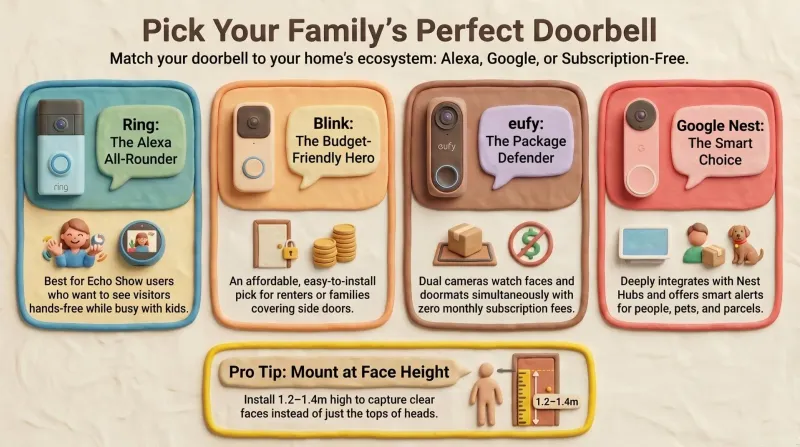
Best Smart Video Doorbells for Families – Prime Day 2026 Guide
Our dad-focused Prime Day 2026 guide to the best smart video doorbells for families – Ring, Blink, eufy, and Google Nest, all available on Amazon.com.

Prime Day 2026: 5 Best Robot Vacuums for Family Households
Our dad-focused Prime Day guide to the top 5 robot vacuums in 2026 that keep family homes clean – from self-emptying Roombas to powerful all-in-one stations from Shark, Dreame, and eufy.
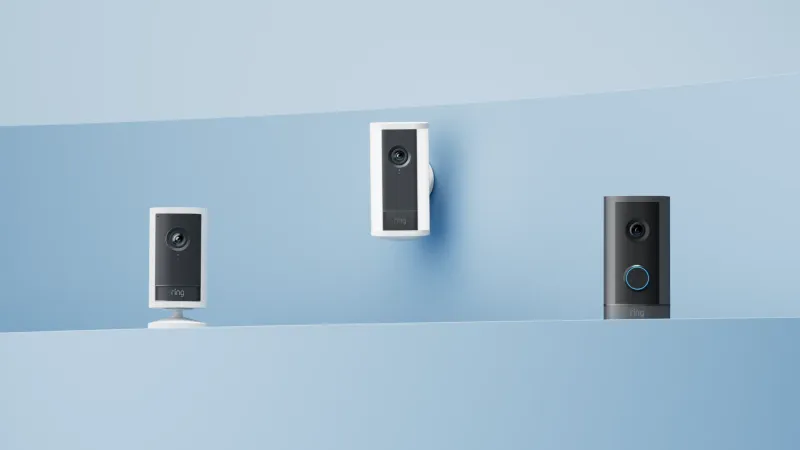
Ring Alarm Review: 4 Years, 9 Cameras and 3 False Alarms
After four years, Ring is the rare smart-home system we have stopped thinking about. The motion detectors caused our only false alarms and came out; contact sensors and cameras have been flawless since. The subscription is the honest cost of entry, and it is worth it.