
The Toniebox 2 Hardware Check: USB-C Savior or Overpriced Upgrade?
The Toniebox 2 finally adds USB-C charging and longer battery life. We review if the €119 upgrade is worth it for parents.
This post contains affiliate links. We may earn a commission if you make a purchase, at no extra cost to you. As an Amazon Associate, Dadnology earns from qualifying purchases.
Introduction: The dad-tech evolution
Listen, fellow Dads, we’ve all been there. It’s 2:00 AM, the toddler is screaming for their favorite “Lions and Tigers” story, and you’re frantically digging through a junk drawer that looks like a copper-wire explosion, trying to find that one specific, proprietary charging dock. It is the tactical bane of our existence. Since its debut, the original Toniebox has dominated the kids’ audio market, but let’s be honest: in an era where everything from our laptops to our beard trimmers runs on a universal standard, the Gen 1 box was starting to feel like a relic from the age of DVD players.
Enter the Toniebox 2, dropping September 15, 2025. This isn’t just a mid-cycle refresh; it’s a strategic attempt by Tonies to modernize the “screen-free” experience for a new generation of families. But at a €119.99 (UVP) price point for the starter set, we have to ask the hard question: Is this a mandatory “day one” buy for your household, or can the original Gen 1 box still hold the line? The answer starts with a change we’ve been demanding since the first diaper change.
The charging revolution: Death to the dock
For the traveling family, charging logistics are a major friction point. Packing a proprietary charging station just to keep a single toy alive is a rookie move, but we didn’t have a choice—until now. The Toniebox 2 finally adopts USB-C, and for our “travel-sanity,” this is a massive win. It means one less cable to lose and the ability to juice up using the same brick you use for your phone.
However, there’s some technical nuance here for the spec-heads. While the device is compatible with your 18W fast-charging bricks, the internal circuitry limits the draw to 7.5 Watts. This means you won’t get “Hyper-Charge” speeds; a full “zero-to-hero” charging session still takes 3 hours. The real MVP feature, though, is the new “Quick Charge” capability: 10 minutes of charging gives you 45 minutes of playtime. That’s exactly enough juice to survive the final leg of a road trip or a particularly difficult bedtime routine without a proprietary dock holding you hostage.
Battery deep dive: LiFePO4 vs. The old guard
When it comes to kids’ gear, battery chemistry isn’t just a spec—it’s about safety and surviving the “sibling hand-me-down” gauntlet. The original Toniebox relied on NiMH (Nickel-Metal Hydride) batteries, which were prone to “memory effects” and eventual capacity fade.
The Toniebox 2 moves to LiFePO4 (Lithium Iron Phosphate) technology. Here is why that matters for your “Dad-logistics”:
- Safety First: LiFePO4 is significantly more thermally stable than standard Lithium-ion, virtually eliminating “thermal runaway” risks. That’s peace of mind when the device is tucked into a child’s bed.
- Longevity: LiFePO4 has a vastly superior cycle life. While your old NiMH box might start flagging after a year, this chemistry is built to last through three kids, not just one.
- Runtime: Efficiency gains have bumped the active play session from 7 hours to a robust 10 hours.
Critical Input: The Repairability Trade-off The “Tech-Dad” catch? The original Gen 1 was a DIY dream. As noted by repair experts at akku.net, swapping out the three standard-looking NiMH cells was a simple weekend project. The Gen 2’s LiFePO4 setup is a more integrated, “non-user-serviceable” unit. You’re trading “easy fixability” for “modern endurance.”
Interactivity & gimmicks: From audio box to Screenless console?
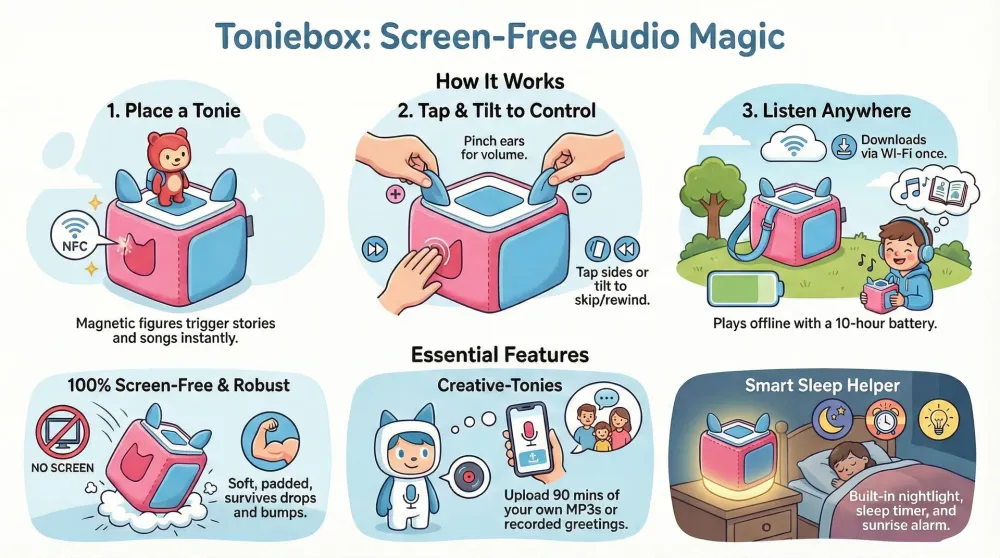
Tonies is leaning into the “screen-free” trend by turning the box into a “console without a screen.” The old status LED is gone, replaced by the Magic LED Ring that interacts with stories by changing colors and patterns.
No-Nonsense Safety Note: The source warns that the LED ring produces light flashes that can trigger epilepsy in sensitive individuals. Also, remember that like the figures, the box contains magnets—keep them away from pacemakers or your high-end tech.
The real shift is Tonieplay, which introduces movement-based controls (shaking, tilting, and tapping) for interactive games and quizzes. This transforms the device from a passive storyteller into an active gaming hub for kids up to age 9. Tonies is even launching a dedicated “Controller” accessory for these challenges. Perhaps the biggest “Senior Editor” win? Bluetooth Headphone support is finally here. No more tangled wires in the back seat; your kids can “rock out” wirelessly while you enjoy the silence.
The sleep suite: Mastering the bedtime routine
Parental sanity often hinges on a solid bedtime routine, and the Toniebox 2 is a strategic play for your nightstand real estate. It effectively replaces three separate devices: a nightlight, an “ok-to-wake” clock, and an audio player.
Through the Tonie app, you can manage the Sunrise Alarm (waking them with gentle light and melodies) and the Nightlight. The most important feature for light sleepers is the Sleep Timer: the audio and light gently fade away, ensuring your “little explorer” stays in dreamland once they finally drift off. It’s an all-in-one bedside companion that clears the outlet clutter.
The Tonies ecosystem: What you’re actually buying into
The Toniebox doesn’t exist in isolation — it’s a platform. Before you buy the Gen 2 box, understanding the ecosystem matters as much as the hardware.
The Tonie figures are the core content delivery mechanism: small, painted figurines that click onto the box magnetically and trigger playback of their associated story or music. For kids who’ve grown past the “put anything in your mouth” stage, they’re genuinely magical — there’s no screen, no menu, no “which button is play?” confusion. The figure is the interface. A 3-year-old who can barely dress themselves can operate a Toniebox independently. That’s the design win that nothing in the Amazon Echo Kids space has matched.
Content breadth has expanded substantially since Gen 1. Classic stories (Pippi Longstocking, Winnie the Pooh, countless Ravensburger titles) sit alongside dedicated music albums, language learning content, and the Creative Tonie for uploading your own recordings. The Creative Tonie — essentially a blank, user-programmable figure — is the most “tech-dad” element of the system: load it with custom audiobooks, recordings of grandparents telling stories, or that specific bedtime song your kid needs and can’t find in the catalogue. It’s €19 well spent.
Catalogue trap awareness: as with any closed platform, you’re buying into an MSRP-controlled ecosystem. Individual Tonies run €15-20 each, which adds up fast if you let kids choose freely. Set a clear cadence (birthdays, Christmas, one per quarter) and they become genuinely special. Let the catalogue spiral and you’ve bought a very charming debt machine.
The good news: the content format hasn’t changed between Gen 1 and Gen 2. Every Tonie you bought for the original box works on the new one without re-purchasing. Backwards compatibility is the right call and earns Tonies real goodwill here.
Tech-specs showdown: V1 vs. V2
| Feature | Toniebox (Gen 1) | Toniebox 2 |
|---|---|---|
| Charging Port | Proprietary Dock | USB-C |
| Runtime | ~7 Hours | ~10 Hours |
| Full Charge Time | ~3 Hours | ~3 Hours |
| Battery Type | NiMH (Memory Effect risk) | LiFePO4 (High Cycle Life) |
| WiFi Support | 2.4GHz Only | 2.4GHz & 5GHz |
| Bluetooth Support | No | Yes (Headphones) |
| Max Input | Proprietary | 7.5W (Throttled from 18W) |
| Bedtime Tech | Simple Audio | Sunrise Alarm / Nightlight |
The dad-verdict: To upgrade or not to upgrade?
The Toniebox 2 is a polished, necessary evolution. While €119.99 is a premium for a “starter set,” the quality-of-life improvements—specifically that 5GHz WiFi support—are more than just marketing fluff.
Buy the Toniebox 2 if…
- You use a modern mesh WiFi system: Gen 1 notoriously struggles with Eero or Google Nest routers that default to 5GHz. This box solves that headache.
- You travel frequently: USB-C means one less proprietary cable to lose in a hotel room.
- You have multiple kids: The LiFePO4 battery’s cycle life ensures this will actually survive the “hand-me-down” process.
- You want wireless silence: Bluetooth headphone support is a game-changer for long flights.
Stick with Gen 1 if…
- You’re a DIY repair nut: If you want to swap your own batteries in five years, Gen 1 is the way to go.
- The kids are toddlers: They won’t care about “Tonieplay” quizzes while they’re busy testing the box’s “durability” with their teeth.
- You’ve already invested in the ecosystem: If you have charging docks in every room, the USB-C move is less urgent.
Pros
- USB-C charging with a fast 10-minute quick-charge top-up
- More stable 5GHz WiFi for reliable streaming and updates
- Same kid-proof, screen-free durability families love
- Fully backward-compatible with the existing Tonies collection
- Genuinely useful 'utility player' upgrade over Gen 1
Cons
- Sealed, non-user-replaceable battery (Gen 1 was DIY-friendly)
- An incremental upgrade, not a must-have for existing owners
- The Tonies ecosystem remains pricey to expand
- New 'Tonieplay' features feel gimmicky and gated
The Dad-Fazit: I’m keeping the Toniebox 2. Between the 10-minute quick charge and the 5GHz WiFi stability, it’s an insurance policy against the “Lions and Tigers” meltdown. It’s less “gimmick” and more “utility player”—and in this house, utility is king.
Related Dadnology guide: our Best First Cameras & Creative Tech for Kids guide rounds up more screen-free picks in the same spirit.
Frequently asked questions
Can I use my old Tonies with the Toniebox 2?
Does the Toniebox 2 still need the charging dock?
Is the battery user-replaceable like in the first generation?
Can I connect Bluetooth headphones?
What age range is the Toniebox best for?
Do Creative Tonies from Gen 1 work with the Toniebox 2?
Keep this in your inbox
One email a week: what we actually watched, built and reviewed — the stuff worth a dad's time. No hype, no daily spam.
Dadnology Weekly
One email a week: the LEGO, gaming and movie news worth a dad's time — plus what we actually reviewed. No hype, no daily spam.
Disclaimer: This review and its visuals were created with the help of AI. Some links may be affiliate links – we may earn a commission if you make a purchase, at no extra cost to you.
Current deals in Tech & gadgets
Verified live discounts tracked on Amazon

Tech & gadgets · Tested by Dadnology
Apple AirPods Pro (3rd generation)
5/5“The best noise-cancelling earbuds for Apple families”Read our review
Tech & gadgets · Tested by Dadnology
Samsung T7 Shield 2TB
5/5“Small, fast, and genuinely hard to break”Read our review
You might also like

Octonauts review: The marine biology class kids actually beg for
Captain Barnacles and crew have turned our 4-year-old into a walking marine biology encyclopedia. Genuine 5/5 — the Creature Report alone justifies the Netflix subscription.
Samsung T7 Shield review: The drive that fixed Apple's storage pricing
The external SSD we recommend in almost every Mac guide we write, and the one actually plugged into our own desk. Fast, pocket-sized, IP65-rated and a fraction of what Apple charges for internal storage.

MacBook Neo review: A windows family switches to Mac
Bought as a second school machine by a Windows family, the MacBook Neo made a switch we expected to be painful almost boring. The Photos app alone justifies it if you carry an iPhone. 5/5 after a few weeks - with the honest note that a few weeks is what this is.