
Ring Alarm review: 4 years, 9 cameras and 3 false alarms
Four years, nine cameras and one alarm system later: what Ring actually gets right, the false alarms that made us rip out the motion sensors, and whether the subscription is worth it.
This post contains affiliate links. We may earn a commission if you make a purchase, at no extra cost to you. As an Amazon Associate, Dadnology earns from qualifying purchases.
🏠 Four years, not four weeks
🔐 This review is part of our Ring Brand Hub — our Ring alarm, camera and contact-sensor reviews from four years of actually living with the system.
Most security-system reviews are written after a fortnight, which is exactly long enough to be impressed by the unboxing and not long enough to learn anything useful. This one is different: we have run Ring in our family home since November 2021, and the system has grown from a starter kit into nine cameras, contact sensors on every entry point we care about, and a subscription we still pay for even after wiring the whole thing into Home Assistant.
Four years is long enough for the interesting stuff. Long enough for batteries to age, for false alarms to happen, for a company to change its privacy policy twice, and for the novelty to wear off completely — which is the only honest way to judge whether a security system is actually good. The short version: it is, with one component we ripped out and one question every American buyer should think about before committing.
🚪 What we actually have, and why
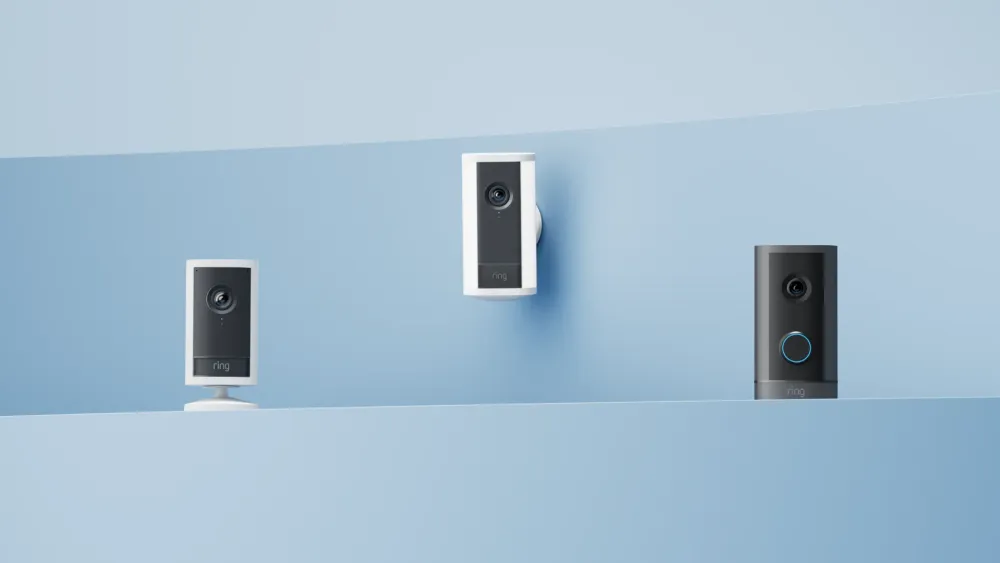
We started small: the Ring Alarm 8-Piece Kit, one outdoor camera at the front door, and one indoor camera at the terrace door — that last one bought as much to keep an eye on the pets as on the house.
The system grew the way these things do, one weekend at a time. The contact sensors went on the three basement windows, both terrace doors and the front door. These are the least interesting part of the setup and the part that has worked best: four years, zero failures, zero false triggers. A Ring contact sensor is a small plastic rectangle with a magnet, and it is the reason the system knows the difference between a door opening and a shadow moving.
Outside we now run four cameras: the front door, the terrace, the carport and one watching the caravan. Inside there are five — three in the basement rooms and two on the ground floor. We have a mix of old and current models, which is worth saying plainly: the current Ring Outdoor Cam and Indoor Cam Plus are better, but the four-year-old units are still doing their job. Nothing has died.
We do not own a Ring video doorbell. We kept the original mechanical bell and put an outdoor camera at the door instead. When someone rings, we look at the camera. That is a slightly unusual choice, and it has cost us less than nothing.
⚠️ The motion detectors came out — and that fixed everything
Here is the part a two-week review will never tell you.
The original kit included motion detectors, and we put them in the basement rooms. Over roughly four years they caused three false alarms. Not many in absolute terms — but a false alarm is not a minor annoyance. It is a siren in your house, a notification storm, and a family that trusts the system slightly less afterwards.
We never worked out what set them off. No pets down there, no obvious draught, nothing visible on the timeline. That was the frustrating part: without a cause you cannot fix it, you can only guess.
So we took a different route. We removed the motion detectors entirely and put an indoor camera in each basement room instead, each pointed at the basement window from the inside. The logic is simple: if an alarm goes off, we do not need a sensor telling us something moved — we want to open the app and see whether anything is actually there.
Since removing them we have not had a single false alarm. Not one. That is the single most useful thing in this review: on our setup, contact sensors plus cameras have been flawless, and motion detectors were the only unreliable component in the entire system.
🔋 Battery life, honestly
Battery cameras live or die on this question, and the honest answer is that it depends entirely on how much your camera sees.
Our front-door camera is the busiest in the system, and it lasts several weeks between charges. The quiet positions — the carport, the caravan — go considerably longer. Nobody can give you a single number here, because a camera facing a busy pavement will drain in a fraction of the time of one facing a shed.
What actually solves the problem is not a bigger battery but a second one. The Quick Release battery pack turns a twenty-minute chore where the camera is offline into a thirty-second swap on the ladder. It is the accessory we should have bought on day one, and the thing we would tell anyone building a multi-camera setup to budget for immediately.
On Wi-Fi: we run cameras well away from the house — the carport and the caravan are both a distance out — and we manage without a Chime Pro or any extender. Range has been genuinely good. Your own walls will decide this, not Ring, but the assumption that a big outdoor setup automatically needs extra hardware did not hold for us.
📱 Living with it: The part that made it stick
The reason we still pay for Ring after four years is not the alarm. It is that the everyday experience is frictionless.
Motion triggers a notification on the phone. You tap it, you see the camera, you get on with your day. It has never needed troubleshooting, never required a firmware fight on a Sunday evening, and — the real test in a family — everyone in the house can use it, not just the person who installed it.
The modes are where the system quietly gets it right. You can configure exactly what is armed when, and our indoor cameras only record when the system is armed. That is not a privacy fig leaf, it is the setting that makes indoor cameras acceptable to live with at all: when the family is home, they are off.
The keypad is genuinely practical, and the siren is loud enough that there is no ambiguity about whether it has gone off.
And then there is the use case nobody buys a security system for, which turns out to be the one you use most. In four years we have never had a real security incident. What we have had, constantly, is the small reassurance of being able to check. Away on holiday and the doorbell rings? You can see the delivery driver leaving a parcel. That has been worth more in daily life than the alarm function it was bought for.
It also plays well with the rest of the Amazon ecosystem: an Echo Show will pull up the front-door camera on request, which is as close as we get to a video doorbell without owning one. Our Echo Show 5, 8 and 11 review covers which size actually suits which room.
🔐 The privacy question — Read this before you buy
Ring is owned by Amazon, and in the United States its relationship with law enforcement has changed more than once. If you are buying a system that watches your front door, you should understand the current position rather than discover it later.
The short history: in January 2024 Ring removed the Request for Assistance tool that had let police ask users for footage through the Neighbors app. In October 2025 Ring announced new law-enforcement partnerships, and a feature called Community Requests launched with Axon. A second planned partnership, with the licence-plate-recognition firm Flock Safety, was cancelled in February 2026 after public backlash.
How Community Requests works in practice: police define a geographic area and a timeframe, and residents inside it get a notification and an email. Sharing is voluntary. You review your own clips, choose which — if any — to send, and if you decline, the police are not told who declined. Separately, and independently of any of this, law enforcement can always pursue footage through a formal legal process.
Our honest position: for us the trade is acceptable, and the voluntary structure matters. But two things are worth saying plainly. First, “voluntary” describes today’s feature, and this policy has now changed direction twice in two years — buy on the assumption it may change again. Second, if that is a dealbreaker, there is a real alternative: we have the entire Ring system integrated into Home Assistant, which keeps footage local and under your control.
That we still use the Ring app anyway is the honest footnote. Home Assistant is the better answer on principle; the Ring app is more practical and more intuitive for the camera side specifically, and after a long day convenience usually wins. If privacy is your primary concern rather than a consideration, build it local from the start — our Raspberry Pi Home Assistant guide is where to begin.
💰 The subscription: The cost nobody mentions up front
The hardware works without a plan, but video history — the thing that makes cameras useful rather than decorative — sits behind the subscription. Treat it as part of the purchase price, not an optional extra.
We are on the mid-tier plan, currently sold as Ring Multi at $9.99 a month or $99.99 a year, which covers every device at a single address. With nine cameras that is the only tier that makes sense; the single-device Ring Solo plan ($4.99/month, $49.99/year) is for someone with one doorbell. Above that sits Ring Pro ($19.99/month, $199.99/year) which adds professional 24/7 monitoring.
Be aware that Ring has renamed these tiers more than once recently — what we signed up to as “Ring Home Standard” is the plan now called Ring Multi. Check the current names and prices before you buy; the structure has been more stable than the branding.
At a hundred dollars a year, covering nine cameras, we consider it fair. At one camera it would be harder to justify.
✅ The verdict
Pros
- Four years with zero hardware failures, including the original 2021 units
- Contact sensors have never produced a single false trigger
- Genuinely easy for the whole family, not just the person who installed it
- Mode configuration is excellent — indoor cameras only run when armed
- Excellent Wi-Fi range; no Chime Pro or extender needed even for outbuildings
- Integrates cleanly into Home Assistant if you want local control
Cons
- The motion detectors were the one unreliable component — three unexplained false alarms
- Video history requires a subscription, so factor it into the purchase price
- Battery cameras on busy positions need charging every few weeks without a spare pack
- Amazon's law-enforcement policy has changed twice in two years
Four years in, Ring has earned the highest compliment a security system can get: we have stopped thinking about it. It works, the family uses it without help, and the everyday reassurance of being able to check on the house from anywhere has proven more valuable than the alarm we actually bought it for. It loses a point for the motion detectors, which caused every false alarm we ever had and are now sitting in a drawer, and for a privacy stance that has moved twice in two years. Buy the contact sensors and cameras, skip the motion detectors, budget for the subscription and a spare battery, and you get a system that quietly does its job for years.
Is Ring Alarm worth it?
How long do Ring camera batteries last?
Do Ring cameras cause false alarms?
Do you need a Ring subscription?
Can police access my Ring footage?
Do you need a Ring Chime Pro or a Wi-Fi extender?
More smart home on Dadnology: Best kid-friendly security cameras · Best kid-friendly video doorbells · Echo Show 5, 8 & 11 review · Home Assistant on a Raspberry Pi
Keep this in your inbox
One email a week: what we actually watched, built and reviewed — the stuff worth a dad's time. No hype, no daily spam.
Dadnology Weekly
One email a week: the LEGO, gaming and movie news worth a dad's time — plus what we actually reviewed. No hype, no daily spam.
Disclaimer: This review and its visuals were created with the help of AI. Some links may be affiliate links – we may earn a commission if you make a purchase, at no extra cost to you.
Current deals in Tech & gadgets
Verified live discounts tracked on Amazon

Tech & gadgets · Tested by Dadnology
Apple AirPods Pro (3rd generation)
5/5“The best noise-cancelling earbuds for Apple families”Read our review
Tech & gadgets · Tested by Dadnology
Samsung T7 Shield 2TB
5/5“Small, fast, and genuinely hard to break”Read our review
You might also like

Ring 4K cameras: Five new models with privacy shutter and outdoor power
Ring's 4K range now reaches indoors and onto battery power, and the cheapest new model has the best privacy design: one slide on the Pan-Tilt Indoor Cam 2K kills camera and microphone. The subscription is still the real price.
Google Home Speaker review: The one that fixes family Spotify
The new Google Home Speaker is the only one of the three big platforms that handles a family of separate Spotify accounts properly, and Gemini is a genuine step up from the old Assistant. 4.5/5 - the best features sit behind a subscription, which stings less if you already pay for AI Pro.

The ultimate Marvel Movie Night: Smart Home Cinema Setup guide
A one-tap Cinema Mode for movie night: color-matched smart lights, a Home Assistant automation, and the TV settings that actually matter.