
Top 5 Smart Speakers and Displays for Families (2026) – Dadnology Prime Day Guide
Looking for the perfect smart speaker or display for your family this Prime Day? Discover 2026’s top five picks – including Amazon Echo Show 8, Echo Dot Kids, Google Nest Hub Max, Apple HomePod mini, and Sonos Era 100 – with family-friendly features and Prime Day deals.
This post contains affiliate links. We may earn a commission if you make a purchase, at no extra cost to you. As an Amazon Associate, Dadnology earns from qualifying purchases.
Editor’s note: This guide is written from a U.S. family perspective. We focus on smart speakers and displays that are widely available on Amazon.com and highlight features that matter most to parents (privacy controls, kid-friendly content, smart home integration). We haven’t personally tested every single device here; many picks are based on our own long-term experience with Alexa and Echo Show plus detailed research and user reviews. Prices and deals can change quickly, especially around Prime Day.
🤔 Why Smart Speakers & Displays Matter for Families
Modern family life is busy, and that’s exactly where smart speakers and displays can help. Think of them as friendly digital assistants that everyone in the house can use. From toddlers to grandparents, there’s something for each family member:
- Hands-free help: Ask for cooking timers, weather updates, or homework answers while you’re juggling kids and dinner. Voice commands make life simpler when your hands are full.
- Family communication: Many devices double as intercoms. You can drop in to the kids’ room to say it’s bedtime or broadcast “Dinner’s ready!” to all speakers at once (no more shouting down the hallway).
- Entertainment for all ages: Stream music during family game night, play audiobooks or lullabies at bedtime, and let the kids ask funny questions or hear jokes. Some models even tell interactive bedtime stories.
- Photo slideshows & video calls: Smart displays can show a continuous slideshow of family photos, turning them into digital picture frames when idle. With built-in cameras, you can video call grandparents or traveling parents easily.
- Smart home control: With compatible smart bulbs, thermostats, and cameras, you can control the house by voice or at a glance. “Alexa, turn off the lights” or “Hey Google, show me the front door camera” quickly becomes second nature.
Because it’s Prime Day 2026, many of these family-friendly devices are at their best prices of the year on Amazon.com – making it a perfect time to add a smart speaker or display to your home.
In this guide, we’ll walk through five standout options available on Amazon.com:
- A do-it-all Alexa display for families – the midsize Echo Show 8 (3rd Gen).
- A kid-focused smart speaker – Echo Dot Kids (5th Gen).
- A big-screen Google Assistant hub – Google Nest Hub Max.
- A cozy smart speaker for Apple households – Apple HomePod mini.
- A premium sound option with family-friendly smarts – Sonos Era 100.
⏱️ TL;DR – Dadnology’s Top 5 Smart Speakers & Displays
If you just want the quick picks, here’s a summary and who they’re best for:
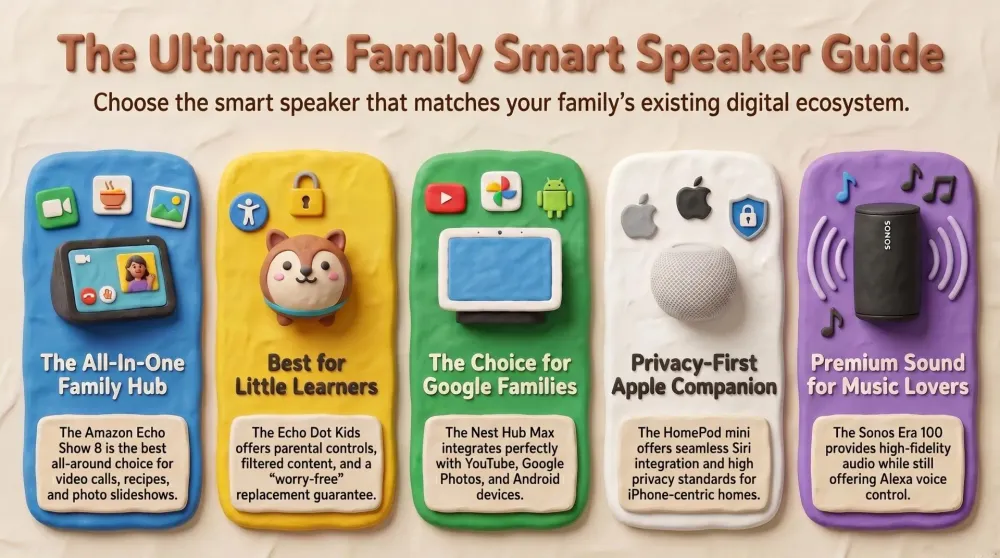
- Best all-around family smart display (Alexa): Amazon Echo Show 8 (3rd Gen, 2023) – 8″ Alexa smart display with camera shutter and rich sound. Great as a digital photo frame, video call hub, and kitchen companion.
- Best smart speaker for young kids: Echo Dot Kids (5th Gen) – Cute dragon/owl-themed mini Alexa speaker with kid-safe content filters and Amazon Kids+.
- Best large-screen hub for Google fans: Google Nest Hub Max – 10″ Google Assistant display with excellent YouTube and Google Photos integration plus built-in Nest Cam features.
- Best for Apple-centric families: Apple HomePod mini – Compact Siri-powered speaker with impressive 360° sound and seamless Apple integration.
- Best premium audio smart speaker: Sonos Era 100 – High-fidelity wireless speaker with Alexa built in and AirPlay 2 support.
1️⃣ Amazon Echo Show 8 (3rd Gen, 2023) – The Family-Favorite Alexa Display
If you want a centerpiece for your family’s smart home, the Echo Show 8 is our go-to pick. It’s the Goldilocks of smart displays: not too small, not too big, and packed with features families love.
We’ve had an Echo Show in our own home for years (check out our full review), and it’s still the Alexa device that gets used the most – for timers, recipes, music, photo slideshows, and calls with relatives. The 3rd-Gen Echo Show 8 brings that experience up a notch with better sound, a brighter screen, and a built-in smart home hub.
Why it’s great for the whole family
- Vibrant 8″ HD touchscreen: Easy to see from across the room for recipes, calendars, cartoons, or baby monitor feeds.
- Perfect digital photo frame: Connect Amazon Photos or Facebook and let family pictures rotate all day in adaptive color mode. It genuinely makes the kitchen or living room feel more personal.
- Centered camera with auto-framing + privacy shutter: The 13 MP camera automatically pans and zooms to keep you in frame on video calls. A physical shutter and mic/camera off button give you full control over privacy.
- Room-filling sound: Upgraded speakers and spatial audio make it loud and clear enough for everyday music, audiobooks, or a quick episode while you cook.
- Alexa as a family organizer: Visual timers, shopping lists everyone can see, shared calendars, reminders, and announcements to other Echo devices help keep the whole household on track.
- Built-in smart home hub (Matter/Thread): Control compatible smart bulbs, plugs, thermostats, and cameras directly from the Show 8 without needing extra hubs.
Pros for families
- 8″ screen is big enough to be useful but still fits on a counter or shelf.
- Hardware camera shutter and mic mute are reassuring from a privacy standpoint.
- Great “all-in-one” device: music, photos, Alexa queries, intercom to kids’ rooms, and more.
- Works beautifully with other Echo/Echo Dot speakers for whole-home announcements and music.
Things to keep in mind
- Works best if you’re comfortable in the Amazon ecosystem (Prime Video, Amazon Music, Photos).
- No native Google services like proper YouTube app (you can still use the browser as a workaround).
- It’s a plug-in device, not portable.
We genuinely see the Echo Show 8 as a kind of digital family hub. If you’re leaning toward Alexa anyway, this is the one we’d start with.
AdAmazon Echo Show 8 (3rd Gen, 2023) (opens in a new tab)
A vibrant 8″ smart display with Alexa, camera shutter, great sound, and fantastic photo frame mode. Perfect as a kitchen or living room hub for timers, recipes, music, and video calls with grandparents.

2️⃣ Echo Dot Kids (5th Gen) – Alexa with Training Wheels for Kids
For the little ones in your household (and their parents’ peace of mind), Echo Dot Kids (5th Gen) is a fantastic entry into the smart speaker world.
It’s essentially a kid-tuned Echo Dot wrapped in a fun Dragon or Owl design. Under the cute fabric is a full Alexa speaker, but with filters, parental controls, and a bundle of kids’ content.
Why kids (and parents) love it
- Adorable designs: It looks like a toy creature, not a piece of serious tech, which makes kids excited to talk to it.
- Kid-safe Alexa mode: Alexa’s responses and content are automatically tuned for children. Explicit music is filtered out; jokes and stories are age-appropriate.
- Amazon Kids+ included for a year: Unlocks a big library of kid-friendly audiobooks, music, games, and skills. Great for storytime, learning, and rainy-day fun.
- Parental dashboard controls: Set daily time limits, bedtime hours when Alexa won’t respond, review questions your child asked, and manage which skills are allowed.
- Encourages independence: Kids can set their own reading timers, ask for lullabies, or turn off lights (with smart bulbs) using voice, which feels empowering and helpful.
Pros for families
- Cute, durable design suited to kids’ rooms.
- A low-cost smart speaker (especially on Prime Day) that can grow with your child.
- Strong parental controls and 2-year worry-free guarantee (Amazon will replace it if it breaks).
- Same improved 5th-Gen audio as the regular Echo Dot – plenty for stories and music.
Things to keep in mind
- Alexa-only; there’s no Google or Siri here.
- After one year, Kids+ becomes a paid subscription (optional; the device still works without it).
- No built-in clock display.
If your children are curious about Alexa, the Echo Dot Kids gives them a safe, fun way to explore – without handing over your main family speaker.
AdEcho Dot Kids (5th Gen) (opens in a new tab)
A cute dragon or owl smart speaker built just for kids, with Alexa parental controls, filtered music, and a 1-year Amazon Kids+ subscription included. Great for bedtime stories, music, and learning.
3️⃣ Google Nest Hub Max – Big-Screen Google Assistant for Busy Households
If your family lives on the Google side – Android phones, Google Photos, YouTube everywhere – the Google Nest Hub Max is your natural smart display choice.
It features a 10″ HD screen, stereo speakers, a built-in camera, and full Google Assistant support. It feels like a communal Google tablet that lives in your kitchen or living room.
Why it shines for Google-centric families
- Large display for videos and photos: The 10″ screen is great for YouTube, recipe videos, and showing off your Google Photos library. As a photo frame, it automatically surfaces your best shots.
- Google Assistant brain: For random “why” questions, homework help, and Google searches, Assistant is very strong. It also pulls in your Google Calendar, reminders, and commute info.
- Face Match personalization: With Face Match enabled, the Hub Max recognizes who is standing in front of it and shows that person’s schedule, messages, and suggestions. One shared device, personalized for each family member.
- Built-in Nest Cam features: The camera can double as an indoor security cam. You can view the live feed in the Google Home app and get motion alerts when you’re away.
- Solid stereo sound: Stereo speakers and a woofer give it better audio than many smart displays – enough for background music or a quick kids’ show.
Pros for families
- Deep integration with Google services (Calendar, Photos, YouTube, Google Meet).
- Great visual interface for controlling Nest thermostats, cameras, and smart home devices.
- Broadcast feature to send announcements to all Google speakers in the house.
- Gesture control (like raising your hand to pause) is handy when your hands are messy.
Things to keep in mind
- No physical shutter; camera and mics can be disabled via switch and software, but not covered.
- Limited Apple integration; no AirPlay, no FaceTime.
- On Amazon, it’s often sold via third-party sellers – double-check seller ratings and warranty.
Choose Nest Hub Max if you want a big Google Assistant screen that feels like a central command center for your Google-heavy household. If it is music rather than a screen you are after, the newer Google Home Speaker is the one worth reading about — it is the only speaker of the three platforms where every family member gets their own Spotify account, recognised by voice.
AdGoogle Nest Hub Max (opens in a new tab)
A big, bright 10″ display with Google Assistant, YouTube, Google Photos, and built-in Nest Cam features. Ideal as a shared family dashboard for Google-centric homes.
4️⃣ Apple HomePod mini – Cozy Smart Speaker for the Apple Family
For families surrounded by iPhones, iPads, and Macs, Apple HomePod mini is the natural Siri-powered smart speaker.
It’s a compact mesh-wrapped orb with surprisingly big 360° sound for its size. Place one in the kitchen or kids’ bedroom and it becomes a seamless extension of your Apple life.
Why Apple-centric families love it
- Deep Apple integration: Ask Siri on HomePod mini to send a text, add a reminder, play an Apple Music playlist, or check your calendar. It all syncs with the iPhones and iPads you already use.
- Privacy by design: Siri only starts listening after “Hey Siri,” requests aren’t tied to your Apple ID, and you can control/disable voice recording in settings. For privacy-conscious parents, that’s reassuring.
- Shockingly good sound for the size: It easily fills a kitchen or bedroom with warm, balanced audio. Two can be stereo-paired, and multiple HomePods can do multi-room audio via AirPlay 2.
- HomeKit / Matter hub: HomePod mini works as a home hub and Thread border router, letting you control compatible smart devices with Siri (“Hey Siri, turn off the living room lights”).
- Intercom for the whole family: Use Intercom to send voice messages to other HomePods or even to family members’ iPhones and Apple Watches (“Intercom: time to leave for school!”).
Pros for families
- Small, stylish design that blends into any room.
- Great if your kids already have iPads or you use Apple Music heavily.
- Voice recognition supports multiple family members with personalized responses.
- AirPlay 2 means you can stream from almost any app on your iPhone.
Things to keep in mind
- Best for all-Apple households; Android users will feel left out.
- No screen; it’s audio-only. If you want visual info or video, you’ll use another device.
- Siri is excellent for Apple-centric tasks but less flexible than Alexa/Google for some third-party skills and smart home brands.
- Discounts are usually smaller than Echo deals on Prime Day.
If your home is already glued together by Apple devices, HomePod mini is a cozy, privacy-friendly way to put Siri in the middle of your family life.
AdApple HomePod mini (opens in a new tab)
A compact 360° smart speaker that plugs straight into your Apple world – Apple Music, Messages, Reminders, HomeKit, and Intercom – with Apple’s strong privacy stance.
5️⃣ Sonos Era 100 – Premium Sound Meets Family-Friendly Smarts
Rounding out our list is the Sonos Era 100 – a premium smart speaker that puts sound quality first but still plays nicely with your smart home.
Think of it as the next-gen Sonos One: upgraded with dual tweeters for stereo, a beefier woofer for real bass, Bluetooth, line-in support, and built-in Alexa plus AirPlay 2.
Why music-loving families will love it
- Best-in-class sound in this list: From Disney soundtracks to movie scores, the Era 100 delivers rich, detailed, room-filling audio that cheaper smart speakers just can’t match.
- Alexa built in: You can still say “Alexa, set a 5-minute pasta timer” or “Alexa, turn off the lights” – Sonos uses the same Alexa smart home and voice features you know from Echo.
- AirPlay 2 for Apple users: Anyone with an iPhone or iPad can stream directly to the Era 100. Siri can effectively control it via AirPlay (“Hey Siri, play music in the living room”).
- Multi-room and expandability: Sonos is legendary for whole-home audio. Add more Sonos speakers over time and group them easily for synchronized music during parties or holidays.
- Multiple ways to connect: Wi-Fi, Bluetooth, and optional line-in (for a turntable or older devices) make it flexible for guests and grandparents who just want “to connect their phone.”
Pros for families
- Fantastic sound for everyday listening and family dance parties.
- Works with Alexa and most major music services via the Sonos app.
- Hardware mic mute switch and privacy-respecting design.
- Built to last; Sonos devices typically have a long support lifespan.
Things to keep in mind
- It’s the most expensive device in this guide; you’re paying for sound quality.
- No Google Assistant support on this generation.
- No screen or clock – it’s purely an audio device.
- Sonos ecosystem means one more app for non-techy family members to learn, although basic use is straightforward.
Pick the Sonos Era 100 if you want a hi-fi smart speaker that doubles as the backbone of a long-term, whole-home audio setup – without giving up voice control or family convenience.
AdSonos Era 100 (opens in a new tab)
A next-generation Sonos speaker with true stereo sound, deep bass, Alexa voice control, and AirPlay 2. Perfect for music-loving families and living rooms where sound really matters.
👪 Which Smart Speaker or Display Is Best for Your Family?
Still not sure which one to pick? Here’s the quick cheat-sheet:
- If your household already uses Alexa: Stick with Amazon Echo devices. Use Echo Show 8 as the main family hub and add Echo Dot Kids in kids’ rooms. Everything ties together with Alexa announcements, routines, and Amazon Kids.
- If you’re all-in on Google services and Android: Choose Google Nest Hub Max. It feels like an extension of your phones, with Google Assistant, YouTube, and Google Photos all built in.
- If your family is an Apple-only household: Go with Apple HomePod mini. It syncs beautifully with iPhones, iPads, Apple Music, and HomeKit, and Apple’s privacy model is a big bonus.
- If you care most about sound quality: Pick Sonos Era 100. It’s the speaker you’ll still be happy with years from now, and it can grow into a full Sonos setup over time.
- If you just want something fun and safe for younger kids: Start with Echo Dot Kids (5th Gen). It’s affordable, kid-tuned, and easy to add to a wider Alexa setup later.
Whatever you choose, Prime Day 2026 is a great moment to pull the trigger – Amazon usually runs aggressive deals on Echo devices, and other brands often follow with their own discounts.
Related Dadnology guides: Best Amazon Devices for a Family Home (2026 Buyer’s Guide) · Best WiFi Routers & Mesh Systems for a Busy Home (2026) · Prime Day 2026
📚 FAQ – Smart Speakers & Displays for Families
Alexa vs. Google Assistant vs. Siri – which is better for a family?
Are these smart speakers always listening to us?
Will the camera on a smart display spy on my family?
How do kid-friendly features actually work on these devices?
Can these play music and stories from our favorite services?
Do these smart speakers and displays go on sale for Prime Day 2026?
Keep this in your inbox
One email a week: what we actually watched, built and reviewed — the stuff worth a dad's time. No hype, no daily spam.
Dadnology Weekly
One email a week: the LEGO, gaming and movie news worth a dad's time — plus what we actually reviewed. No hype, no daily spam.
Disclaimer: This review and its visuals were created with the help of AI. Some links may be affiliate links – we may earn a commission if you make a purchase, at no extra cost to you.
You might also like
Best Smart Video Doorbells for Families – Prime Day 2026 Guide
Our dad-focused Prime Day 2026 guide to the best smart video doorbells for families – Ring, Blink, eufy, and Google Nest, all available on Amazon.com.
Prime Day 2026: 5 Best Robot Vacuums for Family Households
Our dad-focused Prime Day guide to the top 5 robot vacuums in 2026 that keep family homes clean – from self-emptying Roombas to powerful all-in-one stations from Shark, Dreame, and eufy.
Never Get Locked Out Again: 5 Best Smart Locks for Families (Prime Day 2026)
A dad-focused guide to the best smart locks for U.S. family homes in 2026 – including August, Schlage, Yale, Eufy, and Level – with picks for renters, Apple families, fingerprint fans, and more.