
Best Tablets for Family Life: iPad vs Galaxy Tab (2026 Buyer's Guide)
Our dad-tested guide to the best family tablets in 2026: iPad vs Galaxy Tab, kids' tablets vs grown-up tablets, parental controls and durability. Top pick: iPad Air M4.
This post contains affiliate links. We may earn a commission if you make a purchase, at no extra cost to you. As an Amazon Associate, Dadnology earns from qualifying purchases.
📱 This guide is part of our Amazon Prime Day 2026 Deals Hub — our curated buying guides of the gear actually worth a dad’s money.
The Family Tablet Leads a Double Life
A family tablet is never just one device. It is two, sharing a single slab of glass. In the morning it is the parent’s machine — answering email on the train, checking the calendar, editing a few photos, maybe doing real work in a pinch. By the afternoon it has become the kids’ machine — a YouTube portal, a homework tool, a drawing pad, and the single most effective tantrum-suppression device ever invented for a restaurant queue. Buy the wrong one and you end up with a tablet that does neither job well: too locked-down and slow for you, or too open and fragile for them.
This guide is for one specific dad: the one who does not want to buy two tablets. You want a single device powerful enough that you actually reach for it after the kids are in bed, but safe and simple enough to hand to a four-year-old without lying awake worrying about what they bought, watched or deleted. You have a budget, a sticky-fingered toddler, and zero patience for a device that needs a PhD to lock down. If that is you, the choice comes down to two things most buyers get backwards: parental controls and how long the thing will actually stay supported.
Here is our honest disclosure on how these picks were chosen. We weighted three factors heavily: the quality of the parental controls (because that is the feature you will use every single day), the length of software support (a tablet your kid inherits in three years should still get updates), and genuine dual-use value — does a grown-up actually want to use it too? We are a tech-dad blog with opinions, not a spec-sheet aggregator, so where a “kids tablet” is really disguised e-waste, we say so. The hard truth up front: for most families, Apple wins this one, and it is not especially close — but Android has two genuinely good answers, and we will tell you exactly when to pick them.
The real decision in 2026 is not iPad versus Galaxy Tab in the abstract — it is which device plays which role in your house. So we have ranked the do-everything picks first, then the budget kids’ options, then the one accessory that genuinely changes how a tablet gets used. Let’s dig in.
1. Apple iPad Air (M4, 11-inch) — The Do-Everything Family Tablet
If you are buying one tablet for the whole family, this is the machine to beat. The iPad Air sits in the sweet spot: it has the same desktop-class M-series chip family found in Apple’s laptops, but it costs and weighs far less than a Pro, and it runs the most kid-friendly, parent-friendly software on the planet.
AdApple iPad Air (M4, 11-inch) (opens in a new tab)
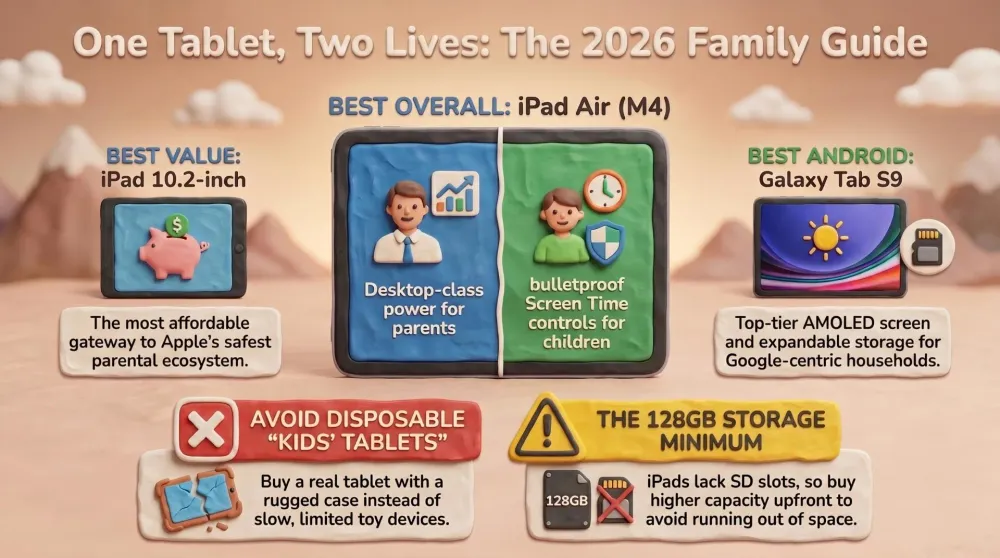
Best Overall: the do-everything family tablet — powerful enough for the parent, simple enough for the kids, with Apple's class-leading controls and support.

What it does well
The headline is that it is genuinely both devices at once. With an M4 chip, this is not a toy — it edits photos, runs proper apps, handles split-screen multitasking, and stays fast for years rather than feeling sluggish after eighteen months the way cheap tablets do. After bedtime it is a real tool. During the day, you hand it to your kid, and Apple’s Screen Time and Family Sharing take over: per-app time limits, content age ratings, downtime schedules, purchase approval that pings your phone before anything gets bought, and web filtering that actually works. Setting it up takes about ten minutes from your own iPhone, which is roughly nine minutes less than fighting Android’s equivalent.
Then there is the longevity argument, which dads underrate. Apple supports iPads with software updates for the better part of a decade. The tablet you buy this year for yourself becomes a hand-me-down to your kid in three or four years and still gets security updates and new features. That is not true of most Android tablets, and it is the single biggest reason an iPad is cheaper than it looks once you spread the cost across two owners and many years. The 11-inch screen is the right size for a family — big enough for two kids to watch a film, light enough for small hands to hold.
It also pairs with the second-generation Apple Pencil (see pick number five), which converts it from a consumption device into a homework, note-taking and drawing tool. For an older child doing schoolwork, that is a meaningful upgrade — and paired with an AI study method like our family’s NotebookLM approach, photographing class handouts and having your kid revise from them in chat, the iPad Air becomes a genuine studying tool, not just a bigger phone.
Where it falls short
Honesty time. The iPad Air has no expandable storage — there is no microSD slot, so whatever capacity you buy is what you live with forever. That makes the storage decision more important than on any Android tablet (buy 128GB minimum; see Common Mistakes). It is also the most expensive pick here by a clear margin, and accessories pile on top: the Pencil and a decent case are sold separately and are not cheap. And while iPadOS is wonderfully simple, it is also a walled garden — if you are an Android-and-Google household, dropping an iPad into the mix means living across two ecosystems.
Who should buy it
The dad who wants exactly one tablet for the whole family and is willing to pay once for a device that lasts for years and serves two owners. If your top priorities are bulletproof parental controls, long-term support, and a tablet you genuinely enjoy using yourself, the iPad Air is built precisely for your house.
2. Apple iPad (10.2-inch, 2021) — The Best Value Gateway for Kids
Not every family needs an M4. If your honest answer to “who is this tablet really for?” is “mostly the kids,” the standard 10.2-inch iPad gives you the thing that actually matters — Apple’s parental controls and ecosystem — for a fraction of the Air’s price.
AdApple iPad (10.2-inch, 2021) (opens in a new tab)
Best Value for Kids: the cheapest gateway into iPadOS, with the same excellent Screen Time parental controls as the pricier models.
What it does well
This is the cheapest legitimate way into iPadOS, and that is the whole pitch. It runs the exact same Screen Time, Family Sharing and content controls as the flagship — there is no “lite” version of the parental tools. So your kid gets the same polished, hard-to-bypass guardrails, the same app age ratings, the same purchase-approval pings to your phone, all on a tablet that costs dramatically less. The 10.2-inch screen is perfectly sized for cartoons and reading apps, the battery comfortably survives a long car journey, and the App Store’s curated children’s section is the best-stocked and safest of any platform. For a first tablet that a child will not destroy your finances if they drop, it is the rational buy.
Where it falls short
It is an older, slower chip than the Air, and you feel it — heavier games and demanding apps will stutter, and it will reach the end of its supported life sooner than a current model. Crucially for accessory shoppers: it uses the first-generation Apple Pencil, not the magnetic second-gen one in this guide, so do not buy them together expecting them to pair (more on this below). Storage is non-expandable like all iPads, and the base model is genuinely tight — size up if you can.
Who should buy it
The dad who wants the safety and simplicity of iPadOS specifically for the kids, without paying flagship money. It is the best “first real tablet” for a child — far more durable as a long-term choice than a locked-down toy tablet, and it inherits the entire Apple parental-control system unchanged.
3. Samsung Galaxy Tab S9 (11-inch) — The Best Android Has to Offer
Android is not the wrong answer — it is the right answer for a specific household. The Galaxy Tab S9 is the tablet that proves it: a premium, beautifully built device that beats the iPad on a couple of things dads actually care about.
AdSamsung Galaxy Tab S9 (11-inch) (opens in a new tab)
Best Android Premium: a gorgeous AMOLED screen, an S Pen included in the box, expandable microSD storage and proper Google integration.
What it does well
Three things stand out. First, the screen: a gorgeous AMOLED display with deep blacks and punchy colour that makes the iPad’s LCD look a little flat side by side — for watching films, it is the best panel in this guide. Second, the S Pen is included in the box at no extra cost, where Apple charges separately for the Pencil; for a kid who likes to draw or an older one taking notes, that is real money saved. Third, expandable microSD storage — you can drop in a cheap card and add hundreds of gigabytes of offline shows and games, which neatly sidesteps the storage anxiety that plagues every iPad buyer. It also slots seamlessly into a Google household: Gmail, Photos, Family Link and Android phones all talk to each other naturally.
Google’s Family Link parental controls have matured a lot — app approvals, screen-time limits and location are all there. It is genuinely good now, even if it is not quite as frictionless as Apple’s setup.
Where it falls short
Two honest knocks. Android tablet software support is shorter than Apple’s — Samsung has improved, but you should not expect the decade-long update runway that makes an iPad a multi-owner hand-me-down. And while the Android tablet app ecosystem has improved, it still has more stretched-phone-app jankiness and fewer truly tablet-optimised kids’ apps than the App Store. Family Link works well but takes a little more fiddling to lock down tightly than Apple’s Screen Time.
Who should buy it
The dad who is already living in Android and Google, wants the best screen for movie nights, values the included S Pen and the microSD slot, and does not want to be forced into Apple’s ecosystem to get a premium family tablet. For the right household, it is every bit as good a buy as the iPad Air.
4. Samsung Galaxy Tab A8 (10.5-inch) — The Knockabout Kids’ Tablet
Sometimes you do not want to hand a four-year-old a device worth several hundred euros. The Galaxy Tab A8 is the answer: a cheap, decent, big-screen Android tablet you can wrap in a rugged case and genuinely stop worrying about.
AdSamsung Galaxy Tab A8 (10.5-inch) (opens in a new tab)
Best Budget Android: the cheap, knockabout kids' tablet — slap a rugged case on it and let them at it without fear for your wallet.
What it does well
It is inexpensive, the screen is a perfectly good size for cartoons and learning apps, and it runs full Android with Google Family Link parental controls — so you still get app approvals, time limits and content filtering, not the gimped experience of a toy tablet. Crucially, it takes a microSD card, so you can load it with offline videos and games for road trips without paying for a high-capacity model. Drop a chunky kid-proof case on it and you have a device that survives the back seat, the sandbox and the inevitable tumble off the sofa, all without flinching at the repair bill.
Where it falls short
It is a budget tablet and it behaves like one: the chip is slow, it can stutter on heavier games, the screen is ordinary, and software support is short. This is a device for consumption — YouTube Kids, streaming, simple games, light learning apps — not for anything demanding. It is also not a device a parent will want to borrow; this one is firmly the kids’.
Who should buy it
The dad who wants a dedicated, low-stakes tablet purely for the children, where the entire point is that it does not matter much if it gets dropped, drooled on or lost under a car seat. As a deliberate “kids’ device” it is far smarter than a true toy tablet — it runs real apps and real parental controls — while costing little enough that you can relax.
5. Apple Pencil (2nd Generation) — The Accessory That Changes the Tablet
This is not a tablet, it is the accessory that turns one into a different kind of tool. With a Pencil, the iPad Air stops being a screen you watch and becomes something you make things on — notes, homework, drawings, signed PDFs.
AdApple Pencil (2nd Generation) (opens in a new tab)
Best Accessory: turns the iPad Air into a homework, note-taking and drawing tool — but it only pairs with M-series iPads, not the budget 10.2-inch.
What it does well
It is genuinely excellent: low latency, pressure sensitivity, and it snaps magnetically to the side of a compatible iPad to charge and pair, so it never goes flat in a drawer. For an older child doing schoolwork, it transforms the iPad into a handwriting and note-taking machine; for a younger one, drawing apps become properly expressive. For the parent, it makes marking up documents and quick sketches effortless. If your family iPad is going to do any homework or creative work at all, the Pencil is the upgrade that unlocks it.
Where it falls short
Here is the honest, important warning: the second-generation Apple Pencil only pairs with M-series iPads like the iPad Air (M4). It does not work with the budget 10.2-inch iPad in this guide, which uses the older first-generation Pencil with a completely different charging method. The two Pencils look nearly identical and have nearly identical names, so this is one of the most common — and most annoying — accidental mismatches in tablet buying. Confirm your exact iPad model before you order. It is also a premium-priced accessory for what is, ultimately, a stylus.
Who should buy it
The dad whose family iPad is an iPad Air (or another M-series model) and who wants it to pull double duty as a homework, note-taking or drawing tool. If your tablet is the 10.2-inch iPad, do not buy this one — buy the first-generation Pencil instead.
How They Compare: The Spec Showdown
This is where the family decision actually gets made. Note the parental controls and software support rows — for a household tablet, those two lines matter more than any chip benchmark.
| Feature | iPad Air M4 | iPad 10.2in | Galaxy Tab S9 | Galaxy Tab A8 |
|---|---|---|---|---|
| OS | iPadOS | iPadOS | Android | Android |
| Screen | 11in LCD | 10.2in LCD | 11in AMOLED | 10.5in LCD |
| Storage | 128GB+, no SD | 64GB+, no SD | 128GB+, microSD | 32GB+, microSD |
| Pencil / Stylus | Apple Pencil 2 | Pencil 1 only | S Pen included | S Pen (sold separately) |
| Parental controls | Screen Time (best) | Screen Time (best) | Family Link (good) | Family Link (good) |
| Best For | Whole family | Kids on a budget | Android households | Knockabout kids' use |
| Verdict | Top pick | Best value | Best Android | Best budget |
The table tells a clear story. If parental controls and years of support are your deciding factors, the two iPads win — the same brilliant Screen Time system, the longest update runway. If a stunning screen, a free stylus and expandable storage matter more, and you live in Google’s world, the Galaxy Tab S9 is the equal. And if the tablet is purely for the kids and price is everything, the Galaxy Tab A8 does the job without the heartbreak of a dropped flagship.
How to Choose: A Decision Framework
If you have read this far, here is how to actually decide without overthinking it.
If you want one tablet for the whole family — buy the iPad Air (M4). It is the only device here that genuinely serves both a parent and a child well, with the best controls and the longest life. The cost-per-year, across two owners, is lower than it looks.
If the tablet is mostly for the kids and you want Apple’s safety — buy the 10.2-inch iPad. You get the identical Screen Time parental controls for far less money, on a device that will outlast any toy tablet.
If you live in Android and Google — buy the Galaxy Tab S9. Don’t switch ecosystems just to get a good family tablet. You get a better screen, a free S Pen and a microSD slot, with parental controls that are now genuinely good.
If you just want a cheap, drop-proof kids’ device — buy the Galaxy Tab A8. Real Android, real Family Link, expandable storage, and a price low enough that the inevitable tumble does not ruin your week.
If you are truly torn between the iPad Air and the Galaxy Tab S9: ask one question — which phone is in your pocket? Apple controls and Apple devices talk to each other effortlessly; the same is true of Android and Google. Match the tablet to the phone the parent already uses, and setup, parental controls and photo-sharing all just work.
AdApple iPad Air (M4, 11-inch) (opens in a new tab)
Best Overall: the do-everything family tablet — powerful enough for the parent, simple enough for the kids, with Apple's class-leading controls and support.
The meta-advice, in proper tech-dad spirit: do not buy the tablet for the chip on the box. The spec that actually changes your daily family life is how easily and reliably you can control what your kid does on it — and that is parental software, not gigahertz. Apple is ahead on that single axis, which is why it wins for most families even when the raw hardware is a wash.
Common Mistakes to Avoid
- Buying a “kids tablet” that turns into e-waste. Many cheap, locked-down toy tablets are slow, run a near-useless walled app store, and feel obsolete within a year. A real tablet — even a budget iPad or Galaxy Tab A8 — with a rugged case and proper parental controls lasts years longer for not much more money.
- Buying the smallest storage tier. Kids’ games, photos and downloaded shows for the car fill space faster than you think, and an iPad has no microSD slot to bail you out. Buy at least 128GB on an iPad. On a Galaxy Tab, a cheap microSD card solves it.
- Getting the Apple Pencil compatibility wrong. The second-generation Pencil pairs only with M-series iPads like the Air. It does not work with the 10.2-inch iPad, which needs the first-generation Pencil. The names are almost identical — check your exact model before ordering, or you will own a stylus that refuses to pair.
- Switching ecosystems for one device. If every phone in the house is Android, an iPad fights you at every setup screen and the reverse is just as true. Match the tablet to the family’s phones and your life is simpler.
Pros
- Genuinely serves both a parent and a child — fast enough for real work, simple enough for a toddler
- Best-in-class parental controls (Screen Time and Family Sharing) set up in minutes from your phone
- Years of software updates, so it survives as a multi-owner hand-me-down
- Pairs with the 2nd-gen Apple Pencil for homework, notes and drawing
- Right-sized 11-inch screen for family use
Cons
- No expandable storage — choose your capacity carefully because you live with it forever
- Most expensive pick here, and the Pencil plus a case are extra
- A walled garden that fights you if your household is otherwise Android and Google
Conclusion: The Bottom Line
After comparing five options, the honest take is simple: for a family that wants one tablet to serve both the parent and the kids, the controls and the longevity matter far more than the chip — and on both of those, Apple is ahead.
That is why the iPad Air M4 is our undisputed winner: powerful enough that a grown-up actually wants it, simple and safe enough to hand to a four-year-old, with the best parental controls and the longest support of anything here. The 10.2-inch iPad is the smart-money kids’ choice if you want the same controls for less; the Galaxy Tab S9 is the equal pick for Android households and the best screen of the bunch; the Galaxy Tab A8 is the knockabout kids’ device; and the Apple Pencil (2nd Gen) is the accessory that turns the Air into a homework tool — just confirm it fits your model first.
The Final Word: most families should buy the iPad Air M4 and never think about it again. Period.
Related Dadnology guides: Best Family Board & Card Games for Game Night · Best Wooden & Learning Toys for Kids (Screen-Free Play) · Best Outdoor & Camping Gear for Families (2026 Buyer’s Guide)
What is the best tablet for families in 2026?
Is an iPad or a Galaxy Tab better for kids?
Should I buy a dedicated kids tablet instead?
How much storage does a family tablet need?
Does the Apple Pencil work with every iPad?
Should I wait for a new model or buy now?
Keep this in your inbox
One email a week: what we actually watched, built and reviewed — the stuff worth a dad's time. No hype, no daily spam.
Dadnology Weekly
One email a week: the LEGO, gaming and movie news worth a dad's time — plus what we actually reviewed. No hype, no daily spam.
Disclaimer: This review and its visuals were created with the help of AI. Some links may be affiliate links – we may earn a commission if you make a purchase, at no extra cost to you.
You might also like
Best Smartwatches & Fitness Watches for Dads (2026 Buyer's Guide)
Our dad-tested guide to the best smartwatches and fitness watches in 2026: from the Apple Watch for iPhone dads to rugged Garmins. Top pick: Apple Watch Series 9.
Best Wireless Earbuds for Dads (2026 Buyer's Guide)
Our dad-tested guide to the best wireless earbuds in 2026: from the AirPods Pro 2 for iPhone dads to budget buds you won't cry over losing. Top pick: AirPods Pro 2.
The iPhone Duo Just Made Every Other Foldable Phone Boring
The iPhone Duo is the first Apple product in years that made us sit forward instead of scroll past. It is also a first-generation $1,999 phone, which is its own kind of caution. Here is what is genuinely good, what to wait on, and everything else Apple announced alongside it.