
PlayStation Portal + Switch 2: The Ultimate Dad Travel Gaming Combo
Why we never travel with just one — the PlayStation Portal for good hotel Wi-Fi and PS Plus Premium, the Switch 2 as the backup that always works and does 4-player Mario Kart on a rainy day.

This post contains affiliate links. We may earn a commission if you make a purchase, at no extra cost to you. As an Amazon Associate, Dadnology earns from qualifying purchases.
1. The Travel Reality: Packing a PS5 Is a Hassle Nobody Enjoys
🍄 This guide is part of our Nintendo Brand Hub — our Switch 2, Zelda and Mario coverage, from a family that plays co-op.
Here’s the actual math of bringing a console on vacation: a PS5, its power brick, an HDMI cable, a controller or two, and — because hotel TVs are never actually good — sometimes a small monitor too. That’s a duffel bag’s worth of gear for maybe four real hours of play across a five-day trip, most of which happens after the kids are finally asleep and everyone else has claimed the one TV in the room.
August is peak travel season, and the gaming half of the internet spends most of it arguing about the same problem: how do you keep a real single-player backlog alive when you’re living out of a suitcase, a rental car, or an RV for two weeks? The honest answer for most of us used to be “you don’t” — vacation meant a backlog pause, and pause too many times and you never go back.
The PlayStation Portal changes that math more than its price tag suggests it should. It’s an 8-inch screen with a real DualSense built in — actual haptics, actual adaptive triggers — that streams your PS5 library instead of running it locally. No console to pack, no HDMI hunting, no fighting your partner for the hotel TV once the kids are down.
AdPlayStation Portal Remote Player (opens in a new tab)
Half of the combo: PS5-quality Remote Play and Cloud Streaming on an 8-inch display, for the 30 minutes after the kids are asleep and the hotel Wi-Fi is behaving.

This isn’t a device review — we’ve already written the full one, covering setup and home performance here. This is the guide for actually using it away from home — and, just as important, for why it never travels alone.
2. The Combo: Why We Pack Both, Not One or the Other
Here’s the thing every “Portal is the ultimate travel console” take skips: the Portal is only as good as the Wi-Fi it’s sitting on. Ask us on a good night in a hotel with our own travel router and it’s magic. Ask us on a rainy afternoon in an RV park with three bars of a weak cell signal and it’s a black rectangle.
The Switch 2 is the one that has to make the bag. It doesn’t care about hotel Wi-Fi, campground signal, or whether you sprang for PS Plus Premium — it just works, on a plane, in a car, in a tent. That reliability is exactly why it’s the device you actually hand a kid for two hours in the back seat, not the Portal. And it does something the Portal structurally cannot: real local multiplayer. A rained-out afternoon with four family members and one Switch 2 running Mario Kart World is a better vacation memory than anyone streaming a single-player PS5 game solo in the corner.
AdThe One That Always Comes (opens in a new tab)
Works with zero internet, hands off to a kid without a second thought, and does 4-player Mario Kart World when the whole family is stuck inside.

The Portal earns its spot on top of that, not instead of it. When the conditions line up — decent Wi-Fi, ideally PS Plus Premium so Cloud Streaming works without depending on the PS5 back home — it’s the only way to keep a real PS5 story going after everyone else is asleep. The two devices aren’t competing for the same bag slot; they’re covering two completely different situations on the same trip.
3. Remote Play vs. Cloud Streaming — Know Which One You’re Actually Using
This distinction matters more on the road than it ever does at home, because it decides whether your vacation depends on one internet connection or two.
Remote Play streams from your actual PS5, sitting at home. Your console needs to be on (or in rest mode with Remote Play enabled) and your home internet needs to be holding up its end — which means anyone else at home streaming a movie or downloading an update is competing with you from a thousand miles away. This is the default mode and it’s what most Portal owners use without thinking about it.
Cloud Streaming, which Sony has continued rolling out and stabilizing since launch (see our coverage of the update), connects straight to PlayStation’s own servers instead. Your home PS5 can be completely off. This is the mode that actually matters for travel, because it removes your home network as a point of failure entirely — you’re only fighting the Wi-Fi in front of you, not two networks at once. It requires a PS Plus Premium subscription and, honestly, a better connection than Remote Play needs, since you’re now streaming from a data center instead of a box in your living room.
Our rule of thumb for trips: if you’re bringing the Portal specifically because the PS5 is staying home, decide before you leave whether you’re paying for Cloud Streaming or leaving the console on and hoping the home Wi-Fi behaves for two weeks. Don’t find out which one you’re using at 9pm in a hotel room with a five-year-old asleep six feet away — and remember the Switch 2 in your bag doesn’t care either way.
4. Network Hacks on the Go: Making Hotel and Campground Wi-Fi Behave
This is the section that actually determines whether the Portal earns its spot in your bag at all — the Switch 2 needs none of it.
The single biggest fix: stop using shared guest Wi-Fi. Hotel and campground Wi-Fi is built for email and Netflix, shared across every room on the floor, and it degrades hard exactly when you need it — evening, when every other guest is also streaming. A compact travel router or mobile hotspot gives you a private 5GHz network off your own cell signal or a wired connection, and it is, without exaggeration, the difference between smooth Remote Play and a slideshow of compression artifacts.
A few settings worth checking before you go, not after you arrive:
- Prefer 5GHz over 2.4GHz whenever it’s an option. It’s shorter range but far less congested in a building full of other devices — exactly the tradeoff you want in a single hotel room.
- If you’re relying on Remote Play back to a home PS5, put that PS5 on Ethernet, not home Wi-Fi. It’s a five-minute job before a trip and it removes the weakest link in the whole chain — you can’t fix your home network’s congestion from a rental car, but you can remove your console from competing with it.
- RVs and campgrounds are the hardest case. Park Wi-Fi is usually worse than a budget hotel’s, and cell signal is your realistic fallback — check your carrier’s coverage map for your route before you assume Cloud Streaming will be an option.
- Test it the first night, not the third. Find out at 8pm on day one whether your setup works, while you still have time to problem-solve, instead of discovering it the night you actually needed it.
Roam 6 AX1500 Portable Wi-Fi 6 Travel Router (opens in a new tab)
Your own private 5GHz network in a hotel room or campground, instead of fighting shared guest Wi-Fi for Remote Play bandwidth.
The honest limitation: none of this makes the Portal work with zero signal. A stretch of highway with no cell coverage and no Wi-Fi means a dead Portal, full stop — it has no local storage and cannot run a single game on its own. This is the entire reason the Switch 2 travels in the same bag, every trip, no exceptions: it’s the backup that never needs a network hack in the first place.
5. What to Actually Pack
Keep the accessory list short and deliberate — one bag pocket for the Portal side of the combo, and the Switch 2 in its own case:
- A dedicated travel case for the Portal. Its grips make it an awkward shape for a normal bag pocket, and its 8-inch LCD is exactly the kind of screen that doesn’t survive getting tossed in with shoes.
- A short USB-C cable and a wall plug you actually trust for both devices. Hotel nightstand outlets are a lottery; bring your own, and note the Portal and Switch 2 both charge over USB-C, so one good cable and a multi-port block covers everything.
- The travel router from the section above. This does more for the Portal side of the trip than any other single item on this list — the Switch 2 doesn’t need it.
- Headphones. Obvious, but worth saying: the Portal has no built-in speaker output, so this isn’t optional if you’re playing after the kids are asleep in a shared room.
- A second set of Joy-Con or an extra controller for the Switch 2, if you’re actually planning that 4-player Mario Kart World session — you’ll want more than two players ready to go.
6. The Dad-Time Roster: 5 PS5 Games Built for a 30-Minute Window
Not every PS5 game survives being picked up for half an hour and put back down. These five do — either because they’re structured in bite-sized chunks, or because their pacing is forgiving enough that a short session still feels complete. Every title below already has a full Dadnology review if you want the deep dive.
- Astro Bot — the cleanest fit on this list. Levels are short, self-contained, and built around DualSense haptics the Portal reproduces perfectly. Beat one level, feel good about it, go to bed. Full review here.
- Marvel’s Spider-Man 2 — the open world is dense enough that 10 minutes of web-swinging and a side crime is a genuinely complete unit of fun, no main-story commitment required. Full review here.
- Ghost of Tsushima Director’s Cut — slower and more deliberate, and that’s exactly the point on vacation: a single standoff duel or a side tale is a complete, satisfying scene on its own. Full review here.
- Horizon Forbidden West Complete Edition — a genuinely enormous open world that tolerates being abandoned for three days mid-trip and picked back up without losing the thread. Full review here.
- God of War Ragnarök — the riskiest pick for a spotty connection, since it’s the most story-dense of the five, but also the one most worth clearing an evening for when the Wi-Fi cooperates. Full review here.
Astro Bot (PS5) (opens in a new tab)
Level-based platforming that's built for exactly this — pick a level, finish it, put the Portal down.
If none of these fit your taste, the filtering question that matters is the same one we used to build this list: does the game have a natural stopping point every 10-20 minutes, or does it punish you for putting the controller down mid-scene? Vacation gaming lives or dies on that one property.
7. RV, Hotel, or Road Trip: Three Different Problems
Hotel rooms are the easiest case for the Portal — reliable power, a nightstand, and (with your own travel router) a decent private network. The main obstacle is social: someone else in the room usually wants the lights off before you’re done with a level. The Switch 2 has no such limits — daytime lobby wait, pool deck, back seat on the drive there.
RVs add a genuine technical problem for the Portal: cell signal that changes minute to minute as you drive, and a shore-power hookup that isn’t always available for charging overnight. Charge the Portal whenever you’re plugged in, and don’t count on Cloud Streaming while the RV is actually moving — save that for when you’re parked at a site with usable signal. The Switch 2, meanwhile, doesn’t notice any of this; it’s the device that actually gets used while the RV is in motion.
Straight road trips (staying in a different hotel each night) are the worst case for Remote Play specifically, because you’re testing a new network every single evening. This is where a dedicated hotspot earns its keep the most for the Portal side of the combo. It’s also exactly when the Switch 2 proves its value most: zero setup, zero network testing, works identically in every hotel room and every rest stop.
8. After-Bedtime Etiquette (and Battery Reality)
The Portal’s screen brightness is genuinely too bright for a dark shared room at full setting — turn it down before your first session, not mid-game when your eyes have adjusted. Headphones are non-negotiable once anyone else in the room is trying to sleep.
On battery: plan around one solid evening session per charge rather than counting on multi-day standby, and top it up whenever you’re near an outlet during the day rather than waiting for it to run empty. A real power bank earns its weight here — a flight delay plus a road-trip afternoon plus an evening session adds up fast, and a depleted Portal at 9pm with your one PS5 window of the day is the worst way to end a good vacation day. The Switch 2’s battery life is far more forgiving for daytime use, but it’s still worth putting on the same power bank rotation rather than assuming it’ll make it through a full travel day untouched.
9. Only Buying One? Here’s How to Decide
If budget or bag space really only allows one device, the decision framework is simple: buy the Switch 2 first. It’s the one that works regardless of Wi-Fi, the one you can actually hand to a kid, and the one that turns a family of four into four active players instead of one person streaming a single-player game. The Portal is the upgrade you add once the Switch 2 is already covering the baseline — the “nice to have” that extends a dad’s own backlog into the trip, not the device the whole family depends on.
If you’re weighing this against other options entirely — a Steam Deck, a ROG Xbox Ally X — our full comparison of handhelds and Remote Play devices for dads covers all four side by side. This guide is deliberately narrower: it’s not “which one device should I buy,” it’s “how do these two specific devices work together on an actual trip,” because for most dads reading this, the honest answer was never either/or in the first place.
Conclusion: The Combo Actually Delivers PS5 Gaming AND a Family Backup
Neither device replaces the other, and that’s the whole point. The Portal turns “I have 30 minutes and a hotel room with decent Wi-Fi” into real PS5 gaming instead of another lap of your phone. The Switch 2 is the one that works when the Wi-Fi doesn’t, hands off to a kid without hesitation, and turns a rained-out afternoon into 4-player Mario Kart World instead of four bored people staring at their phones.
The Final Word: if your PS5 stays home on vacation, pack the Portal for the good nights and the Switch 2 for everything else — that combination, not either device alone, is what actually gets a family of gamers through two weeks away.
Buy Now(Ad)
Should I bring the PlayStation Portal or the Switch 2 on vacation?
Does the PlayStation Portal work without a PS5 at home?
How much Wi-Fi speed do I need for Remote Play on vacation?
Can I play PS5 games on the Portal without an internet connection at all?
Why is the Switch 2 the better vacation console for kids?
Do I need PS Plus Premium to use the Portal on a trip?
Keep this in your inbox
One email a week: what we actually watched, built and reviewed — the stuff worth a dad's time. No hype, no daily spam.
Dadnology Weekly
One email a week: the LEGO, gaming and movie news worth a dad's time — plus what we actually reviewed. No hype, no daily spam.
Disclaimer: This review and its visuals were created with the help of AI. Some links may be affiliate links – we may earn a commission if you make a purchase, at no extra cost to you.
You might also like
GTA 6 or Ocarina of Time: Two Weeks Apart, One Budget
The Ocarina of Time remake lands November 5, GTA 6 on November 19. Two weeks, two very different players in the same house, one budget.
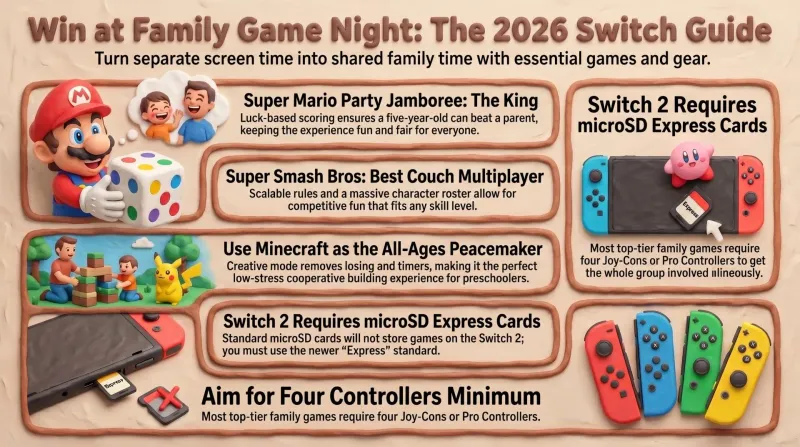
Best Nintendo Switch Games & Gear for Family Game Night (2026 Buyer's Guide)
Our dad-tested guide to the best Nintendo Switch games and gear for family game night: couch party games, co-op, and the one storage card every Switch 2 needs.
Gears of War Goes Back to Day One, Plus October Games Worth It
October 2026 in games: Rayman Legends Retold, Gears of War: E-Day, Call of Duty: Modern Warfare 4, It Takes Two on Switch 2, and a stacked month of catch-up ports.