
ASUS ProArt P16 RTX Spark review: The local AI laptop that finally makes sense
We have been working on the ASUS ProArt P16 with RTX Spark and 64 GB: a 27B model with a 256K context runs locally, the OLED is superb and the touchpad replaced our mouse.
This post contains affiliate links. We may earn a commission if you make a purchase, at no extra cost to you. As an Amazon Associate, Dadnology earns from qualifying purchases.
I normally hate touchpads. Every laptop I have owned had a mouse next to it within the first hour. The ASUS ProArt P16 with NVIDIA RTX Spark is the first one where that never happened, and the touchpad is not even the main reason it gets five stars. The reason is that it runs a serious local AI model, on Windows, in a 16-inch laptop you can carry around, and it does so without feeling like a compromise.
Our machine is the configuration most reviewers have been testing and the one that makes the most sense: the 20-core N1X chip with 64 GB of unified memory. On it, Qwen 3.8 27B runs in Ollama with a context window of 256,000 tokens. That is a model big enough to do real programming work, with enough context to hold a sizeable codebase, running entirely on the laptop. If that sentence means something to you, this is a 5/5. If it does not, read the section on who should not buy it before you spend this much money.
What those numbers add up to is simple: the GPU can use most of a very large shared memory pool, so models that would never fit into the video memory of a gaming laptop run here without tricks.
Why 64 GB is the point of this laptop
The usual way to run AI models locally on Windows is a big graphics card. The problem is memory. Even the RTX 5090 laptop GPU has 24 GB of video memory, and a 27B model with a long context window does not fit into that. RTX Spark works like Apple’s M-series chips: CPU and GPU share one pool of memory, and with 64 GB the model, its context and everything else you have open all fit at once. Our guide to whether an RTX Spark laptop is worth it explains the architecture in detail.
That is also why the configuration matters more than anything else. Anything below 64 GB is too little for serious local AI work. The 128 GB version can load 70B-class models, but ASUS charges $2,500 more for it, and for most people that money is better spent elsewhere. When we looked at alternatives without RTX Spark that could hold the same models, every one of them was clearly more expensive.
I use Ollama for the models (LM Studio is installed as well) and run Qwen 3.8 27B with the full 256K context. Right now I do everything locally on it. From my desktop setup I know how powerful it is to combine a local model with a cloud model, local for anything private and repetitive, cloud for the hardest jobs, and this laptop is built for exactly that kind of hybrid work. You do not have to choose one side.
First impressions: Setup and build
Setup was uneventful, which is the best thing you can say about a Windows laptop. ASUS ships Windows 11, the external 140 W USB-C power adapter is in the box, and everything I installed worked from the start. I do not run a huge zoo of programs, so take that with a grain of salt, but in my daily work I have not hit a single compatibility problem so far. It is worth knowing that RTX Spark is an Arm chip: ASUS itself warns that some games with anti-cheat software may not run. For the creative and AI tools I use, that has not mattered.
The 16-inch size is worth its weight in gold. You get room for a code editor next to a terminal, or a photo next to its tools, without squinting. And it does not feel like a heavy desktop replacement: at 1.77 kg it is lighter than a 16-inch MacBook Pro, and it is pleasant to carry.
I also like that ASUS did not go USB-C-only. Next to the three USB4 ports there is a normal USB-A port, plus HDMI and a full SD Express card reader. For a photographer that last one matters: the card goes straight into the laptop.
The display and the touchpad
The OLED screen is the best display I have ever had on a Windows PC. Photos look fantastic, colours are rich without looking cartoonish, and the black level is perfect, which you notice the first time you open a dark image. For culling and editing photos and for checking graphics before they go out, it is a joy. Our unit has the 4K tandem panel ASUS calls Lumina Pro OLED (3,840 by 2,400 pixels, factory-calibrated to a Delta E below 1, anti-reflective coating). Some retailers also list a 64 GB version with a 3K OLED, so check the model number before you buy. The touch layer works perfectly. I do not use a pen, so I cannot say anything about that.
Then there is the touchpad. Since I switched to a Mac I occasionally use Apple’s Magic Trackpad and genuinely like it. The haptic touchpad on the ProArt P16 is comparable, maybe better. For someone who has always worked with a mouse, not having plugged one in once is a statement. It is the best touchpad I have used on any laptop.
Real-world performance: Local AI, photos, graphics
My main uses are local AI for programming, culling and editing photos, and checking graphics. Gaming plays no role for me.
In all three, the RTX Spark chip is a rocket. Whether it is a revolution I cannot say yet, but everything I have thrown at it has worked, and I have not found a weakness. The model answers quickly enough that working with it feels like a conversation, not like waiting for a batch job. Photo work is smooth even with large files.
Independent tests back up the impression. TechRadar measured Photoshop performance in PugetBench only a little behind Apple’s M5 chip and video work ahead of it, and in its own tests also ran Qwen3.8 27B, the model we use. In c’t 3003’s tests, a compressed 27B Qwen model ran at about 14.5 tokens per second on RTX Spark, as we cover in our RTX Spark guide.
The one thing you will notice: when the model is computing, the fans come on audibly and the laptop gets warm. Only under that load, though, and it stays within reason. In normal work it is quiet, and ASUS stops the fans completely under moderate loads.
Battery life is the honest caveat. I do not run standard battery tests, other sites do that well. What I can say: local AI pulls a lot of power, so I keep it plugged in when I work, because I want full speed. On the move it lasts a good while, depending on what you do. TechRadar measured 11 hours 23 minutes of video playback and 14 hours 24 minutes in PCMark 10’s office test, which is fine for a day of normal work but well short of a MacBook Pro.
ProArt P16 vs MacBook Pro: The honest comparison
Most people looking at this laptop are really choosing between it and a MacBook Pro, because Apple’s unified memory makes Macs good local AI machines too.
| Feature | ASUS ProArt P16 (RTX Spark, 64 GB) | MacBook Pro 16-inch (M5 Pro) |
|---|---|---|
| Operating system | Windows 11 on Arm | macOS |
| Local AI | 64 GB unified memory, native CUDA | Unified memory up to the configured size, no CUDA |
| Display | 16-inch 4K tandem OLED touchscreen, 120 Hz | 16-inch mini-LED, no touch |
| Ports | 3x USB4, USB-A, HDMI 2.1, SD Express | Thunderbolt, HDMI, SDXC |
| Battery | Good for a workday, short under AI load | Class-leading |
| Best for | Local AI on Windows, CUDA tools, touch | Long days unplugged, macOS workflows |
| Verdict | Our pick if you need Windows | Our pick if you do not |
It comes down to whether you need Windows. If you rely on Windows software or on tools built for NVIDIA’s CUDA first, the ProArt P16 is the better machine and, for me, the perfect alternative to a MacBook Pro. If you live in macOS anyway and care most about battery life, buy the Mac and configure it with enough memory. Our comparison of the ProArt P16 with the Dell XPS 16 Creator and the Surface Laptop Ultra covers the Windows alternatives with the same chip.
Who should not buy it
This needs saying clearly, because the price is high. If you do nothing with local AI, this laptop is probably oversized and too expensive. For office work, browsing and even most photo editing, a cheaper laptop does the job, and a Mac mini at the desk gives you more editing power per dollar. The ProArt P16 earns its price only when the 64 GB of unified memory and the RTX GPU are actually working.
It is also not a gaming laptop, and I did not test it as one. ASUS supports games on RTX Spark, but because the chip is Arm-based, titles with anti-cheat software may not run, so check compatibility first if gaming matters to you.
Long-term outlook
I have not taken it on a trip yet; that is coming, and I will add how it holds up on the road. What I can say after daily use is that nothing has annoyed me so far. No crashes, no driver drama, no compatibility issue in my tools. The only thing I would like is a bigger battery for running models unplugged, and that is physics more than ASUS.
Pros
- 64 GB of unified memory runs a 27B model with a 256K context entirely on the laptop
- The best OLED display we have used on a Windows PC: rich colours, perfect blacks, great touch
- A haptic touchpad good enough to retire the mouse
- USB-A, HDMI and an SD Express reader next to three USB4 ports
- Light for a 16-inch laptop at 1.77 kg
Cons
- Expensive, and only worth it if you actually run AI models locally
- Fans are clearly audible and the chassis gets warm while a model computes
- Battery drains quickly under AI load; we work plugged in
- Arm-based: some games with anti-cheat software may not run
Conclusion: The Windows answer to the MacBook Pro
After daily work with the ASUS ProArt P16 with RTX Spark, the verdict is a clear buy for one kind of user: anyone who wants to run serious AI models locally and needs Windows to do it. The 64 GB configuration is the sweet spot, the display is the best we have seen on Windows, and the touchpad is good enough to change a lifelong habit.
If you never run a model locally, look elsewhere; you would pay for power you never use. If you do, there is currently no better Windows laptop for the job.
The Final Word: The first local AI laptop that makes sense, and the best Windows laptop we have used.
Is the ASUS ProArt P16 RTX Spark worth it?
Should I buy the 32 GB, 64 GB or 128 GB version?
How does the ProArt P16 compare to a MacBook Pro?
How long does the battery last?
Is the ProArt P16 loud?
Keep this in your inbox
One email a week: what we actually watched, built and reviewed — the stuff worth a dad's time. No hype, no daily spam.
Dadnology Weekly
One email a week: the LEGO, gaming and movie news worth a dad's time — plus what we actually reviewed. No hype, no daily spam.
Disclaimer: This review and its visuals were created with the help of AI. Some links may be affiliate links – we may earn a commission if you make a purchase, at no extra cost to you.
Current deals in Tech & gadgets
Verified live discounts tracked on Amazon

Tech & gadgets · Tested by Dadnology
Apple AirPods Pro (3rd generation)
5/5“The best noise-cancelling earbuds for Apple families”Read our review
Tech & gadgets · Tested by Dadnology
Ninja DualZone Air Fryer, 10 Qt (DZ901)
4.5/5“Two baskets, one of them gluten-free: why this air fryer changed our kitchen”Read our review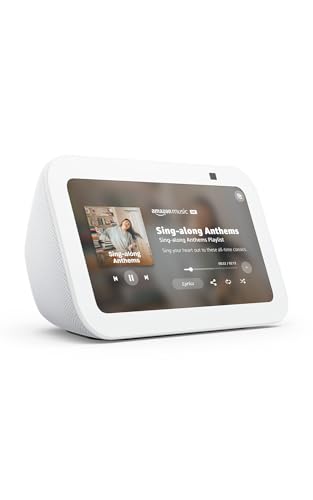
Tech & gadgets · Tested by Dadnology
Amazon Echo Show 5 – Compact Smart Display for Kitchen & Bedside
5/5“The smart displays that turn Alexa into a family photo frame”Read our reviewYou might also like
Ninja DualZone (DZ901) review: The air fryer that works for a celiac household
The Ninja DualZone DZ901 is a 4.5/5: it does what it should, and does it very well. Two baskets make a full meal at once, Smart Finish syncs them, and for a celiac household one basket can stay gluten-free. The only catch is the space a basket takes in the dishwasher.
Samsung T7 Shield review: The drive that fixed Apple's storage pricing
The external SSD we recommend in almost every Mac guide we write, and the one actually plugged into our own desk. Fast, pocket-sized, IP65-rated and a fraction of what Apple charges for internal storage.

MacBook Neo review: A windows family switches to Mac
Bought as a second school machine by a Windows family, the MacBook Neo made a switch we expected to be painful almost boring. The Photos app alone justifies it if you carry an iPhone. 5/5 after a few weeks - with the honest note that a few weeks is what this is.