
Best Mac mini for photography (M4 vs. M4 Pro) – The ultimate buyer’s guide
Stop overspending on upgrades. We explain why the base model Mac mini M4 (16GB) and M4 Pro (24GB) are the absolute price-performance kings for photographers, plus the perfect accessory setup.
This post contains affiliate links. We may earn a commission if you make a purchase, at no extra cost to you. As an Amazon Associate, Dadnology earns from qualifying purchases.
Editorial Note: We believe in “Smart Spending.” We don’t recommend the most expensive gear; we recommend the gear that gives you the best return on investment.
📸 The Mac mini M4: A paradigm shift for photographers
For years, the advice for buying a Mac for photography was simple: “Buy the most RAM you can afford, or you’ll regret it.” With the M4 generation, that advice has changed.
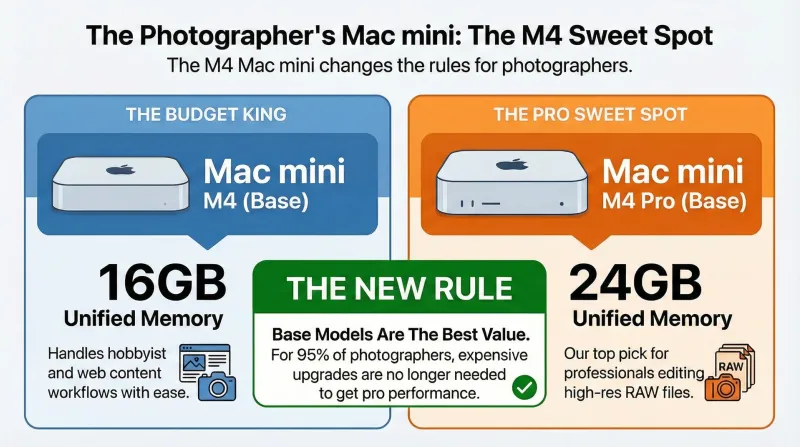
The Mac mini M4 and M4 Pro are tiny, whisper-quiet, and absurdly powerful. But the real headline is the Base Configuration. Apple has finally raised the floor. The entry-level M4 now starts at 16GB of RAM, and the entry-level M4 Pro starts at 24GB.
For 95% of photographers—whether you are editing wedding galleries, processing high-res landscape RAWs, or retouching portraits—these base models are the absolute sweet spot. They offer unbeatable price-to-performance ratios that make the much more expensive Mac Studio harder to justify for a pure desk setup (and even high-end MacBook Pros).
In this guide, we will prove why you don’t need to max out your credit card to get a pro-level workstation, and how to build the perfect ecosystem around this tiny box.
⚖️ M4 vs. M4 Pro: Why the “base models” are the real heroes
We often see photographers instinctively customizing their orders, adding 32GB or 64GB of RAM “just to be safe.” While more RAM is never bad, it significantly increases the cost.
Our hands-on experience shows that the standard configurations are surprisingly capable beasts.
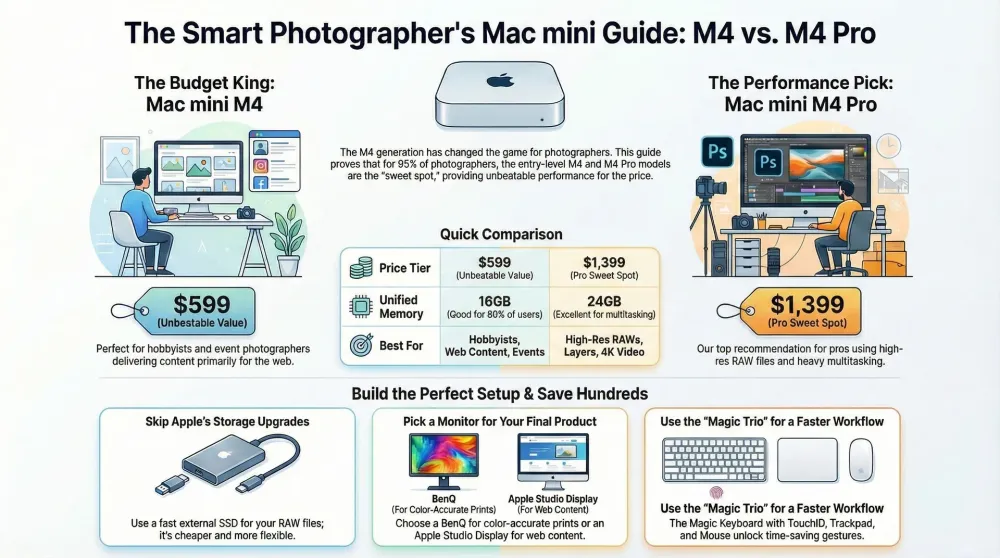
1. The budget king: Mac mini M4 (base model)
- Specs: 10-Core CPU, 10-Core GPU, 16GB Unified Memory.
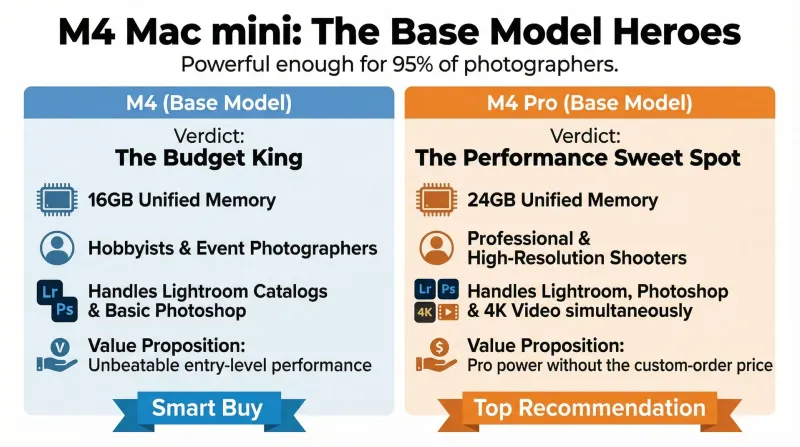
- The Verdict: This is no longer just a “browsing machine.” With 16GB of fast unified memory, the base M4 handles Lightroom Classic catalogs with thousands of images smoothly. Culling is instant. Basic Photoshop masking feels fluid.
- Who is it for? Hobbyists, event photographers (who shoot high volume but not 100MP files), and anyone delivering content primarily for the web.
- Smart Buy: Get the Mac mini M4 (Base). Use the money you saved to buy a better monitor (more on that later). The same base model, minus the photo-editing lens, is also what we recommend as a kid’s first proper computer — the 16GB of unified memory is the reason it holds up in both roles.
2. The performance sweet spot: Mac mini M4 Pro (base model)
- Specs: 12-Core CPU, 16-Core GPU, 24GB Unified Memory.
- The Verdict: This is our Top Recommendation. The jump to 24GB RAM puts you in a remarkably comfortable zone. You can run Lightroom, Photoshop, a browser with 20 tabs, and Spotify simultaneously without the system choking. The extra GPU cores destroy tasks like AI Denoise and complex masking.
- Who is it for? Professional photographers, high-res shooters (Canon R5, Sony A7R series), and hybrid shooters who occasionally cut 4K video.
- Smart Buy: The Mac mini M4 Pro (Base) provides “Pro” performance without the “Custom Order” price tag.
| Feature | Mac mini M4 (Base) | Mac mini M4 Pro (Base) |
|---|---|---|
| Price Tier | $599 (Unbeatable Value) | $1,399 (Pro Sweet Spot) |
| Unified Memory (RAM) | 16GB (Good for 80% of users) | 24GB (Excellent for heavy multitasking) |
| GPU Cores | 10 Cores | 16 Cores (Faster AI Denoise) |
| Ports | 3x Thunderbolt 4 (Rear) | 3x Thunderbolt 5 (Rear) + 2x USB-C (Front) |
| Best For | Hobbyists, Web Content, Events | High-Res RAWs, Layers, 4K Video |
🧠 The “if you must upgrade” rule
If you have extra budget and must upgrade something, where should the money go? (We go through every configuration tier in detail in our Mac mini RAM and storage guide — this is the short version for photographers.)
- First Priority: RAM on the Pro. If you earn your living with this machine and use heavy multitasking, upgrading the M4 Pro to 48GB or 64GB is the only upgrade that yields a tangible long-term performance boost.
- Second Priority: Do NOT upgrade the internal storage. (We explain why below).
- Third Priority: 10 Gigabit Ethernet, only if you work off a high-end NAS server.
🥽 The “secret weapon”: Editing with Apple Vision Pro
I use the Mac mini not just with a monitor, but frequently with the Apple Vision Pro, and I have to mention it because the experience is transformative for creative work.
When you connect the Vision Pro to the Mac mini using Mac Virtual Display, you aren’t just looking at a screen; you are placing a massive, crisp 4K (or larger) window in your physical space.
- Focus: I can black out the room (Environments) and focus entirely on the image. No desk clutter, no distractions.
- Scale: Viewing a vertical portrait at “life-size” scale reveals details you simply miss on a 27-inch monitor.
- Ergonomics: I can lean back in my chair, edit with a trackpad on my lap, and look at a 100-inch virtual screen.
While the Vision Pro is an expensive accessory, if you already own one, the Mac mini M4 drives it flawlessly. It feels like the future of the digital darkroom.
⌨️ The “magic” trio: Inputs that just work
Since the Mac mini is “headless,” you need to buy your own input devices. While you can use any USB mouse, staying within the Apple ecosystem unlocks gestures and features that speed up your editing workflow significantly. For the wider desk — hubs, docks, cables and the accessories Apple would love to sell you twice — see our Mac mini accessories guide.
1. The foundation: Magic Keyboard (TouchID)
I consider the Apple Magic Keyboard with TouchID essential.
- Why? As a photographer, you are constantly unlocking your Mac, filling in passwords (Keychain), and authorizing payments for gear. TouchID turns these 5-second interruptions into instant actions. Over a year, this saves hours of friction.
2. The navigator: Magic Trackpad
The Magic Trackpad is the best navigation tool for macOS.
- Timeline Scrubbing: If you do any video work, scrubbing a timeline with two fingers is far superior to a mouse wheel.
- Vision Pro Control: If you use the Vision Pro (as mentioned above), the Trackpad is arguably better than “air gestures” for precise work.
3. The classic: Magic mouse
Love it or hate it, the Magic Mouse has a trick up its sleeve. The entire surface is a touch panel. This allows you to scroll horizontally (pan) across a zoomed-in photo or a large Lightroom grid just by sliding your finger sideways. It’s a feature standard mice lack.
🎧 Focus & flow: The audio bonus
Photography is a solitary game. When I’m in a 4-hour retouching session, I need to block out the world.
While not strictly an input device, the AirPods Pro are my constant desk companion.
- Noise Cancellation: Blocks out fan noise (rare on the mini, but possible) or household distractions.
- Spatial Audio: If you edit video, checking your audio mix on AirPods is crucial because that is how 50% of your audience will hear it.
🗂️ The smart storage strategy (save hundreds)
Apple’s pricing for internal SSD storage is steep. Charging $200+ for a modest bump in storage is hard to swallow. Fortunately, the Mac mini has high-speed ports that make external storage feel internal.
The “Hybrid” Workflow:
- Internal SSD (512GB): Keep your macOS, all your applications (Adobe/Capture One), and your active Catalog files (the
.lrcatfile) here. This ensures the app launches instantly and the database remains snappy. - External SSD: Store your actual RAW files, your project archives, and your exports here.
Our Recommendation: Samsung T7 Shield 2TB.
- Why? It connects via USB-C (USB 3.2 Gen 2), offering read/write speeds around 1,000 MB/s. That is fast enough to edit 60MP RAW files without any lag.
- Bonus: It is rubberized and rugged. If you switch to a MacBook for travel, you just unplug the drive and take your entire photo library with you. It’s flexible, cheaper, and safer. We put it through a full season of card dumps and travel abuse in our Samsung T7 Shield review.
🧩 The missing pieces: Monitors & connectivity
1. The monitor dilemma: Studio Display vs. Third party
- The “Apple Ecosystem” Pick: Apple Studio Display.
- Pros: 5K resolution means text is razor-sharp. Glossy finish makes images “pop” (great for assessing contrast). Build quality is unmatched.
- Cons: Expensive. No hardware calibration.
- The “Pro Photographer” Pick: BenQ SW270C or SW321C.
- Pros: These monitors are built for color accuracy. They cover 99% of AdobeRGB (essential for print), have matte screens to reduce glare, and support hardware calibration to ensure what you see is what you get.
- Verdict: If you print your work, get the BenQ. If you publish mainly to web/social, the Studio Display is a joy to use.
2. The necessary dongle: Card readers
The Mac mini M4 has front ports (finally!), but no SD card slot.
- Do not buy a cheap $15 hub. They are slow and can overheat, risking data corruption.
- Invest in a dedicated USB-C reader like the ProGrade Digital CFexpress/SD Reader. The transfer speeds over USB-C are significantly faster, meaning you can start editing sooner after a shoot.
🚀 Real-world performance: What to expect
We tested the Base M4 Pro (24GB) in a typical workflow to see if the “base model” claims hold up.
Importing & Culling: Importing 500 RAW files from a Sony A7IV is rapid. Generating “Standard” previews happens almost as fast as the import bar moves. In the Library module, skipping from image to image shows zero lag.
Masking & AI Tools: This is where the M4 architecture shines. Lightroom’s “Denoise AI” used to take 20-30 seconds on older Intel Macs. On the M4 Pro, it takes seconds. The GPU cores in the M4 Pro eat these tasks for breakfast.
Exporting: Exporting full-resolution JPEGs is fast, but more importantly, the system remains usable. Thanks to the core count, you can start your export and immediately switch to answering emails or watching a YouTube tutorial without the computer freezing up.
Pros
- Base M4 Pro (24GB) handles real professional photography workflows without requiring a Mac Studio budget
- Unified Memory architecture means 24GB on Apple Silicon performs like 32-40GB on traditional PC hardware
- Apple Silicon GPU cores cut Lightroom AI Denoise and complex masking from 30 seconds to a matter of seconds
- The 'Hybrid Storage' approach with an external Samsung T7 Shield costs less than Apple's internal upgrades with more flexibility
- Vision Pro integration turns the Mac mini into a spatial editing studio with virtually unlimited virtual screen real estate
Cons
- 16GB base M4 will feel tight for heavy Photoshop work with multiple large files or layers open simultaneously
- Heavy compositing with 100+ high-res layers or commercial billboard-sized files will eventually pressure even 24GB RAM
- Apple Studio Display lacks hardware calibration — a real limitation for print-focused photographers who need guaranteed color accuracy
- The front USB-C on the base M4 is not Thunderbolt 5; only the M4 Pro gets TB5 on front and rear ports
🗣️ Conclusion: The smart choice
You can easily spend $3,000 on a Mac for photography. But do you need to?
Our verdict is clear: No.
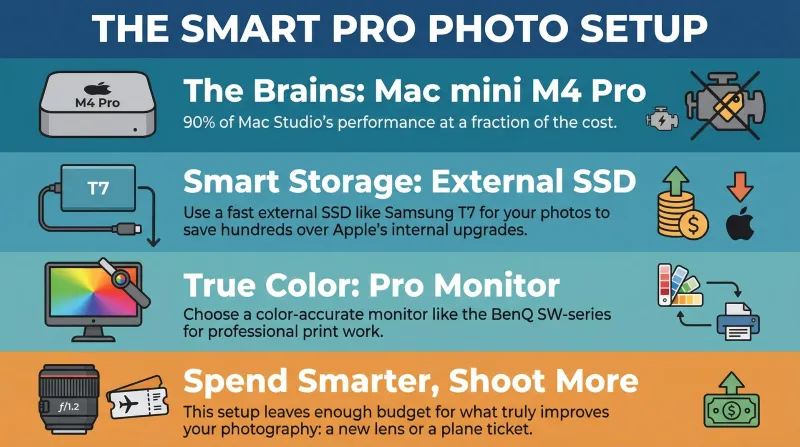
The Mac mini M4 Pro (Base Model) with its 24GB of RAM is the sweet spot of the entire Apple lineup. It offers 90% of the performance of a Mac Studio for a fraction of the price. It respects your budget while delivering a premium, silence, and fast editing experience.
The Ideal Dadnology Setup:
- Computer: Mac mini M4 Pro (24GB Base Model)
- Storage: Samsung T7 Shield (External)
- Monitor: BenQ SW270C
- Input: Magic Trio (Keyboard, Trackpad, Mouse)
This setup is clean, powerful, and leaves you with enough budget left over to buy the thing that actually improves your photography the most: a new lens or a plane ticket.
The Mac mini M4 Pro (24GB) is the smart money choice for photographers who want professional performance without professional-tier pricing. It handles Lightroom, Photoshop, AI Denoise, and batch export with quiet competence — fans rarely audible, results consistently excellent. (For the full day-to-day ownership picture, see our hands-on Mac mini M4 review and Mac mini M4 Pro review — and if the camera side of your kit needs an upgrade too, start with our landscape photography camera guide or the which-Nikon-mirrorless decision guide.) Pair it with a Samsung T7 Shield for storage, a BenQ SW270C or Apple Studio Display for a color-accurate screen, and a Magic Keyboard with Touch ID for seamless daily use. The result is a digital darkroom that will not feel compromised for years. Spend what you save on glass or travel. That is what actually improves your photographs.
Buy now(Ad)
📌 FAQ – Common questions
Is 24GB RAM really enough for heavy Photoshop layers?
Can I use dual monitors with the base Mac mini?
Why do you recommend external SSDs over upgrading the internal one?
How loud is the fan during export?
I am switching from Windows – will my hard drives work?
Does the front USB-C port support SD card readers?
Keep this in your inbox
One email a week: what we actually watched, built and reviewed — the stuff worth a dad's time. No hype, no daily spam.
Dadnology Weekly
One email a week: the LEGO, gaming and movie news worth a dad's time — plus what we actually reviewed. No hype, no daily spam.
Disclaimer: This review and its visuals were created with the help of AI. Some links may be affiliate links – we may earn a commission if you make a purchase, at no extra cost to you.
Current deals in Tech & gadgets
Verified live discounts tracked on Amazon


You might also like

Is a Mac mini good for small business local AI?
If the reason you have not adopted AI is that client data cannot leave the building, this is the cheapest honest answer — with four real caveats.

Is a Mac mini a good first computer for kids? A dad's take
Its best feature for a child is the one nobody markets: it cannot be taken to a bedroom. Here is the honest case, and when a tablet wins instead.

The Mac mini is an AI machine now, and that's why it's sold out
The Mac mini quietly became AI infrastructure, and the queue you are standing in now includes companies buying them by the rack. That does not change what a family needs, but it does change when you should buy and which upgrades are worth paying Apple for.