
Best Gaming Laptops for Dads (2026 Buyer's Guide)
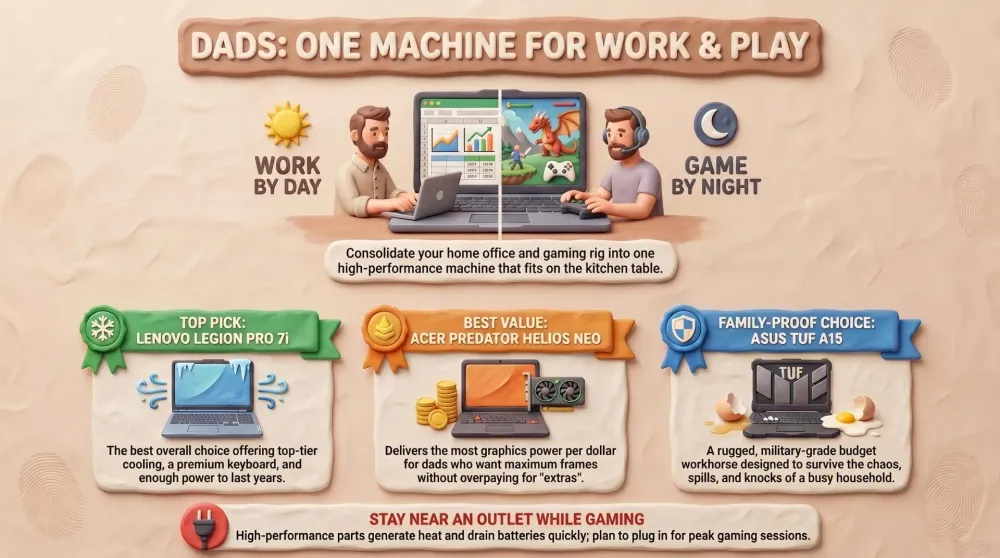
Our dad-tested guide to the best gaming laptops in 2026: one machine that games AND does work, honest on heat and battery. Top pick: Lenovo Legion Pro 7i.
This post contains affiliate links. We may earn a commission if you make a purchase, at no extra cost to you. As an Amazon Associate, Dadnology earns from qualifying purchases.
💻 This guide is part of our Amazon Prime Day 2026 Deals Hub — our curated buying guides of the gear actually worth a dad’s money.
The One Machine That Games After Bedtime and Works All Day
Here is the dad-tech fantasy in one sentence: a single machine that crunches the spreadsheets and the family budget by day, then turns into a proper gaming rig on the couch once the kids are finally, mercifully asleep. No spare room for a desktop tower humming away in the corner. No second device to buy, charge, and find storage for. Just one laptop that closes the lid for the school run and opens it again at 9:47pm for an hour of frame rates before bed. That machine exists, and it is a gaming laptop.
This guide is for one specific dad: the one who used to have a gaming PC before the kids arrived and the spare room became a nursery, and who now needs that horsepower to live in something portable. You want to play modern games at a frame rate that doesn’t make you wince, but you also need a real work computer — video calls, photo edits, a hundred browser tabs, maybe a bit of code — and you do not have the square footage, the budget, or the spousal approval for two separate machines. A gaming laptop is the honest compromise, and it’s a genuinely good one.
Here’s the methodology, plainly, and the honesty up front: gaming laptops run hot and chew through battery when you push them, full stop. Powerful parts in a thin shell make heat, the fans get loud, and unplugged gaming is a one-to-two-hour affair, not an all-nighter. We weighted the things that actually matter for daily dad life — cooling that keeps the machine quiet and stable, a keyboard you can also type a report on, a screen that fits the couch, and value that respects your wallet — over chasing the absolute peak benchmark. We’re a tech-dad blog with opinions, not a spec aggregator. And yes, every one of these is among the deals worth watching on Prime Day if you’d rather not pay full RRP.
The big decision here isn’t really brand — it’s how much GPU you actually need and how much you mind the heat, weight, and price that comes with it. So we’ve ranked these in straight recommendation order, from the do-everything champion down to the balanced everyday pick. Let’s dig in.
1. Lenovo Legion Pro 7i — The Do-It-All Flagship
If you want one machine that games like a desktop, works like a proper workstation, and stays relevant for years, this is the pair to beat — and frankly it’s not a close contest at the top end. Lenovo’s Legion Pro 7i sits in the flagship tier, pairing a high-end CPU with a top-of-the-stack GPU, and then does the thing flagships usually forget: it keeps all that power cool and quiet enough to actually live with.
AdLenovo Legion Pro 7i (opens in a new tab)
Best overall: top-tier performance, the best cooling and keyboard in the class, the do-it-all machine that lasts years.

What it does well
The headline is performance with headroom. This is the machine that runs today’s most demanding games at high settings and high frame rates, and crucially still has horsepower in the tank three years from now — which is the whole point of paying flagship money. For work it’s a beast too: heavy multitasking, big photo and video edits, and dozens of browser tabs don’t faze it, so you genuinely don’t need a separate work laptop.
Then there’s the part most reviews undersell: the cooling and the keyboard. Lenovo’s Legion thermal design is among the best in the business, which means under a full gaming load the machine stays more stable and runs quieter than rivals pushing the same parts — a real difference when you’re gaming at 10pm with thin walls and a sleeping kid down the hall. The keyboard is genuinely excellent to type on, not just to game on, which matters when this is also the machine you write that overdue report on. The 16-inch high-refresh display is a sweet spot for both spreadsheets and shooters.
Where it falls short
Honesty time. This is the priciest pick here, and you pay the flagship tax for that last slice of performance. It’s also heavy and not very portable — this is a desktop-replacement you move around the house, not a thin-and-light you sling in a backpack daily. And like every gaming laptop, battery under load is modest: unplugged gaming is short, so this lives near an outlet when you’re playing. For light work it’ll see you through a useful chunk of the day, but don’t expect ultrabook stamina.
Who should buy it
The dad who wants the best single machine and intends to keep it for years — the one who refuses to compromise on frame rates or cooling and has the budget to back it up. If you want to buy once, cry once, and never think about upgrading again, stop reading and buy this. Everyone watching the budget more closely, keep going.
2. Acer Predator Helios Neo 16 — The Most GPU Per Dollar
Here’s the pair that makes you question why you’d pay flagship money at all. The Helios Neo 16 is Acer’s value-performance play, and its whole pitch is simple: get you the biggest, most capable graphics card your money can stretch to, and trim the price elsewhere. For a dad whose top priority is “make the games run great without remortgaging,” it’s the rational choice.
AdAcer Predator Helios Neo 16 (opens in a new tab)
Best performance value: the biggest GPU per dollar, a 16-inch screen, and frame rates that punch above the price.
What it does well
The Helios Neo 16 punches absurdly above its price on raw gaming performance. Acer puts a strong GPU at the center of the machine and prices the whole thing aggressively, so you get frame rates close to far pricier laptops for noticeably less money. The 16-inch high-refresh display is the modern sweet spot — more screen than a 15 without the bulk of a 17 — and it’s plenty for both work and play. Cooling is solid for the tier, the build is sensible, and it handles work multitasking without complaint.
For the dad whose mental math is “frames per dollar,” this is the standout. It’s the machine that lets you play the latest games at high settings without the flagship invoice, and that’s exactly what most people are actually buying a gaming laptop to do.
Where it falls short
You can feel where Acer saved money. The chassis and screen aren’t quite as premium as the Legion’s — it’s a touch more plasticky, the display is good rather than gorgeous, and the keyboard, while perfectly fine, isn’t the class-leader the Legion’s is. Like all of these, it runs hot and gets loud under a full load, and battery while gaming is short. None of that is a dealbreaker at the price; it’s just the honest trade you make for the GPU.
Who should buy it
The value-conscious dad who cares most about gaming performance and refuses to overpay for premium fit and finish. If your priority is “the games run great and I kept the rest of the money,” this is your machine — and it’s a smart buy, not a compromise.
3. MSI Katana A17 (Ryzen + RTX) — The Big-Screen Bargain
Not every dad wants a 16-inch screen. Some of us game on the couch from a few feet back, or just like a big, generous display for both work and play, and don’t fancy paying a premium for the privilege. That’s exactly what the Katana A17 is: a 17-inch gaming laptop with a capable Ryzen-and-RTX combo, priced like the smaller machines.
AdMSI Katana A17 (Ryzen + RTX) (opens in a new tab)
Best big-screen value: a 17-inch panel and capable Ryzen-plus-RTX combo for the price of smaller rivals.
What it does well
The obvious win is the 17-inch screen for the money. More real estate makes a real difference for couch gaming, for working with two windows side by side, and for tired eyes at the end of a long day. The Ryzen CPU paired with an RTX graphics card is a genuinely capable combo that handles modern games at sensible settings and flies through everyday work tasks, photo edits, and the usual tab-hoarding. As a do-everything family machine that doubles as the big-screen gaming rig, it’s strong value.
It’s also a sensible, no-drama design — the kind of laptop you set up on the kitchen table and just use, without fiddling with a hundred settings to make it behave.
Where it falls short
A 17-inch laptop is big and heavy — this is a machine that mostly stays put, not one you carry daily, so think of it as a portable desktop rather than a travel companion. To hit the price, MSI makes the usual sacrifices: the build and display are mid-tier, the GPU is capable rather than flagship, and — say it with me — it runs hot, gets loud, and won’t game long off the battery. If you want the absolute best frames or a premium chassis, look up the list.
Who should buy it
The dad who specifically wants the biggest practical screen for the least money and doesn’t need to move the machine around much. If your gaming happens at a desk or on a stable couch setup and you value display size over portability, the Katana A17 gives you the most inches per dollar.
4. ASUS TUF Gaming A15 (2024) — The Tough Budget Workhorse
Let’s be real about how laptops actually live in a house with kids: they get knocked off the couch, sat on, carried by the screen, and exposed to spills, crumbs, and the occasional juice-box incident. For that reality, you don’t want a fragile flagship. You want the ASUS TUF — the “TUF” is right there in the name, and it’s earned.
AdASUS TUF Gaming A15 (2024) (opens in a new tab)
Best budget and durable: a tough, MIL-spec workhorse that survives a chaotic household at an honest price.
What it does well
The TUF A15’s whole identity is durability at an honest price. ASUS builds these to military-grade ruggedness standards, so the chassis shrugs off the daily abuse of a chaotic household far better than thinner, pricier machines. It’s a genuine budget gaming laptop that still plays modern games at reasonable settings and handles all the everyday work — calls, documents, browsing, light editing — without breaking a sweat. Battery tends to be respectable for the tier when you’re not gaming, and the build inspires the kind of confidence that lets you stop worrying every time a toddler walks past.
As the affordable entry point into gaming laptops, or as the resilient second machine that lives where life is messiest, it’s brilliant value.
Where it falls short
You get what you pay for in the performance department. The GPU sits at the lower end of this lineup, so you’ll dial back settings on the most demanding games and won’t be chasing flagship frame rates. The display and overall polish are functional rather than fancy, and — the universal gaming-laptop truth — it still runs warm and noisy when you push it. This is a do-the-fundamentals-reliably machine, not a do-everything one.
Who should buy it
The budget-minded dad who wants a tough, dependable machine that survives family life and plays games respectably without overspending. If your priority is value and resilience over peak performance, or you want a hard-wearing first gaming laptop, this is the sensible buy.
5. Lenovo Legion 5i — The Balanced All-Rounder
Sometimes you don’t want the heaviest flagship or the cheapest workhorse — you want the sensible middle: a machine that games genuinely well, works seriously well, and is portable enough that you’ll actually carry it. That’s the Legion 5i, and it might be the most quietly clever pick on this list.
AdLenovo Legion 5i (opens in a new tab)
Best all-rounder: a balanced mix of solid performance and real portability that travels and games equally well.
What it does well
The Legion 5i nails balance. It inherits Lenovo’s excellent Legion DNA — strong cooling, a great keyboard, a sensible 16-inch high-refresh screen — in a package that’s more portable and more affordable than the Pro 7i flagship. Performance lands comfortably in the mid-to-upper tier, so modern games run well at high settings and serious work tasks fly. Crucially, it’s the one here you can realistically travel with — close the lid, throw it in a bag, take it to the in-laws — without it being a backbreaker.
For the dad who wants one machine that does a bit of everything genuinely well rather than maxing out any single thing, this is the rational pick. It’s the Goldilocks option: not too heavy, not too compromised, just right.
Where it falls short
By design, it’s a machine of compromise — it doesn’t game as hard as the flagship Legion or carry as big a GPU per dollar as the Helios Neo, and it’s pricier than the budget TUF. And it remains a gaming laptop, so the familiar caveats apply: it gets warm and audible under heavy load, and gaming battery life is short even if everyday battery is more reasonable than the flagship’s. You’re buying balance, which by definition means you don’t top any single category.
Who should buy it
The dad who wants the well-rounded everyday machine — solid gaming, strong work performance, and real portability — without the flagship price or the desktop-replacement bulk. If you can’t decide what you prioritize, the answer is usually this one.
How They Compare: The Spec Showdown
This is where the decision actually gets made. Note the GPU tier and portability rows — for most dads, those two lines settle the argument faster than any benchmark number.
| Feature | Legion Pro 7i | Helios Neo 16 | Katana A17 | TUF A15 | Legion 5i |
|---|---|---|---|---|---|
| Screen | 16-inch | 16-inch | 17-inch | 15-inch | 16-inch |
| GPU tier | Flagship / top | High (value) | Mid (capable) | Entry / budget | Mid-to-upper |
| Best for | Do-it-all power | Frames per dollar | Big-screen value | Tough budget | Balanced all-round |
| Portability | Low (heavy) | Medium | Low (17in) | Medium | Medium-high |
| Verdict | Best overall | Best perf value | Best big screen | Best budget | Best all-rounder |
The table tells a clear story. If you want maximum performance and the best cooling and keyboard, it’s the Legion Pro 7i. If you want the most graphics power for your money, the Helios Neo 16 wins outright. Below that, you’re choosing between screen size, durability, and balance — and each of those is a perfectly valid way to shop.
How to Choose: A Decision Framework
If you’ve read this far, here’s how to decide without overthinking it. The single most useful question is how much GPU do you actually need, and the honest answer for most dads is “the value tier, not the flagship.”
If you want the best do-it-all machine and intend to keep it for years — buy the Lenovo Legion Pro 7i. Top performance, the best cooling and keyboard in the class, and enough headroom to stay relevant. Buy once, cry once.
If your priority is gaming performance per dollar — buy the Acer Predator Helios Neo 16. It gets you the biggest practical GPU for the least money, and it’s the smart-money pick for most performance-focused dads.
If you want the biggest screen for the least money and rarely move the laptop — buy the MSI Katana A17. Seventeen inches of couch-friendly display and a capable Ryzen-plus-RTX combo.
If you want a tough, affordable machine that survives family chaos — buy the ASUS TUF Gaming A15. Military-grade durability and honest value, with the trade-off of an entry-tier GPU.
If you’re truly torn between the flagship Pro 7i and the balanced 5i: ask one question — will you ever carry this laptop out of the house? If yes, the more portable Legion 5i is the better real-world pick. If it lives on one surface and you want maximum power, the Pro 7i wins.
AdLenovo Legion Pro 7i (opens in a new tab)
Best overall: top-tier performance, the best cooling and keyboard in the class, the do-it-all machine that lasts years.
The meta-advice, in proper tech-dad spirit: on screen size, 16 inches is the modern sweet spot — more usable than a 15, far easier to live with than a 17 — so default there unless big-screen couch gaming is your specific goal. And on the laptop-versus-desktop question, a desktop genuinely gives you more performance per dollar and runs cooler and quieter, but it claims a permanent desk most dads don’t have. The laptop wins the moment “I want to use it on the couch after bedtime” enters the equation, which is the whole reason you’re reading this.
Common Mistakes to Avoid
- Under-speccing the GPU to save a few bucks. The graphics card is the one part you cannot upgrade later, so a too-weak GPU is the fastest way to a laptop that feels old in a year. Spend on the GPU tier first; everything else is secondary.
- Ignoring cooling and weight. Two laptops with the same chip can perform very differently if one cooks itself and throttles. A machine that runs cooler and quieter — like the Legions — is more pleasant to live with, especially gaming at night near a sleeping kid. And be honest with yourself about weight: a 17-inch monster you never move is a desktop you overpaid for.
- Paying the flagship tax you don’t need. The Legion Pro 7i is brilliant, but most dads get 90% of the experience from the value tier — the Helios Neo 16 or the Legion 5i — for a lot less money. Don’t buy maximum frames you’ll never notice while juggling a toddler and a work deadline.
- Expecting all-day battery while gaming. It doesn’t exist on any gaming laptop. Plan to game plugged in, and judge battery on light work and browsing instead — that’s where the realistic, usable day lives.
- Paying full RRP in late June. These machines drop hard on Prime Day. Buying a flagship laptop at full price during a sale event is leaving money on the table.
Pros
- Top-tier gaming performance with years of headroom
- Best-in-class cooling that stays stable and quieter under load
- Excellent keyboard that's a joy for both gaming and real work
- 16-inch high-refresh display hits the sweet spot for play and spreadsheets
- A genuine desktop replacement and work machine in one
Cons
- The priciest pick here — you pay the flagship tax
- Heavy and not built for daily portability
- Short battery life while gaming, like every gaming laptop
Conclusion: The Bottom Line
After comparing five machines across every budget, the honest take is simple: the best gaming laptop for you depends on how much GPU you actually need and how much heat, weight, and price you’ll tolerate for it — but there’s a clear winner for most dads who want to buy once and keep it.
For the dad who wants the do-everything flagship, the Lenovo Legion Pro 7i is the easy call: top performance, the best cooling and keyboard in the class, and the headroom to stay relevant for years of gaming and work. The Acer Predator Helios Neo 16 is the performance-value champion that buys the biggest GPU per dollar; the MSI Katana A17 is the big-screen bargain; the ASUS TUF Gaming A15 is the tough, affordable workhorse that survives family life; and the Lenovo Legion 5i is the balanced all-rounder that games well, works well, and actually travels.
The Final Word: if you want one machine for years and the budget allows, buy the Legion Pro 7i. If you want the smart-money play, buy the Helios Neo 16 for the GPU or the Legion 5i for the balance. Everything else is a budget or screen-size call. Period.
Related Dadnology guides: Best PC & Gaming Upgrades for Dads (Biggest Bang for the Buck) · Best Gaming Headsets for Dads (2026 Buyer’s Guide) · Best Game Controllers for Every Setup (2026 Buyer’s Guide)
What is the best gaming laptop for dads in 2026?
Can one gaming laptop really handle both work and play?
How much should I spend on a gaming laptop?
Do gaming laptops run hot and have bad battery life?
What screen size should I get: 15, 16, or 17 inches?
Should I buy a gaming laptop or a gaming desktop?
Keep this in your inbox
One email a week: what we actually watched, built and reviewed — the stuff worth a dad's time. No hype, no daily spam.
Dadnology Weekly
One email a week: the LEGO, gaming and movie news worth a dad's time — plus what we actually reviewed. No hype, no daily spam.
Disclaimer: This review and its visuals were created with the help of AI. Some links may be affiliate links – we may earn a commission if you make a purchase, at no extra cost to you.
You might also like

Prime Day 2026: 5 Best Robot Vacuums for Family Households
Our dad-focused Prime Day guide to the top 5 robot vacuums in 2026 that keep family homes clean – from self-emptying Roombas to powerful all-in-one stations from Shark, Dreame, and eufy.

Never Get Locked Out Again: 5 Best Smart Locks for Families (Prime Day 2026)
A dad-focused guide to the best smart locks for U.S. family homes in 2026 – including August, Schlage, Yale, Eufy, and Level – with picks for renters, Apple families, fingerprint fans, and more.

Top 5 Smart Security Camera Systems for Families (2026) – Dadnology Guide
Our dad-focused guide to the 5 best smart security camera systems for U.S. families in 2026 – from Ring and Arlo to Google Nest, eufy, and Blink – with options for every budget, ecosystem, and privacy preference.