
Best Game Controllers for Every Setup (2026 Buyer's Guide)
Our dad-tested guide to the best game controllers in 2026: one pick per platform, from Switch 2 to PS5 to PC to mobile. Top pick: 8BitDo Pro 3.
This post contains affiliate links. We may earn a commission if you make a purchase, at no extra cost to you. As an Amazon Associate, Dadnology earns from qualifying purchases.
🎮 This guide is part of our Amazon Prime Day 2026 Deals Hub — our curated buying guides of the gear actually worth a dad’s money.
The One Piece of Gaming Gear You Touch Every Single Session
Every dad gamer has a graveyard somewhere. A drawer, a shoebox, the bottom of a console cabinet — full of controllers that technically still work but quietly betray you. The left stick that drifts your character into a wall while you sit perfectly still. The bumper that registers one press in three. The pad that only ever paired with a console you sold two years ago. A controller is the single piece of gaming gear your hands are on for the entire session, and a bad one ruins games you actually like.
This guide is for one specific dad: the one who plays across more than one thing. Maybe it’s the Switch on the sofa once the kids are in bed, a PS5 for the bigger nights, a bit of PC gaming when you can steal the desk, and the odd cloud-gaming session on your phone in the passenger seat on a long drive. You don’t want five controllers from five different ecosystems cluttering a drawer — you want the right one for each setup, and ideally one or two that quietly cover several at once.
Here’s the methodology, plainly: we weighted the things that survive real family life — drift-proof sticks that don’t die in eighteen months, cross-platform pairing so one pad covers more than one device, a fit that suits the hands actually holding it, and a price that doesn’t make you wince. We’re a tech-dad blog with opinions, not a spec aggregator, so where a feature is marketing fluff we say so. And since most of these go on sale hard during Prime Day, this is also the list to bookmark if you’d rather not pay full RRP.
The big decision here isn’t really brand — it’s which screen you’re playing on and whose hands are on the pad. So we’ve ranked these in straight recommendation order, starting with the one that covers the most ground for the most dads, and ending with the niche-but-brilliant picks. Let’s dig in.
1. 8BitDo Pro 3 — The Drift-Proof Do-Everything Pad
If you only buy one controller off this list, make it this one. The 8BitDo Pro 3 is the rare pad that solves the two problems that quietly plague dad gaming — controllers that drift, and controllers locked to a single box — in one reasonably priced package. It’s the everyday champion, and it earns the spot.
Ad8BitDo Pro 3 (opens in a new tab)
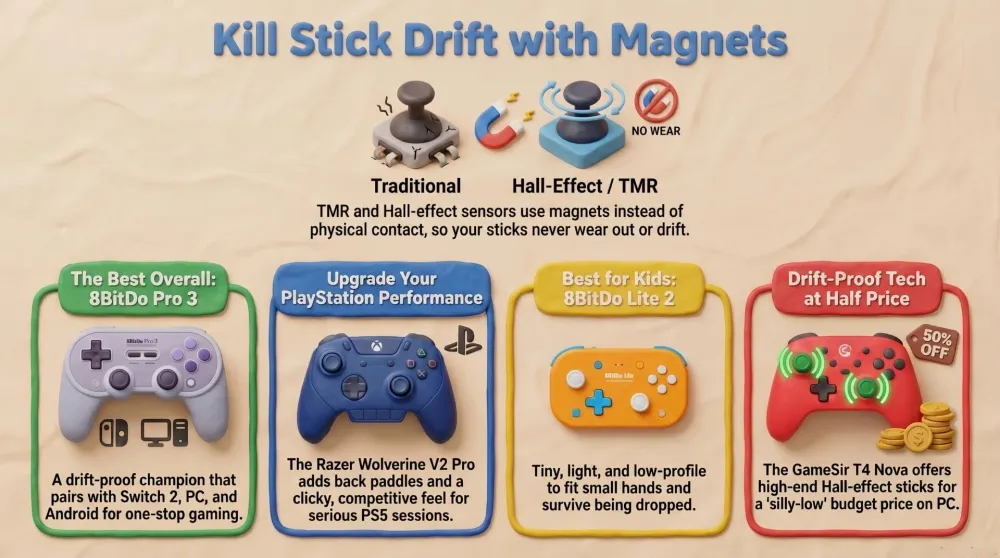
Best overall: drift-proof TMR sticks, pairs with Switch, Switch 2, PC and Android, at a fraction of a first-party pad.

What it does well
The headline is the TMR sticks, and they matter more than any spec sheet lets on. Traditional controller sticks use little carbon contacts that physically rub as you move them; over a year or two of Mario Kart and Fortnite those contacts wear down, and the result is the dreaded stick drift — your character creeps sideways while you’re not even touching the pad. TMR (and the closely related Hall-effect) sticks read the position with magnets and sensors instead, so nothing physically rubs and nothing wears out. In plain terms: this controller is built to not develop drift, which is the single most common reason a pad ends up in the graveyard drawer.
The second trick is cross-platform reach. The Pro 3 pairs with the original Switch and the Switch 2, with PC (Windows and Steam), and with Android. That one pad genuinely covers the sofa Switch, the desk PC, and a phone or tablet, which is exactly the multi-device reality most dads live in. Add genuinely useful extras — remappable back buttons for clawing out an extra input without re-gripping, a comfortable full-size body, and rumble — and you’ve got a pad that punches well above its modest price.
Where it falls short
It is not a PlayStation controller — there’s no native PS5 support, so console PlayStation dads need to look at pick number two. The styling is a touch retro-hobbyist rather than sleek-flagship, which bothers nobody who’s actually playing but is worth knowing. And while the back buttons and software are great, the companion app has the usual learning curve of any deeply configurable pad — five minutes of setup you’ll do once and forget.
Who should buy it
The dad who games across more than one platform and is sick of replacing drifting controllers. If your gaming life involves a Switch, a Switch 2, or a PC in any combination, this is the no-brainer default — buy it, set it up once, and stop thinking about controllers for years. Console PlayStation owners, keep reading.
2. Razer Wolverine V2 Pro — The PlayStation Power Tool
When the kids are down and you’ve got a proper evening for a competitive shooter or a souls-like, you want a pad that does more than the stock one. The Razer Wolverine V2 Pro is the PS5 dad’s upgrade: a wireless, pro-grade controller built for the people who actually care about that extra ten percent of control.
AdRazer Wolverine V2 Pro (opens in a new tab)
Best for PlayStation: wireless PS5/PC pro pad with back paddles and a clicky competitive feel.
What it does well
The standout is the back paddles — extra buttons under the grips you can map to jump, reload, or crouch, so your thumbs never have to leave the sticks. In a shooter that’s the difference between staying on target and dying mid-reload, and once you’ve played with paddles, going back to a stock pad feels like fighting with one hand. It runs wirelessly on both PS5 and PC, so it doubles as your big-screen-and-desk controller, and the buttons have a crisp, clicky competitive feel that’s tuned for fast, deliberate inputs rather than mushy casual play.
You also get a comfortable pro-grade body, swappable thumbstick caps, and Razer’s mature software for tuning sensitivity and remapping on the fly. For a dad who plays PS5 seriously — ranked, competitive, or just demanding single-player — this is the pad that respects your reflexes.
Where it falls short
It’s the priciest pick on this list, and that’s the honest trade — pro features cost pro money. It’s also focused on PlayStation and PC, so it’s no help to your Switch. And unlike the official DualSense, it doesn’t replicate Sony’s signature haptic feedback and adaptive triggers, the rumble-and-resistance trickery that a handful of first-party games lean on. If those specific effects are a deal-breaker for you, that’s the one reason to keep a DualSense around too.
Who should buy it
The PS5 dad who plays with intent — shooters, fighting games, anything competitive — and wants paddles and a faster, more precise feel than the stock controller gives. If you mostly play relaxed single-player and never miss the back buttons, the standard DualSense is fine; but if you’ve ever lost a match to a fumbled reload, this is your pad.
3. GameSir T4 Nova — The Stupidly Good Value PC Pick
Here’s the controller that makes you question why anyone overpays. The GameSir T4 Nova crams the one feature that actually matters for longevity — drift-proof sticks — into a wireless pad that costs a fraction of the big names. For PC gaming on a budget, it’s borderline unbeatable.
AdGameSir T4 Nova (opens in a new tab)
Best value PC controller: Hall-effect sticks and wireless PC/mobile play for a genuinely silly-low price.
What it does well
The headline, again, is the sticks: the T4 Nova uses Hall-effect sticks, the same magnet-and-sensor magic as the Pro 3’s TMR sticks, which means it’s built to resist drift even at this price. That a controller this cheap ships with the anti-drift feature you used to pay a premium for is genuinely the whole story — it’s the reason this pad belongs on the list instead of being just another bargain-bin option.
Beyond that, it plays wirelessly on PC and mobile, has a comfortable, conventional layout that anyone who’s held a controller will recognize instantly, includes rumble, and has a clean look that doesn’t scream “gaming gamer.” For a dad who wants a reliable second pad for couch co-op on the PC, a spare that won’t die, or simply a low-risk first controller for PC gaming, it delivers nearly everything the expensive pads do for a sliver of the cost.
Where it falls short
You can feel the price in the finish — the plastics and triggers aren’t as plush as a flagship, and there are no back paddles or deep pro features. It’s not aimed at the PS5 (it covers PC and mobile), and the software, while functional, is more basic than Razer’s. None of that matters for the job it’s built for; just don’t expect it to feel like a sixty-quid pro pad, because it isn’t one — it’s a fifteen-to-twenty-quid pad doing a brilliant impression of one.
Who should buy it
The value-minded PC dad, the parent who wants a drift-proof second controller for couch co-op without spending real money, or anyone testing the PC-gaming waters who doesn’t want to gamble on a no-name pad. This is the smart-money pick, and it’s a smart buy rather than a compromise.
4. 8BitDo Lite 2 — The First Real Controller for Small Hands
Anyone who has watched a five-year-old wrestle with a full-size adult controller knows the problem: their hands don’t reach, the tall sticks get snapped, and the whole thing is too big to be fun. The 8BitDo Lite 2 is built for exactly those hands.
Ad8BitDo Lite 2 (opens in a new tab)
Best for kids: tiny, light, no protruding sticks to snap, perfect for small hands on Switch and Android.
What it does well
This pad is tiny, light, and low-profile by design. The sticks sit nearly flush rather than poking up like targets, which is the single best thing you can do to stop a child snapping a stick clean off in week one. The compact body fits small hands properly, so a kid can actually reach every button instead of stretching, and it’s light enough that dropping it (which they will, repeatedly) is a non-event. It pairs cleanly with the Switch and Android, making it ideal for Mario Kart, Minecraft, or a tablet game without handing a child a sixty-quid first-party pad to test against gravity.
It’s also just a nice little controller for adults who want something pocketable for travel or a quick handheld session — small-hands-friendly doesn’t mean cheap-feeling.
Where it falls short
The trade-off is right there in the name: it’s a lite pad. There’s no rumble, the sticks have shorter throw (a consequence of the low profile), and it’s not a competitive controller for an adult playing seriously. It’s also not for PS5 or PC gaming as a main pad. But none of that is the point — you’re buying this so a kid can play comfortably and not destroy it, and on that brief it’s excellent.
Who should buy it
The dad buying a child’s first proper controller, or anyone with small hands who finds full-size pads fatiguing. It’s the right call for a young kid on the family Switch or a tablet — comfortable, durable, affordable, and impossible to break in the obvious ways. Buy it, hand it over, and stop worrying about the stick.
5. Razer Kishi V2 (Mobile) — Turn an iPhone Into a Real Handheld
The phone in your pocket is a more powerful gaming machine than most consoles from a few years ago, and with cloud gaming it can stream the rest. The only thing standing between you and a proper session on a long train ride is the touchscreen — and the Razer Kishi V2 fixes that.
AdRazer Kishi V2 (Mobile) (opens in a new tab)
Best for mobile: a proper clamp controller that turns an iPhone into a real handheld for cloud and mobile games.
What it does well
The Kishi V2 is a clamp controller: it physically grips either side of your iPhone and turns it into something that looks and feels like a real handheld console, with proper sticks, face buttons, and triggers wrapping the screen. Crucially, it connects through the charging port rather than Bluetooth, which means there’s effectively no input lag — a real problem with cheaper wireless phone clips, and a deal-breaker in any game where timing matters. The mechanism is sturdy, it folds down reasonably for a bag, and it’s genuinely the difference between “I’ll just watch something” and “I’ll actually play” on a long journey.
It’s tailor-made for cloud gaming (streaming your console or PC library to the phone) and for the growing pile of mobile games that support real controllers. Touchscreen controls are fine for a puzzle game; for anything with a character to move, this is night and day.
Where it falls short
It’s a single-purpose tool: it’s for your phone and nothing else, so it’s not a couch-or-desk controller. Fit can depend on your phone’s exact size and case, so a chunky case usually has to come off first. And like anything you slot a phone into repeatedly, the port connector is a wear point to treat with a bit of care. Within its lane, though, it’s the best way to play properly on an iPhone.
Who should buy it
The dad who travels, commutes, or just wants to game on the phone during the unglamorous gaps in family life, and who’s into cloud gaming or controller-supported mobile titles. If your gaming time happens on trains, in waiting rooms, and on the sofa with a phone rather than a console, this is the one piece of kit that transforms it.
How They Compare: The Spec Showdown
This is where the decision actually gets made. Watch the Platforms and Sticks rows in particular — for most dads, which screen you play on and whether the sticks are drift-proof settle the argument faster than anything else.
| Feature | 8BitDo Pro 3 | Razer Wolverine V2 Pro | GameSir T4 Nova | 8BitDo Lite 2 | Razer Kishi V2 |
|---|---|---|---|---|---|
| Platforms | Switch / Switch 2 / PC / Android | PS5 / PC | PC / Mobile | Switch / Android | iPhone (clamp) |
| Connection | Wireless / wired | Wireless / wired | Wireless / wired | Wireless | Wired via charging port |
| Sticks | Drift-proof TMR | Standard (back paddles) | Drift-proof Hall-effect | Standard (low-profile) | Standard (compact) |
| Best For | Multi-platform all-rounder | Competitive PS5 play | Cheap drift-proof PC pad | Kids / small hands | Mobile and cloud gaming |
| Verdict | Best overall | Best for PlayStation | Best value PC | Best for kids | Best for mobile |
The table tells a clear story. If you spread your gaming across a Switch, Switch 2, or PC, the Pro 3 covers the most ground with drift-proof sticks. PlayStation players who want pro features go Wolverine; budget PC players grab the T4 Nova; small hands get the Lite 2; and phone gamers get the Kishi. Each one owns its lane outright.
How to Choose: A Decision Framework
If you’ve read this far, here’s how to decide without overthinking it.
If you game across a Switch, Switch 2, or PC — buy the 8BitDo Pro 3. Drift-proof sticks, one pad for several devices, and a price that doesn’t sting. It’s the default for a reason.
If you mainly play PS5 and want a competitive edge — buy the Razer Wolverine V2 Pro. The back paddles and faster button feel are worth it, and it doubles on PC.
If you want a cheap, drift-proof PC pad — buy the GameSir T4 Nova. Hall-effect sticks at a bargain price make it the smartest low-cost pick going.
If you’re buying for a young kid — buy the 8BitDo Lite 2. Small, light, nothing tall to snap, and cheap enough to survive childhood.
If your gaming happens on your phone — buy the Razer Kishi V2. It turns an iPhone into a real handheld with no Bluetooth lag.
If you’re truly torn between the Pro 3 and a first-party pad: ask one question — do you play on more than one platform, or do you want drift-proof sticks? If yes to either, the Pro 3 wins. The only reason to go first-party is a feature unique to it, like the DualSense haptics in the handful of games that use them well.
Ad8BitDo Pro 3 (opens in a new tab)
Best overall: drift-proof TMR sticks, pairs with Switch, Switch 2, PC and Android, at a fraction of a first-party pad.
The meta-advice, in proper tech-dad spirit: don’t get hypnotized by RGB lighting, gamer-aesthetic shells, and trigger-stop switches you’ll never touch. The specs that actually change your gaming life are will the sticks still work in two years (buy drift-proof), does it pair with the things I actually play on, and does it fit the hands holding it. Nail those three and you’ve bought the right controller.
Common Mistakes to Avoid
- Ignoring stick drift until it’s too late. The most common controller killer is a worn potentiometer stick. If you replace pads every couple of years, the fix isn’t a more expensive standard pad — it’s a drift-proof Hall-effect or TMR pad like the Pro 3 or T4 Nova that’s built not to wear out.
- Buying for the wrong platform. A gorgeous PS5 pad does nothing for your Switch, and an Xbox-layout pad isn’t native on a PlayStation. Check the Platforms row before you buy — a controller that doesn’t pair with your actual hardware is just an expensive paperweight.
- Handing a kid a full-size adult pad. Tall sticks get snapped, small hands can’t reach, and you’ll be replacing it within the month. Get a small-hands pad like the Lite 2 instead.
- Grabbing a no-name controller off the bargain page. The genuinely cheap-but-good options (like the T4 Nova) are from real brands with real software support. The truly anonymous ones tend to have laggy connections, mushy buttons, and sticks that drift out of the box — false economy that ends up in the drawer fastest of all.
- Paying full RRP in late June. Most of these drop hard on Prime Day. Buying a controller at full price during a sale event is leaving money on the table.
Pros
- Drift-proof TMR sticks built not to develop stick drift
- Pairs with Switch, Switch 2, PC and Android from one pad
- Remappable back buttons add pro-style control without re-gripping
- Comfortable full-size body with proper rumble
- Costs a fraction of a first-party controller
Cons
- No native PlayStation 5 support
- Companion app has a small one-time learning curve
- Styling is more retro-hobbyist than sleek flagship
Conclusion: The Bottom Line
After comparing five controllers across every platform a dad actually plays on, the honest take is simple: the best controller for you depends on which screen you game on and whose hands are holding it — but there’s a clear winner for most dads.
For the multi-platform majority, the 8BitDo Pro 3 is the easy call: drift-proof TMR sticks, pairing across Switch, Switch 2, PC and Android, back buttons, and a price that doesn’t sting. The Razer Wolverine V2 Pro is the pro-grade pick for serious PS5 play; the GameSir T4 Nova is the stupidly good value drift-proof PC pad; the 8BitDo Lite 2 is the small-hands controller for kids; and the Razer Kishi V2 turns an iPhone into a proper handheld for mobile and cloud gaming.
The Final Word: if you play on more than one platform, buy the 8BitDo Pro 3 and stop replacing drifting controllers forever. Everything else on this list is a matter of which screen you’re aiming at. Period.
Related Dadnology guides: Best Gaming Monitors for Dads (2026 Buyer’s Guide) · Best Parts for a Gaming PC Build (CPU, GPU & Motherboard) · Best Gaming Laptops for Dads (2026 Buyer’s Guide)
What is the best game controller for dads in 2026?
What is stick drift and how do Hall-effect and TMR sticks stop it?
Will the 8BitDo Pro 3 work on the Nintendo Switch 2?
What is the best controller for a young kid with small hands?
How do I use a controller on my iPhone?
Should I just buy the official first-party controller instead?
Keep this in your inbox
One email a week: what we actually watched, built and reviewed — the stuff worth a dad's time. No hype, no daily spam.
Dadnology Weekly
One email a week: the LEGO, gaming and movie news worth a dad's time — plus what we actually reviewed. No hype, no daily spam.
Disclaimer: This review and its visuals were created with the help of AI. Some links may be affiliate links – we may earn a commission if you make a purchase, at no extra cost to you.
You might also like

Prime Day 2026: 5 Best Robot Vacuums for Family Households
Our dad-focused Prime Day guide to the top 5 robot vacuums in 2026 that keep family homes clean – from self-emptying Roombas to powerful all-in-one stations from Shark, Dreame, and eufy.
Never Get Locked Out Again: 5 Best Smart Locks for Families (Prime Day 2026)
A dad-focused guide to the best smart locks for U.S. family homes in 2026 – including August, Schlage, Yale, Eufy, and Level – with picks for renters, Apple families, fingerprint fans, and more.
Top 5 Smart Security Camera Systems for Families (2026) – Dadnology Guide
Our dad-focused guide to the 5 best smart security camera systems for U.S. families in 2026 – from Ring and Arlo to Google Nest, eufy, and Blink – with options for every budget, ecosystem, and privacy preference.