
Best Parts for a Gaming PC Build (CPU, GPU & Motherboard)
Building or rebuilding a gaming PC with your kid? This dad's guide picks the CPU, GPU and motherboard across budgets — and is honest about matching sockets.
This post contains affiliate links. We may earn a commission if you make a purchase, at no extra cost to you. As an Amazon Associate, Dadnology earns from qualifying purchases.
🖥️ This guide is part of our Amazon Prime Day 2026 Deals Hub — our curated buying guides of the gear actually worth a dad’s money.
The Three Parts That Actually Decide Your Build
There’s a particular kind of weekend project that bonds a dad and a teenager better than almost anything: clearing the kitchen table, laying out a pile of boxes, and building a gaming PC together. It’s part LEGO for adults, part lesson in patience, and part the quiet satisfaction of watching your kid’s face when the fans spin up for the first time and it actually posts. Whether you’re building fresh or rebuilding the family hand-me-down into something that can run this year’s games, three parts do the heavy lifting: the CPU, the GPU and the motherboard. Get those right and everything else is plumbing.
This guide is for the dad who wants to build or rebuild a gaming PC without a computer-science degree or a four-figure budget — maybe alongside a teen who’s been begging for an upgrade, maybe just for yourself once the kids are asleep. You don’t need to memorize benchmark charts. You need to know which CPU is the sensible pick, which graphics card gives you the most frames per euro, and — the part that trips up every first-timer — which parts actually fit together. Because the single most expensive mistake in PC building isn’t buying the wrong tier; it’s buying a CPU and a motherboard that don’t physically match.
So here’s the honest philosophy in proper tech-dad spirit: you don’t need the most expensive everything, and you absolutely must match your platform. For gaming, the graphics card matters more than the CPU, so we’ll steer you away from overspending on a flagship processor you’ll never stress. We’ve picked the best CPU, GPU and motherboard across budgets — and we’ll be brutally clear about which sockets pair with which chips, because a wrong socket is a returned box and a disappointed kid. Read the “How to Choose” section before you click buy. It’s the part that saves your build.
Let’s go through them — the CPUs first, then the GPU that decides your frame rate, then the motherboard question that ties (or breaks) it all together.
1. AMD Ryzen 7 7700 — The Gaming-and-Everything Sweet Spot
If you want one CPU recommendation to stop reading after, it’s this one. The Ryzen 7 7700 is the processor most dads building a gaming PC should buy: eight strong cores that chew through modern games and still have plenty left for everything else the family machine does. It sits on AMD’s current AM5 platform, which means a build around it has years of upgrade life ahead.
AdAMD Ryzen 7 7700 8-Core Processor (opens in a new tab)
The gaming-and-everything sweet spot: 8 cores that handle modern games and the family's other jobs without breaking a sweat.

What it does well
The 7700’s whole appeal is balance. Eight cores and sixteen threads is genuinely the sweet spot for a do-everything PC: games are happy, but so is a browser stuffed with tabs, a Discord call, a game launcher, and the occasional bit of light video work or photo editing for the family album. It never feels like the bottleneck. And because it’s the non-X model, it runs cooler and sips less power than the hotter top-tier chips — it even ships with a perfectly capable cooler in the box, which quietly saves you money on a build.
The bigger long-game win is the AM5 socket it lives on. AMD has a strong track record of supporting a socket across multiple CPU generations, so a 7700 build isn’t a dead end — in a couple of years you can drop in a faster chip without replacing the motherboard. For a dad who’d rather not rebuild from scratch every time, that future upgrade path is worth real money. Pair it with the RTX 4060 Ti below and you’ve got a machine that handles essentially any game at high settings without drama.
Where it falls short
The 7700 is a sensible chip, not a bragging-rights chip. If your teen wants the absolute highest frame rates in competitive shooters at 1080p, the gaming-focused X3D chips edge it out — but they cost more and that gap mostly shows up at frame rates a normal monitor can’t even display. The other honest note is platform cost: AM5 means you also need DDR5 RAM and an AM5 (B650-class) motherboard, which makes the whole platform a touch pricier to enter than the older AM4 route. For what you get and how long it lasts, that’s money well spent — but it’s money, and it’s worth knowing up front.
Who should buy it
The dad building a gaming PC that also has to be the family’s everything-machine. If you want one CPU that games brilliantly, multitasks without stutter, and leaves room to upgrade down the line, this is the default pick — and the one to build around unless you have a specific reason not to.
2. ASUS TUF Gaming RTX 4060 Ti OC — The Mainstream GPU That Actually Makes Sense
Here’s the part that decides your frame rate. For gaming, the graphics card matters more than the CPU, full stop — and the RTX 4060 Ti is the mainstream pick that gives most dads the most frames for the money without wandering into flagship-price madness. The ASUS TUF Gaming version wraps it in a tough, well-cooled, quiet package built to survive a long life.
AdASUS TUF Gaming GeForce RTX 4060 Ti OC Edition (opens in a new tab)
The mainstream GPU value pick: comfortable high-settings 1080p and very capable 1440p gaming without the flagship price.
What it does well
The 4060 Ti is built for the resolution most people actually game at. At 1080p it runs essentially everything at high settings with frames to spare, and at 1440p it’s very capable in all but the most punishing titles, especially once you turn on NVIDIA’s DLSS upscaling, which trades almost-invisible quality for a healthy frame-rate boost. For a family gaming PC that lives on a normal 1080p or 1440p monitor — not a 4K wall — this is the sweet spot where you stop paying for resolution you don’t have.
The TUF Gaming branding earns its keep too. ASUS’s TUF line is the sensible, over-built tier: solid cooling that keeps the card quiet under load, durable components, and none of the fragile flagware that pushes prices into the stratosphere. It’s the GPU equivalent of a reliable estate car — not flashy, but it starts every morning. It also runs cool and efficient enough that you don’t need a monster power supply to feed it, which keeps the rest of the build cheaper.
Where it falls short
Be honest about what this card is not: a 4K powerhouse. Push it to 4K in demanding modern games and you’ll be leaning hard on upscaling and dialing back settings. If 4K gaming is genuinely the goal, this isn’t your card — you’re looking at a pricier tier. There’s also an ongoing internet argument about this card’s memory and bus width versus the previous generation; in real-world 1080p and 1440p play it performs exactly where it should, but enthusiasts will tell you it’s not a generational leap. For its actual job — high-settings mainstream gaming — it does the work cleanly.
Who should buy it
The dad building a gaming PC for a 1080p or 1440p monitor who wants strong, no-fuss performance without flagship money. If your family games on a normal screen and you want frames-per-euro sense rather than a 4K trophy, this is the GPU to pair with either Ryzen pick.
3. AMD Ryzen 5 7600 — The Budget Champion for Pure Gaming
Not every build needs eight cores. If the machine is mostly for gaming and the budget is tighter, the Ryzen 5 7600 is one of the smartest-value CPUs you can buy. Six strong cores are all most games actually use, and it sits on the very same AM5 platform as the 7700 — so you get the same modern foundation and upgrade path for less money.
AdAMD Ryzen 5 7600 6-Core Processor (opens in a new tab)
The budget gaming champion: brilliant value for pure gaming, where 6 strong cores are all most builds need.
What it does well
The 7600 punches absurdly above its price for gaming specifically. Modern games rarely stress more than six good cores, so in actual gameplay the 7600 lands remarkably close to its pricier sibling — you’re often talking frame-rate differences you’d need a benchmark overlay to notice. Paired with the RTX 4060 Ti, it builds a machine that games at high settings without complaint, and it leaves more of your budget free for the graphics card, which is exactly where gaming money should go.
Like the 7700, it’s an AM5 chip that ships with a cooler in the box and runs efficiently, which keeps the total build cost and the noise down. And because it’s on the current socket, the budget you save today doesn’t trap you — when you want more cores in two years, you can upgrade the chip without touching the rest of the machine. For a teen’s first gaming build, that combination of low entry price and a real upgrade path is hard to beat.
Where it falls short
Six cores is plenty for games, but it’s the trade-off the moment the machine becomes a do-everything workhorse. Heavy multitasking — gaming while streaming, big video exports, lots of background apps — is where the extra cores of the 7700 start to matter, and the 7600 will feel the squeeze sooner. It’s a gaming CPU first. If the PC is going to double as a serious content-creation machine, spend up to the 7700 (or beyond). For pure play, none of that applies.
Who should buy it
The dad on a tighter budget, or building a gaming-first machine for a teen, who wants to put every spare euro into the graphics card. If the PC is for games more than work, the 7600 is the value pick that doesn’t compromise where it counts — and shares the 7700’s modern platform.
4. Intel Core i9-13900K — The No-Compromise High-End Option
For the dad who wants headroom for everything and a budget to match, the Intel Core i9-13900K is the high-end pick. This is a serious, many-core processor for a build that does more than game — and it’s worth being upfront that it’s a different platform entirely, using Intel’s LGA1700 socket, so it needs an Intel motherboard, not any of the AMD boards in this guide.
AdIntel Core i9-13900K Desktop Processor (opens in a new tab)
The no-compromise high-end CPU for the dad who also edits video or streams — a different platform, so plan the board to match.
What it does well
The 13900K is about raw, broad power. Its large core count — a mix of performance and efficiency cores — devours the workloads that make a mid-range chip sweat: heavy video editing, encoding, streaming while gaming, running multiple demanding apps at once. If your gaming PC moonlights as a content-creation machine, or you simply want a CPU that never, ever feels like the limiting factor, this delivers it. In games it’s also genuinely top-tier, so you’re not trading gaming performance for the productivity muscle.
It’s the “buy once, don’t think about it for years” tier. For a dad whose hobby crosses over into editing the family videos, building a YouTube channel with a teen, or who just values uncompromising performance, the 13900K is the chip that says yes to everything you throw at it.
Where it falls short
This is where the honesty has to be loud. For pure gaming, it’s overkill — you will not see the money’s worth in frame rates over a Ryzen 7 7700, because games don’t use that many cores. It also runs hot and power-hungry, which means it needs a serious aftermarket cooler (it does not include one) and a beefier power supply, adding to the total cost. And critically, it lives on Intel’s LGA1700 socket — you cannot pair it with the AMD AM5 or AM4 boards in this guide. Buy a matching Intel board, or the chip is an expensive paperweight. For most dads, the budget here is better split between a sensible CPU and a better GPU.
Who should buy it
The dad whose gaming PC is also a workstation — heavy editing, streaming, serious multitasking — and who has the budget for the chip plus the cooler and power supply it demands. If you just want to play games, save the money and buy the Ryzen 7 7700. If you want a machine that never says no, this is it — on an Intel platform.
5. GIGABYTE B550 Eagle WiFi6 — The Value AM4 Budget-Build Path
A motherboard doesn’t make your games faster — its job is to connect everything reliably and not get in the way. The GIGABYTE B550 Eagle is a genuinely good value board with built-in WiFi 6, and it’s the smart pick for a budget build on AMD’s older AM4 platform. But read the next paragraph twice, because this board is where first-time builders make the costliest mistake.
AdGIGABYTE B550 Eagle WiFi6 Motherboard (opens in a new tab)
The value AM4 budget-build board with WiFi — pairs with Ryzen 5000 chips, NOT the AM5 Ryzen 7000 picks above.
What it does well
For an affordable build, the B550 Eagle gives you everything that matters and nothing you’ll overpay for. Built-in WiFi 6 means no wrestling with a separate network card or running an ethernet cable across the house to a kid’s bedroom — for a family PC, that alone is worth a lot. It has the M.2 slot for a fast NVMe SSD, solid power delivery for a mid-range chip, and GIGABYTE’s reliable build quality. As the foundation for a budget gaming PC, it does its job quietly and well, which is exactly what you want from a motherboard.
The B550 platform is also the cost-effective path if you’re building to a tight number or rebuilding around an older AMD chip you already own. AM4 parts are mature and well-priced, and a B550 board paired with the right CPU makes a capable, affordable gaming machine without the higher entry cost of the newest platform.
Where it falls short — read this before you buy
Here’s the critical truth, and there’s no soft way to say it: the B550 is an AM4 board, and it is NOT compatible with the Ryzen 7 7700 or Ryzen 5 7600 picks above. Those are AM5 chips. They physically will not fit in this socket. The B550 pairs with AMD’s Ryzen 5000-series CPUs — chips like the Ryzen 5 5600 or Ryzen 7 5700X — and that’s the build it belongs to: a budget AM4 machine.
If you want the AM5 Ryzen 7000 chips in this guide, you need an AM5 motherboard (a B650-class board) instead — not this one. And the Intel Core i9-13900K needs an LGA1700 Intel board, which is a third, separate platform. Three sockets, three different boards: AM5 for the modern Ryzen chips, AM4 (this board) for older Ryzen 5000 chips, and LGA1700 for the Intel chip. Mixing them up is the single most common — and most expensive — beginner error. Match the socket to your CPU before anything else.
Who should buy it
The dad building a budget gaming PC on the AM4 platform — pairing this board with a Ryzen 5000 chip like the 5600 or 5700X — who wants reliable parts and built-in WiFi without paying for the newest platform. If you’re buying a Ryzen 7000 chip from this guide, do not buy this board; buy a B650 instead.
How They Compare: CPU, GPU and the Socket That Ties Them Together
The point of this table isn’t to crown one winner — it’s to show you which parts belong in which build, and on which platform. The “Platform / Socket” column is the one to read carefully: parts only work together when their sockets match.
| Part | Type | Platform / Socket | Best For | Tier | Verdict |
|---|---|---|---|---|---|
| Ryzen 7 7700 | CPU | AMD AM5 | Gaming + everything | Mid / Sweet spot | Best overall CPU |
| ASUS TUF RTX 4060 Ti | GPU | Any (PCIe x16) | 1080p / 1440p gaming | Mainstream | Best value GPU |
| Ryzen 5 7600 | CPU | AMD AM5 | Pure gaming, tight budget | Budget | Best value CPU |
| Intel i9-13900K | CPU | Intel LGA1700 | Gaming + heavy creation | High-end | Power, but overkill for play |
| GIGABYTE B550 Eagle | Motherboard | AMD AM4 (Ryzen 5000) | Budget AM4 builds | Value board | Match to AM4 chips only |
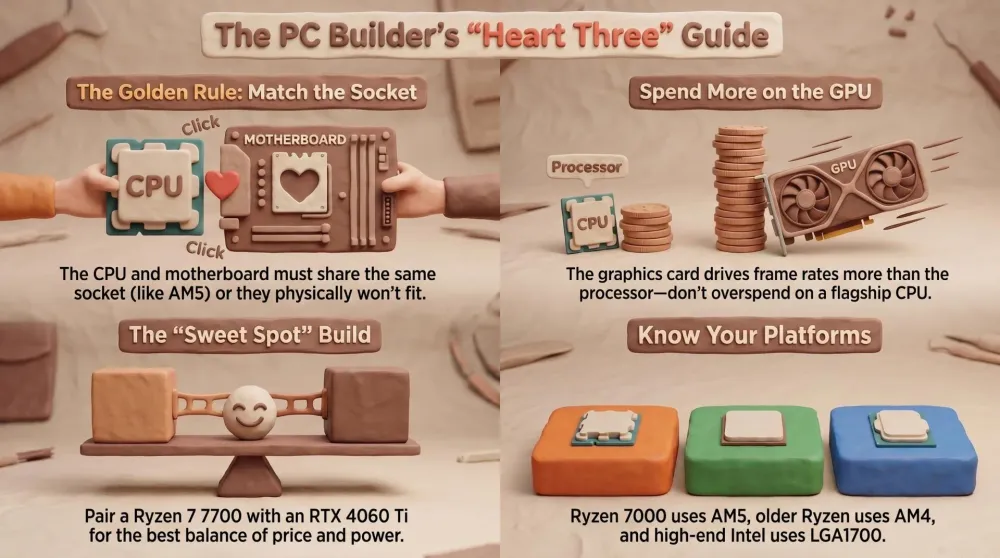
The story the table tells: a GPU drops into essentially any modern build, but a CPU and motherboard are a matched pair locked by socket. The two Ryzen chips here need an AM5 board (a B650). The B550 listed is an AM4 board for older Ryzen 5000 chips. The Intel chip needs an LGA1700 board. There is no overlap — and that’s the whole game.
How to Choose: Match the Socket, Then Balance the Build
If you’ve read this far, here’s the framework. It’s three decisions, in order, and the first one is the one people skip at their peril.
First, match the socket to the CPU — this is non-negotiable. The CPU and motherboard must share a socket or they physically won’t connect. Decide your CPU first, then buy its matching board:
- AMD Ryzen 7 7700 or Ryzen 5 7600 → needs an AM5 motherboard (a B650-class board) and DDR5 RAM. The B550 in this guide will not work.
- Older AMD Ryzen 5000 chip (5600, 5700X) → the AM4 GIGABYTE B550 here is your value board.
- Intel Core i9-13900K → needs an LGA1700 Intel motherboard and DDR5 RAM.
Second, balance the CPU and GPU — and don’t overspend on the CPU for gaming. Frames come mostly from the graphics card, so a mid-range CPU plus the best GPU you can afford beats a flagship CPU choked by a weak GPU. For most dads that means a Ryzen 5 7600 or Ryzen 7 7700 paired with the RTX 4060 Ti — sensible CPU, money pushed toward the part that matters for gaming.
Third, pick your tier honestly. If it’s a gaming-first machine on a budget, the Ryzen 5 7600 is the champion. If it’s a do-everything family PC, step up to the Ryzen 7 7700. If it’s also a serious creation workstation and the budget allows, the Intel i9-13900K is the no-compromise pick — on its own Intel platform, with a proper cooler.
AdAMD Ryzen 7 7700 8-Core Processor (opens in a new tab)
The gaming-and-everything sweet spot: 8 cores that handle modern games and the family's other jobs without breaking a sweat.
The meta-advice, in proper tech-dad spirit: the flashy, expensive CPU gets the attention, but for a gaming build it’s rarely the right place for your money. Match your platform carefully, put the budget into the GPU, and pick the CPU tier that fits how the PC will actually be used — not the one with the biggest number on the box.
Common Mistakes to Avoid
- Buying a CPU and motherboard with mismatched sockets. This is the big one. A Ryzen 7000 chip (7700 / 7600) is AM5 and needs a B650-class board — it will not fit the AM4 B550 in this guide, which is for older Ryzen 5000 chips. The Intel i9-13900K is a third socket entirely (LGA1700) and needs an Intel board. Decide the CPU, then buy its matching board. Never assume “AMD board + AMD chip” is enough — the socket number has to match.
- Overspending on the CPU instead of the GPU. For gaming, the graphics card drives your frame rate far more than the processor. Pouring money into a flagship CPU while skimping on the GPU gets it backwards — a Ryzen 5 7600 with a good graphics card games better than an i9 with a weak one. Spend where the frames live.
- Forgetting the parts beyond these three. CPU, GPU and motherboard are the heart of the build, but they’re not the whole body. You still need RAM (DDR5 for AM5 and LGA1700), an NVMe SSD, a power supply sized for your GPU, a CPU cooler (the i9-13900K needs a serious aftermarket one; the Ryzen chips include a stock cooler), and a case. An undersized PSU or no real cooling will crash or throttle the whole machine — budget for them up front.
Pros
- Eight cores hit the sweet spot — games brilliantly and multitasks without stutter
- Modern AM5 platform with a real upgrade path — drop in a faster chip later without a new board
- Runs cool and efficient, and ships with a capable cooler in the box (saves build cost)
- The sensible default to build a family gaming PC around
Cons
- AM5 platform means pricier entry — needs DDR5 RAM and a B650-class board (NOT the B550 here)
- Gaming-focused X3D chips edge it for top competitive frame rates, at higher cost
Conclusion: The Bottom Line
After picking the CPU, GPU and motherboard across budgets, the honest take is simple: for most dads building a gaming PC, the Ryzen 7 7700 paired with the RTX 4060 Ti is the sweet spot — and the rule that saves your build is matching the CPU socket to the motherboard before you buy anything.
Quick recap of who each pick is for. The Ryzen 7 7700 is the do-everything sweet spot to build around (AM5 board + DDR5). The RTX 4060 Ti is the GPU that decides your frame rate for 1080p and 1440p gaming. The Ryzen 5 7600 is the budget champion for a gaming-first build (also AM5). The Intel i9-13900K is the no-compromise high-end pick for dads who also create — on Intel’s LGA1700 platform. And the GIGABYTE B550 is the value board for a budget AM4 build with a Ryzen 5000 chip — not the AM5 picks above.
The Final Word: match your socket first, put the money in the GPU, and build around the Ryzen 7 7700. You don’t need the most expensive everything — you need parts that fit. Period.
Related Dadnology guides: Best Gaming Laptops for Dads (2026 Buyer’s Guide) · Best PC & Gaming Upgrades for Dads (Biggest Bang for the Buck) · Best Gaming Headsets for Dads (2026 Buyer’s Guide)
What is the best CPU for a gaming PC build in 2026?
How do I match my CPU to the right motherboard?
Is the GIGABYTE B550 compatible with the Ryzen 7 7700?
How much should I spend on the CPU versus the GPU for gaming?
Do I need the most expensive CPU for gaming?
What other parts do I need beyond CPU, GPU and motherboard?
Keep this in your inbox
One email a week: what we actually watched, built and reviewed — the stuff worth a dad's time. No hype, no daily spam.
Dadnology Weekly
One email a week: the LEGO, gaming and movie news worth a dad's time — plus what we actually reviewed. No hype, no daily spam.
Disclaimer: This review and its visuals were created with the help of AI. Some links may be affiliate links – we may earn a commission if you make a purchase, at no extra cost to you.
You might also like

Prime Day 2026: 5 Best Robot Vacuums for Family Households
Our dad-focused Prime Day guide to the top 5 robot vacuums in 2026 that keep family homes clean – from self-emptying Roombas to powerful all-in-one stations from Shark, Dreame, and eufy.
Never Get Locked Out Again: 5 Best Smart Locks for Families (Prime Day 2026)
A dad-focused guide to the best smart locks for U.S. family homes in 2026 – including August, Schlage, Yale, Eufy, and Level – with picks for renters, Apple families, fingerprint fans, and more.

Top 5 Smart Security Camera Systems for Families (2026) – Dadnology Guide
Our dad-focused guide to the 5 best smart security camera systems for U.S. families in 2026 – from Ring and Arlo to Google Nest, eufy, and Blink – with options for every budget, ecosystem, and privacy preference.