
Best Gaming Monitors for Dads (2026 Buyer's Guide)
Our dad-tested guide to the best gaming monitors in 2026: from a budget second screen to a flagship 4K QD-OLED. Top pick: the GIGABYTE AORUS FO32U2.
This post contains affiliate links. We may earn a commission if you make a purchase, at no extra cost to you. As an Amazon Associate, Dadnology earns from qualifying purchases.
🖥️ This guide is part of our Amazon Prime Day 2026 Deals Hub — our curated buying guides of the gear actually worth a dad’s money.
The Screen You Stare At for Eight Hours a Day
Here’s the thing about a monitor: it’s the one component you look at constantly. The graphics card hides in the case, the keyboard lives under your fingers, but the screen is in your face for the entire work day and then again for your two precious hours of gaming after bedtime. Get it right and everything — the spreadsheet, the firefight, the family video call — looks better. Get it wrong and you’ve bought eye strain you’ll regret for five years.
This guide is for one specific dad: the one whose desk does double duty as a home office and a gaming rig, who wants a screen that’s sharp and comfortable for work and fast and immersive for play, and who doesn’t want to overspend on specs he’ll never use. The honest truth is there’s no single best monitor — there’s a best monitor for your mix of work, the games you actually play, and the desk you actually own.
Here’s the methodology, plainly: we weighted the things that matter in real dual-use life — sharpness for text, motion clarity for games, panel quality, and value — and we’re blunt about the one trade-off that decides everything: refresh rate versus resolution. We’re a tech-dad blog with opinions, not a spec aggregator, so where a number is marketing theatre, we say so. And yes, every one of these is among the deals worth watching on Prime Day if you’d rather not pay full RRP.
The big decision isn’t brand — it’s what you play and how big your desk is. So we’ve ranked these from the do-everything flagship down to the budget second screen. Let’s dig in.
1. GIGABYTE AORUS FO32U2 — The Do-It-All Flagship
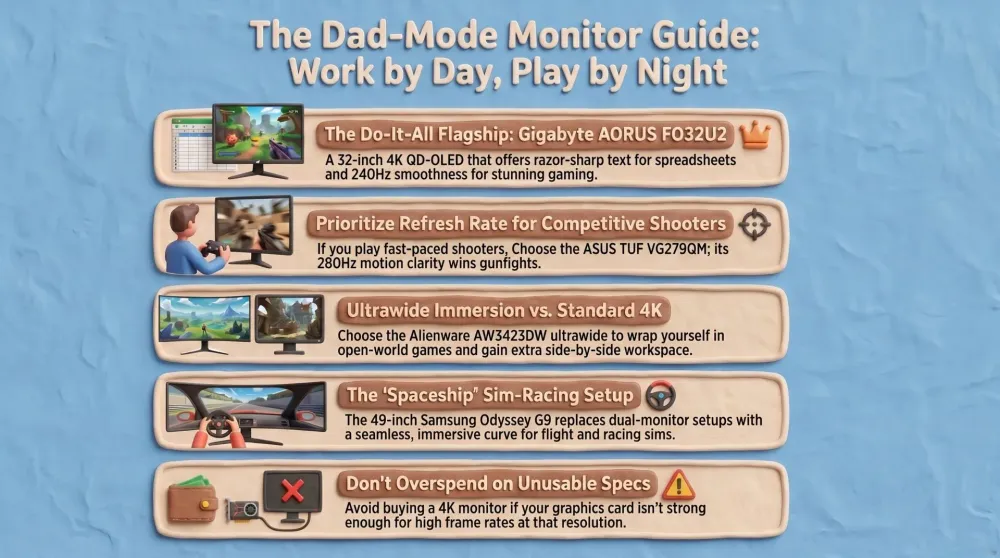
If you want one screen that handles serious work and serious play without compromise, this is the one to beat. The FO32U2 takes the two things that usually force a trade-off — 4K sharpness and a blistering refresh rate — and delivers both in a 32-inch QD-OLED panel.
AdGIGABYTE AORUS FO32U2 (32-inch 4K QD-OLED) (opens in a new tab)
Best overall: a 32-inch 4K 240Hz QD-OLED that's jaw-dropping for games and pin-sharp for work — the do-it-all flagship.

What it does well
The magic is that you don’t have to choose. At 4K resolution, text is razor-sharp for a full work day of documents and code, and games look spectacular with fine detail. At 240Hz, motion is buttery smooth, so fast games feel fluid and responsive rather than smeared. The QD-OLED panel is the star: perfect blacks, dazzling contrast, and vivid colour that makes both a movie and a game pop in a way no traditional LCD can match. At 32 inches it’s an immersive, commanding size without being absurd, and the build and connectivity (including USB-C) are flagship-grade.
Where it falls short
This is a premium purchase, and the price reflects it. Driving 4K at high frame rates demands a strong graphics card — pair it with an older or mid-range GPU and you won’t feed those 240Hz in modern titles. And as with any OLED, there’s a small, manageable burn-in consideration for static work elements over years of use, mitigated by pixel-shifting and the warranty but worth knowing if you leave fixed UIs on screen all day.
Who should buy it
The dad who wants a single, no-compromise screen for both a demanding work setup and beautiful gaming, and who has (or will buy) a graphics card to match. If your PC can drive it, this is the screen you’ll be delighted by every single day.
2. Alienware AW3423DW — The Immersive Ultrawide
Some dads don’t want a bigger rectangle — they want to be wrapped in the game. The AW3423DW is the pair of arms that does it: a curved QD-OLED ultrawide that pulls you into racing and open worlds, and then doubles as a near-two-monitor productivity wall when work calls.
AdAlienware AW3423DW (34-inch QD-OLED ultrawide) (opens in a new tab)
Best ultrawide: an immersive curved QD-OLED that wraps games around you and gives spreadsheets room to breathe.
What it does well
The immersion is the headline. The gentle curve and 34-inch ultrawide aspect ratio fill your peripheral vision in driving, flight and open-world games in a way a flat screen simply can’t, and the QD-OLED panel brings the same perfect blacks and vivid colour as our top pick. For work, the extra horizontal space means a document and a browser side by side with no bezel in the middle — genuinely transformative for multitasking. The high refresh rate keeps fast games smooth, and Alienware’s build quality is excellent.
Where it falls short
Ultrawide isn’t for everyone or every game — some titles letterbox or stretch oddly on the aspect ratio, and competitive shooters technically give you a slightly narrower vertical view. It needs a deep desk to sit at a comfortable distance, and like all OLEDs it carries the small static-element burn-in caveat. It’s also a premium-priced screen, though it earns it.
Who should buy it
The dad who loves immersive single-player, racing or flight games and multitasks heavily for work. If “I want to feel inside the game and have room for three windows,” sounds like you, the ultrawide is the pick — just measure your desk first.
3. ASUS TUF Gaming VG279QM — The Competitive Shooter’s Choice
Here’s the contrarian truth: for fast competitive games, 4K is the wrong priority. What wins gunfights is motion clarity, and that comes from a high refresh rate, not pixel count. The VG279QM is built around exactly that, and it’s a fraction of the flagship price.
AdASUS TUF Gaming VG279QM (27-inch 1080p high-refresh) (opens in a new tab)
Best for fast FPS: a 27-inch 1080p panel pushing ~280Hz, where motion clarity beats pixel count for competitive shooters.
What it does well
This 27-inch 1080p panel runs at around 280Hz, and in fast shooters that smoothness is a genuine competitive edge — flick shots track cleanly, fast pans stay sharp, and the whole game feels more responsive. Because it’s 1080p, even a mid-range graphics card can actually hit those high frame rates, so you get the benefit instead of just the spec. It’s a fast IPS panel with good colour, FreeSync/G-Sync compatibility, and a sensible 27-inch size. For the money, it delivers the thing competitive players actually feel.
Where it falls short
It’s 1080p, so on a 27-inch screen text and fine detail aren’t as crisp as a 1440p or 4K panel — fine for gaming, less luxurious for all-day spreadsheets. It’s a traditional LCD, so blacks and contrast can’t touch the QD-OLED picks. And if you mainly play slow, cinematic single-player games, you’re paying for a refresh rate you won’t fully exploit. This is a specialist’s tool, brilliantly suited to its job.
Who should buy it
The dad who plays fast competitive shooters and wants the motion-clarity advantage without spending flagship money or needing a monster GPU. If your nights are spent in ranked matches, this is the value-smart pick.
4. Samsung Odyssey G9 — The Cockpit Super-Ultrawide
This is the one you buy when you want your desk to feel like a spaceship. The 49-inch Odyssey G9 is a super-ultrawide — effectively two monitors fused into one seamless curve — and for the right dad it’s spectacular.
AdSamsung Odyssey G9 (49-inch super-ultrawide) (opens in a new tab)
Best super-ultrawide: the 49-inch cockpit screen for sim racing, flight sims and a wraparound productivity wall.
What it does well
For sim racing and flight sims, nothing beats it: the 49-inch curve wraps the cockpit completely around you for total immersion. For work, it’s a multitasking monster — you can comfortably run three or four windows across it with no bezels, which is genuinely productive for spreadsheets, code, or trading-style layouts. The high refresh rate keeps games smooth, the build is robust, and the sheer presence of it on a desk is something else.
Where it falls short
It’s enormous, and that’s the catch: it demands a wide, deep desk and a serious graphics card to drive its huge pixel count at high frame rates. Not all games support the 32:9 aspect ratio gracefully — some letterbox or won’t stretch properly. It’s expensive, and for many people it’s simply more screen than they need. This is a specialist immersion-and-multitasking machine, not a sensible default.
Who should buy it
The dad who’s into sim racing or flight sims, or who genuinely benefits from a wall of workspace, and who has the desk and the GPU to back it up. If that’s you, it’s glorious. If you’re unsure, it’s probably too much.
5. ASUS VP229Q — The Smart Budget Screen
Not every screen needs to be a flagship. Sometimes you need a tidy, reliable, cheap panel — for a kid’s first PC, a homework station, or a second monitor beside your main one. The VP229Q is that sensible, no-drama pick.
AdASUS VP229Q (21.5-inch 1080p IPS) (opens in a new tab)
Best budget: a tidy 1080p IPS panel that's perfect as a cheap main screen for a kid's PC or a second monitor.
What it does well
It’s a clean 21.5-inch 1080p IPS panel with decent colour and viewing angles for the price, FreeSync, and a 75Hz refresh that’s a noticeable step up from a basic 60Hz office monitor. It’s compact, easy to place, and cheap enough to buy two of for a dual-screen setup. As an affordable main screen for a child learning on a PC, or as a second display for chat, email and reference docs beside a bigger gaming monitor, it does exactly what’s asked of it.
Where it falls short
It’s basic by design: 1080p, 75Hz, and a modest 21.5-inch size mean it’s not for serious gaming or for anyone who wants screen real estate. The stand and build are entry-level, and there’s no premium panel tech here. None of that is a flaw at this price — it’s a budget tool that knows its job.
Who should buy it
The dad setting up a kid’s PC, building a cheap homework or office station, or adding a no-fuss second screen to an existing setup. It’s the right amount of monitor for the money when you don’t need the spectacle.
How They Compare: The Spec Showdown
This is where the decision actually gets made. Note the resolution and refresh rows against best for — that trio settles which screen suits how you actually use a PC.
| Feature | GIGABYTE FO32U2 | Alienware AW3423DW | ASUS VG279QM | Samsung Odyssey G9 | ASUS VP229Q |
|---|---|---|---|---|---|
| Size | 32 in | 34 in ultrawide | 27 in | 49 in super-UW | 21.5 in |
| Resolution | 4K | Ultrawide QHD | 1080p | Dual QHD (32:9) | 1080p |
| Refresh | 240Hz | High (175Hz) | ~280Hz | High | 75Hz |
| Panel | QD-OLED | QD-OLED | Fast IPS | Curved VA/OLED | IPS |
| Best for | Work + play | Immersion + multitask | Competitive FPS | Sim racing / wall | Budget / 2nd screen |
| GPU demand | High | High | Modest | Very high | Low |
| Verdict | Best overall | Best ultrawide | Best for FPS | Best super-UW | Best budget |
The table tells a clear story. The FO32U2 wins the all-rounder crown by giving you both 4K and 240Hz. From there it’s about your use case: ultrawide for immersion, high-refresh 1080p for competitive shooting, the giant G9 for sim cockpits, and the VP229Q when you just need a sensible cheap panel.
How to Choose: A Decision Framework
If you’ve read this far, here’s how to decide without overthinking it.
If you want one screen for demanding work and beautiful gaming — buy the GIGABYTE AORUS FO32U2, provided your graphics card can drive 4K at high frame rates. It’s the no-compromise default.
If you crave immersion and heavy multitasking — buy the Alienware AW3423DW. The ultrawide curve transforms racing and open-world games and gives work real elbow room.
If you play fast competitive shooters — buy the ASUS TUF VG279QM. Motion clarity wins gunfights, and a mid-range GPU can actually hit those frame rates.
If you’re a sim-racing or flight-sim dad with the desk and GPU for it — buy the Samsung Odyssey G9. Nothing else wraps you in a cockpit like it.
If you’re torn between the FO32U2 and the VG279QM: ask one question — what do you mostly play? Cinematic, single-player and open-world games reward the 4K OLED; ranked competitive shooters reward the high-refresh 1080p. Buy for the games you actually log hours in.
AdGIGABYTE AORUS FO32U2 (32-inch 4K QD-OLED) (opens in a new tab)
Best overall: a 32-inch 4K 240Hz QD-OLED that's jaw-dropping for games and pin-sharp for work — the do-it-all flagship.
The meta-advice, in proper tech-dad spirit: don’t buy 4K for a GPU that can’t drive it, and don’t buy 240Hz for games you’ll never play competitively. The spec that improves your daily life is the one that matches your games and your desk — everything else is paying for bragging rights.
Common Mistakes to Avoid
- Buying 4K without the GPU to drive it. A 4K high-refresh panel fed by a weak graphics card just runs at low frame rates. Match the screen to your hardware, or upgrade both.
- Chasing 4K for competitive shooters. Motion clarity from a high refresh rate beats pixel count for fast games. Buy the refresh rate, not the resolution, if ranked play is your thing.
- Forgetting to measure your desk. A 49-inch super-ultrawide needs serious depth and width. The most immersive screen is useless jammed against a wall at the wrong distance.
- Ignoring OLED burn-in for all-day static work. QD-OLED is brilliant for mixed use, but a heavy office user with fixed UIs all day might be better served by an IPS panel.
- Paying full RRP in late June. Monitors are a heavily discounted Prime Day category. Buying a flagship panel at full price during a sale event is leaving money on the table.
Pros
- 4K sharpness and 240Hz smoothness in one panel — no trade-off
- Stunning QD-OLED contrast, blacks and colour for games and film
- A commanding 32-inch size that's immersive without being absurd
- Flagship build and connectivity, including USB-C
Cons
- Needs a strong graphics card to drive 4K at high frame rates
- Premium price
- Small OLED burn-in consideration for static work elements over years
Conclusion: The Bottom Line
After comparing five screens across every use case, the honest take is simple: the best monitor for you depends on the games you play and the desk you own — but there’s a clear all-rounder for most dads.
For the dual-use majority, the GIGABYTE AORUS FO32U2 is the standout: 4K sharpness for work and a 240Hz QD-OLED picture for games, with no compromise between the two. The Alienware AW3423DW is the immersive ultrawide for single-player and multitasking; the ASUS TUF VG279QM is the value-smart pick for competitive shooters; the Samsung Odyssey G9 is the cockpit super-ultrawide for sim fans; and the ASUS VP229Q is the sensible budget screen for a kid’s PC or a second display.
The Final Word: if your PC can drive it, buy the GIGABYTE AORUS FO32U2 and enjoy one beautiful screen for everything. If you mainly play competitive shooters, the ASUS TUF VG279QM is the smarter, cheaper buy. Period.
Related Dadnology guides: Best Parts for a Gaming PC Build (CPU, GPU & Motherboard) · Best Gaming Laptops for Dads (2026 Buyer’s Guide) · Best PC & Gaming Upgrades for Dads (Biggest Bang for the Buck)
What is the best gaming monitor for dads in 2026?
Is refresh rate or resolution more important for gaming?
Is OLED burn-in a real risk for a work-and-gaming monitor?
Are ultrawide monitors good for both work and gaming?
What is the best budget gaming monitor?
What size and resolution monitor should I buy?
Keep this in your inbox
One email a week: what we actually watched, built and reviewed — the stuff worth a dad's time. No hype, no daily spam.
Dadnology Weekly
One email a week: the LEGO, gaming and movie news worth a dad's time — plus what we actually reviewed. No hype, no daily spam.
Disclaimer: This review and its visuals were created with the help of AI. Some links may be affiliate links – we may earn a commission if you make a purchase, at no extra cost to you.
You might also like

Prime Day 2026: 5 Best Robot Vacuums for Family Households
Our dad-focused Prime Day guide to the top 5 robot vacuums in 2026 that keep family homes clean – from self-emptying Roombas to powerful all-in-one stations from Shark, Dreame, and eufy.
Never Get Locked Out Again: 5 Best Smart Locks for Families (Prime Day 2026)
A dad-focused guide to the best smart locks for U.S. family homes in 2026 – including August, Schlage, Yale, Eufy, and Level – with picks for renters, Apple families, fingerprint fans, and more.
Top 5 Smart Security Camera Systems for Families (2026) – Dadnology Guide
Our dad-focused guide to the 5 best smart security camera systems for U.S. families in 2026 – from Ring and Arlo to Google Nest, eufy, and Blink – with options for every budget, ecosystem, and privacy preference.