
OpenClaw on Raspberry Pi 5: The safe, cheap $80 AI agent
Stop overspending on AI. The Raspberry Pi 5 is the safest, cheapest 'Nervous System' for your OpenClaw agent—physical isolation included.
This post contains affiliate links. We may earn a commission if you make a purchase, at no extra cost to you. As an Amazon Associate, Dadnology earns from qualifying purchases.
1. The low-budget AI revolution: Beyond the Mac mini hype
🦞 This guide is part of our OpenClaw Master Hub – every guide to running your own AI agent at home, from first install to family automations.
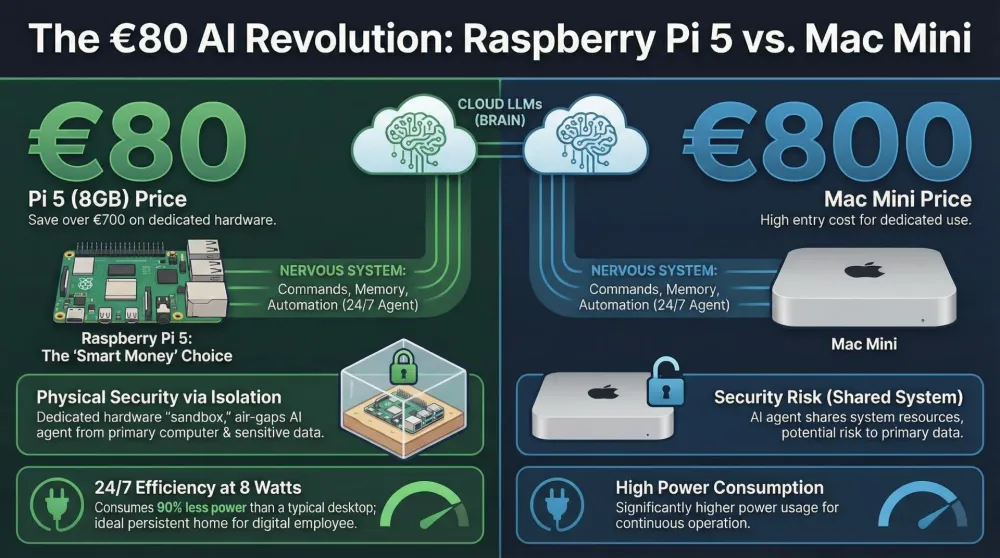
The AI world has been set ablaze by OpenClaw (formerly known as Clawdbot), a self-hosted agent gateway that promises the “Jarvis fantasy”—a persistent, proactive assistant that handles your calendar, messages, and computer tasks 24/7. But this surge in popularity has birthed an expensive misconception: that you need to drop $800 on a high-end M4 Mac mini to join in.
Don’t get us wrong—we love the M4. We’ve argued that the Mac mini is the definitive ‘Best Buy’ for anyone who wants to run massive 70B-parameter models locally. But there’s a big difference between “running a model” and “running an agent.” For a tool meant to stay on indefinitely, the goal isn’t raw local compute—it’s right-sized reliability. And as any dad knows, the gadget you actually keep using is the one that’s cheap enough to leave running in a cupboard and forget about.
The “Dadnology” thesis: Brain vs. Nervous system
To understand why you might be overspending, you need the architecture of an AI agent, which we split into the Brain and the Nervous System.
- The Brain: Where the heavy mathematical lifting happens—reasoning and logic.
- The Nervous System: The interface—the “hands” that type commands and the “memory” that stores logs.
If you’re using cloud-based intelligence (like Anthropic’s Claude) as your “Brain,” your local hardware only needs to be a competent Nervous System. The Raspberry Pi 5 is the world’s best nervous system. Shift your architecture this way and you get a persistent AI presence for roughly $80 of base hardware instead of the entry price of a modern desktop.
2. The hardware blueprint: Why the Pi 5 is the sweet spot
In the home-lab world, the Raspberry Pi 5 (8GB) is the professional’s choice for a stable gateway. The core OpenClaw software can technically squeeze onto less RAM, but the 8GB model is the “Architect’s Safety Margin”—enough headroom for the gateway, a browser skill, and logging at the same time.
Efficiency comparison
| Feature | Raspberry Pi 5 (8GB) | Standard Desktop / Mac Mini |
|---|---|---|
| RAM Overhead | 8GB (dedicated to agent) | 8–16GB (shared with OS) |
| Annual Electricity | ~5W idle (~$15/year) | 20–60W (~$60–$180/year) |
| Upfront Cost | ~$80 | $600–$800 |
| Isolation | Physical 'air-gap' possible | Usually on your main network |
The electricity line matters more than people think. A Mac mini idling at 20–60W is fine for a workstation, but an agent that runs every minute of every day turns those watts into a recurring bill. The Pi’s ~5W idle is the difference between a gadget you justify once and a gadget you justify every month.
The “SD card trap” & storage longevity
A common beginner mistake is running a persistent agent off a standard MicroSD card. Don’t. SD cards aren’t built for the high-frequency random writes a 24/7 agent generates—logs, session memory, temp files—and they fail, usually at the worst possible moment.
For a professional-grade assistant you need an NVMe SSD. We recommend the Argon ONE V3 case specifically because it integrates an NVMe slot into a cooled chassis, and the Crucial P3 500GB as the drive itself. Pair that with the official 27W USB-C supply—a phone charger will cause random reboots the moment the NVMe drive draws power, and a reboot mid-task is how your agent “forgets” what it was doing.
Want a local brain? The AI HAT+ option
If keeping data fully off the cloud matters to you, the 2026 Raspberry Pi AI HAT+ adds dedicated NPU acceleration (tens of TOPS of INT4 inference) so the Pi can run small specialised models locally instead of calling an API. It’s optional—most people are happiest letting a cloud brain do the reasoning—but it’s there if you want a true offline agent.
3. Architecture deep-dive: Gateway vs. Brain
- The Nervous System (Gateway): Your Raspberry Pi manages session identity. It’s the “hands”—executing shell commands, browsing the web, reading the one folder you point it at.
- The Brain (Reasoning Engine): Instead of melting a local CPU, you call high-performance APIs for reasoning. This “cost-hack” gives you top-tier intelligence without the hardware bill, and you only pay tokens for what you actually use.
The beauty of this split is that you can upgrade the brain (swap models) without touching the hardware, and you can lock down the hands (the Pi) without limiting how smart the agent is.
4. Security strategy: The physical air-gap
Giving an AI agent shell access is “spicy.” The single greatest threat to a local agent is prompt injection—a malicious web page or document that tricks the model into running commands it shouldn’t. No amount of clever prompting fully eliminates it. The Raspberry Pi offers a defence no software can match: physical isolation.
The sandbox strategy
- Containment: If your bot is compromised, only the $80 sandbox is at risk. Your primary machine stays physically separate.
- Network control: Put the Pi on a dedicated IoT VLAN. Even a “poisoned” agent then can’t scan your NAS or reach the family laptops.
- Least access: Only mount the specific folder the agent needs (e.g. a
research/share). It can’t leak what it can’t see.
This is exactly the kind of containment we go deep on in our dedicated OpenClaw security & sandboxing guide—worth reading before you give any agent the keys.
5. Deployment guide: The 10-minute headless setup
- OS selection: Flash Raspberry Pi OS Lite (64-bit) to your NVMe drive—no desktop needed.
- The scripted installer: SSH into the Pi and run the official one-liner:
curl -fsSL https://openclaw.ai/install.sh | bash - The Wi-Fi fix: Stop Wi-Fi from sleeping (a classic source of “my agent went unresponsive”):
echo -e "[connection]\nwifi.powersave = 2" | sudo tee /etc/NetworkManager/conf.d/wifi-powersave-off.conf && sudo systemctl restart NetworkManager - Connect your interface: Link the agent to Telegram or WhatsApp so you can “text your house” from the school run.
If you hit speed issues, remember the Pi is a gateway—heavy reasoning belongs in the cloud brain. Our troubleshooting guide covers the usual latency and memory culprits.
6. Pi or Mac mini? A 30-second decision
The two articles people bounce between are this one and the Mac mini Best Buy guide. Here’s the honest decision tree, no fence-sitting:
- Pick the Raspberry Pi 5 if you’re using a cloud brain (Claude, GPT, Gemini) for reasoning, you want the lowest possible running cost, and security-through-isolation matters more to you than raw local horsepower. This is the right call for most families and anyone testing the waters.
- Pick the Mac mini M4 if you specifically want to run large models (think 70B parameters) entirely offline, you’ll also use the machine for other heavy tasks, and the upfront cost isn’t a barrier. This is the call for privacy purists and power users.
- Pick both, eventually, if you get hooked: a Pi as the always-on “hands” on its isolated VLAN, talking to a beefier brain elsewhere. That’s the home-lab endgame, but it’s overkill for a first build.
If you’re still unsure, start with the Pi. It’s the cheapest way to learn what you actually need, and an $80 mistake is a far better teacher than an $800 one. Worst case, you graduate to a Mac mini later having learned exactly which workloads you care about.
Don’t forget the cloud-brain bill
One number people miss: if your Pi calls a cloud API for reasoning, that is your real ongoing cost, not the 5 watts of electricity. For light family use it’s typically a few dollars a month, but an agent left to “research continuously” can surprise you. Set a spending cap on your API key from day one—we explain exactly how in the security guide. The Pi keeps the hardware cost near zero; capped keys keep the brain cost predictable.
7. Three mistakes that kill a Pi agent
Most “my Pi agent is unreliable” complaints trace back to the same three errors. Avoid them and you skip 90% of the pain:
- The SD-card boot. We said it above, but it’s the number-one killer: a 24/7 agent will shred a MicroSD card. Boot from NVMe, full stop. If your agent randomly “forgets everything” after a few weeks, a corrupted SD card is the prime suspect.
- The phone-charger power supply. The Pi 5 draws real current, especially with an NVMe drive attached. Use anything less than the official 27W supply and you’ll get random reboots under load—precisely when the agent is doing useful work. These reboots look like software bugs but are pure power starvation.
- No cooling. A bare board throttles hard during sustained tasks, making the agent feel sluggish and unpredictable. The Argon ONE V3’s active cooling keeps clock speeds stable so “fast on Monday, crawling by Friday” never happens.
Get the boot drive, power, and cooling right and the Pi becomes genuinely set-and-forget. Get them wrong and you’ll blame OpenClaw for what is really a hardware-hygiene problem.
8. Living with it: Three weeks of a Pi-based agent
Specs are one thing; the school-run test is another. After a few weeks of leaving a Pi 5 agent running on a shelf, two things stand out. First, you genuinely forget it’s there—5 watts means no fan noise, no heat, no electricity guilt. Second, the “gateway” model holds up: routing the reasoning to a cloud brain means even a $80 board answers complex requests in a couple of seconds, fast enough that asking it to “summarise the three PDFs in my research folder” feels instant.
The honest downsides: the first evening of setup assumes you’re comfortable in a terminal, and a pure-CPU Pi is useless for local image generation or big local models—if that’s your dream, this isn’t the box. But as a tireless, isolated assistant that handles the boring digital admin of family life, it punches absurdly above its price.
One more real-world note that’s easy to miss on paper: the Pi’s low power draw isn’t just a budget win — it changes your relationship with the device. There’s no guilt about leaving it on over a long weekend, no fan spin-up when a task kicks in at 2 a.m., and no heat output that demands ventilation planning. For a device you’re supposed to forget about, that thermal and acoustic invisibility matters more than any spec sheet number. Physical placement matters more than you’d expect. Because the Pi is silent and palm-sized, the temptation is to bury it in a drawer—don’t. Give it airflow and a spot where the status light is visible, because a glance is the fastest way to know your agent is alive. Mine lives on a shelf next to the router, sharing the same isolated network segment, and in three weeks it needed exactly zero attention beyond one prompt tweak when the school changed its newsletter layout. That “forget it exists” reliability is the whole pitch—and on a Mac mini you’d have paid ten times as much for the same outcome on these workloads.
Pros
- ~$80 entry vs ~$800 for a Mac mini setup
- ~5W idle—cheap to run 24/7, silent, no heat
- Physical air-gap limits the blast radius of a compromised agent
- NVMe + Argon case gives genuine server-grade reliability
- Optional AI HAT+ adds local inference when you want it
Cons
- CPU alone can't run large models locally—needs a cloud brain or the AI HAT+
- Initial headless setup assumes basic terminal comfort
- You must buy the NVMe + proper PSU; the bare board alone isn't enough
9. Final verdict: You don’t need $800 to join the future
The Raspberry Pi 5 (8GB) is the ‘smart money’ king for OpenClaw. It provides better security through physical isolation and costs ~90% less than a Mac mini setup. It loses a point only because a true local brain needs the optional AI HAT+—but as a secure, always-on gateway, nothing touches it at the price.
🔗 Related guides
- The Power Move: Build your 24/7 AI hub on Mac mini M4
- Lock it down: OpenClaw security & sandboxing guide
- The Business Case: Earning passive income with an isolated AI agent
📌 FAQ – Common questions
Is the Raspberry Pi 5 powerful enough to run Llama 3 locally?
Is 8GB of RAM enough for OpenClaw?
Why can't I just use a MicroSD card?
How is a Pi 'safer' than running OpenClaw on my main computer?
Does OpenClaw work on the older Raspberry Pi 4?
Keep this in your inbox
One email a week: what we actually watched, built and reviewed — the stuff worth a dad's time. No hype, no daily spam.
Dadnology Weekly
One email a week: the LEGO, gaming and movie news worth a dad's time — plus what we actually reviewed. No hype, no daily spam.
Disclaimer: This review and its visuals were created with the help of AI. Some links may be affiliate links – we may earn a commission if you make a purchase, at no extra cost to you.
Current deals in Tech & gadgets
Verified live discounts tracked on Amazon

Tech & gadgets · Tested by Dadnology
Apple AirPods Pro (3rd generation)
5/5“The best noise-cancelling earbuds for Apple families”Read our review
Tech & gadgets · Tested by Dadnology
Samsung T7 Shield 2TB
5/5“Small, fast, and genuinely hard to break”Read our review
You might also like
Hermes Agent's Quicksilver release: What's new in v0.19.0
Hermes Agent shipped v0.19.0 (the Quicksilver Release) on July 20 — an 80% faster cold start, Bitwarden and 1Password integration, and a real security hardening pass.
Hermes Agent hardware requirements: The 24GB sweet spot explained
The real Hermes Agent hardware requirements for running Qwen 3.6 27B locally: why agents need more memory than chatbots, the 24GB sweet spot, and what to buy.

OpenClaw 2.0 is out: Team features, and a real security warning
OpenClaw 2.0 just shipped with team collaboration and a new browser UI - but sandboxing is disabled by default, and that matters if you're running it at home.